









Creating 360-Degree Content With The Ricoh Theta S, Part 3: Sharing And Viewing
This is Part 3 of our three-part series looking at how to create content in 360 degrees, using the Ricoh Theta S as a specific example. Some of this will be germane to the Theta S, but you can extrapolate a great deal, including best practices for shooting, editing, and sharing. In Part 1, we discussed how to shoot with the camera. In Part 2, we tackled editing and production. Below, we look at how to share and view the content.
Sharing
Congrats! By this point, you have created your very own 360-degree experience. Now you need to think about your audience. Do you want them to view it on a desktop? Or through an HMD? Or both?
Essentially everyone has access to a computer, which makes that publishing approach appealing. A cluster of websites have emerged as the leaders in this realm. Facebook bought Oculus Rift in 2014 for $2 billion and recently snagged a spatial audio company for 360-degree videos. Facebook is certainly one of the friendliest sites to 360-degree content. Videos perform quite well when natively uploaded to the site. Evgeny Kuzyakov said in a Facebook blog post that the company is able to increase streaming quality by concentrating on whatever is in the field of vision.The mobile app uses the gyroscope within phones to adjust what you see in the video. The high-quality video is also easy to share because it’s on a site people are accustomed to using.
Facebook is not immune to issues, though. It can take a while to fully upload videos, and the experiences are capped at thirty minutes of playback. Further, you still have to hunt for these experiences; they aren’t consolidated in one place.
Littlstar is dedicated entirely to VR and has been my preferred sharing site so far. It is in the upper echelon of video quality and has an easy-to-use search function. You can use the arrow keys to look around easily. The mobile app is intuitive because it has an option to view the content in a “360-degree” mode. With a single upload, you can put a version ready for those using VR viewers or those on the desktop in one fell swoop.
ShrimpEyes is mostly just a desktop viewer.
YouTube is exquisite for relatively quick uploads. However, the resolution takes time to improve, and the finished product is grossly mediocre. I’m not sure why it takes time for YouTube to get the videos up to snuff, but the resolution will improve over time. I use YouTube to test techniques, but I prefer to put the final product on Littlstar.
Get Tom's Hardware's best news and in-depth reviews, straight to your inbox.
My favorite sharing site for 360-degree stills is Kuula, which makes it easy to publicly post your content on Tumblr, Facebook, or Twitter. Kuula links post in 360-degrees to Twitter; your image is visible and interactive within the tweet in the browser, and the gyroscope is used to make it interactive in a separate mobile window.

Flickr and Cardboard VR Photo Sphere Viewer are two other decent 360-degree photo options that we're aware of. They're not as useful as Kuula, but they'll get the job done. We've also had some success with Viar360, where you can add audio, text, and transitions through multiple 360-degree photos at a time.
You can also livestream 360-degree video with the Theta. However, as a huge disclaimer, I found this feature to be incredibly buggy--even customer support struggled to help me make it work. But if you want to try the live streaming feature, here’s what to do:
-Make sure the Theta’s firmware is updated, and then download the blender from Theta’s website. -Press the power button and the button with the camera icon along the side of the device simultaneously. A blue camera icon should appear on the front with the word “live” below it. -Plug the camera into a computer with an HDMI cable. -Go to YouTube and create an account if you haven’t done so already. -In the “Creator’s Studio” tab on the left side of the screen, scroll down to Video Manager and then to Livestreaming. Click Events, and name the livestream. Select Quick, which will use Google Hangouts.-Once you launch the livestream, a Google Hangouts window will appear. Click Start Hangout Window On Air. -Go to the gear button on the top of your screen to select the Blender option. -You can find more information in this unofficial guide.
Viewing
Google Cardboard is one of the cheapest options and costs around $15. For a similar price, one can purchase a phone case with the ability to flip glasses held on the back of the phone over the screen. This is handy because you don’t need to remember to carry a viewer around with you to get an immersive experience.
I like the Samsung Gear VR because it gives you the ability to be within a “matrix” in the virtual world. You become the controller. The headset becomes the mouse. However, you can get by with a $20 viewer. The difference is in head straps--holding up the phone to your face takes away from the experience. A pro tip for using a headset is to view the content while sitting in a spinning chair. It lets you see everything the video has to offer without you having to crane your neck to see what’s behind you.

Another viewer that's ideal for 360-degree content in its purest form is the Google Daydream View. It pairs with Google’s Pixel phones (and a few others) and it seems to be Google's VR muse for the foreseeable future. Although it's not perfect, the presence of the controller makes using it significantly smoother.
Another publishing option is through the Theta’s built-in applications. You can download various applications to allow footage to be live streamed. If you upload directly to Theta’s website, you can share the link. However, this is cumbersome if you expect anyone to watch it on a smartphone. They will have to download a separate application to view it.
Immersive video is a difficult medium to master. It’s far more difficult to create this sort of content as opposed to 2D video, between the issues with setting up shots, new camera gear, editing tools, and sharing. Here, we’ve provided somewhat of a guide, via the Ricoh Theta S, Adobe Premiere Pro, Avid Media Editor, and sharing sites, to give you a sense of the ins and outs of immersive content creation.
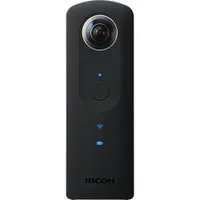
Ricoh Theta Camera
MORE: All VR Content
MORE: Virtual Reality Basics
-
pegnose This is part 3 of a great guide, it provides some valuable insight, and it covers the complete pipeline for 360 video creation with the Theta. Many tips even go beyond this particular hardware.Reply
I only wished the author had payed more attention to little details. I was looking for info on how the hardware gets connected. And from what I understand, the author mixed up microSD with micro-USB in explaining how photos and videos could be transferred to the PC (see part 1 of the guide).
And the advice to connect the HDMI port to a PC for live streaming might explain why he/she had so little success. Probably none of the HDMI ports on consumer mainboards and graphics cards (laptops included) support INPUT. You usually need a special video capturing card. To my knowledge, and according to what the official theta online manual says, in most cases this can only work with USB. See the "Caution" box further down on this page:
https://theta360.com/en/support/manual/s/content/streaming/streaming_01.html