Equipment

After having tested three entry-level monitors, testing a Sony is a real luxury. This model has VGA and DVI inputs and a built-in transformer. As is customary, Sony has included a double backlighting system.
Top-of-the-Line Fidelity
The Sony SDM-HS95P demonstrated good fidelity. Colors were attractive, and the X-Black filter improves the image's contrast. In our calibrator test, the SDM-HS95P confirmed that impression.

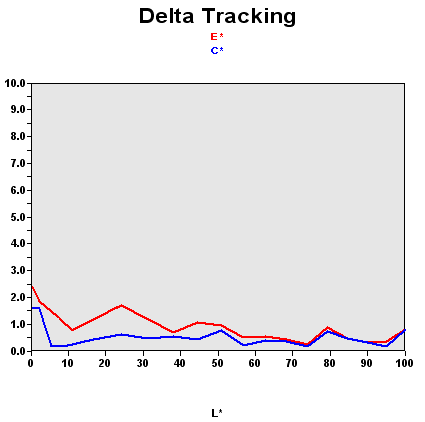
Colors were not accurate by default, but a good calibration straightened everything out. Unfortunately, few people can afford a calibrator - it's a shame that the SDM-HS95P wasn't correctly adjusted by default.
| Black spot | White spot | Contrast |
|---|---|---|
| 0.58 | 300 | 517:1 |
The filter is effective, but you can't fool the calibrator. While the contrast looks higher to the eye, the actual black level is too high. Brightness was also excessive.
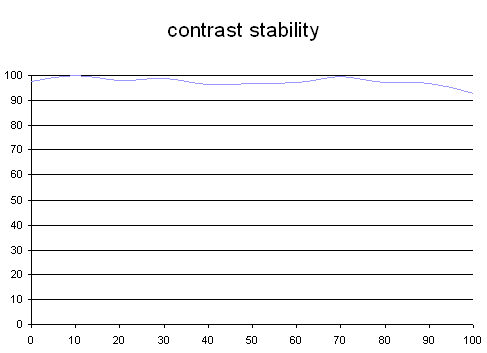
Fortunately, the contrast was fairly stable. The SDM-HS95P also has presets (Movie, Game, Text, etc.) that seem to work fairly well. We strongly recommended you set your SDM-HS95P to Text mode if you spend a lot of time in front of your monitor.