









Best Laptops 2026: Our benchmarked picks for productivity, portability, and battery life
Prime portable PCs for work, play, and general use.

Whether you're a student submitting homework, at work typing away at documents, spreadsheets, or presentations, or you're just someone who wants to access resources online and connect with family and friends, you want a laptop with the components and features you'll need to get the job done. That means a great screen, a comfortable keyboard, and long battery life (and nice design doesn't hurt, either!).
The laptop space is more competitive than ever. Windows machines come from many companies using silicon from three major CPU vendors: Intel, AMD, and Qualcomm. Apple, meanwhile, has a range of powerful and portable systems based on its own Apple Silicon.
In 2026, Intel's most recent chips are its Intel Core Ultra (Series 3) chips, code-named Panther Lake, while AMD launched its "Gorgon Point" Ryzen AI processors at CES. At Computex, Nvidia announced that its RTX Spark chips will launch in laptops from Microsoft, Dell, Lenovo, HP, and more starting in the fall, taking on Qualcomm in the Windows on Arm space. Earlier this year, Qualcomm released its Snapdragon X2 Elite Xtreme, Elite, and Plus chips.
On Macs, Apple's top chips are the M5 series, including the M5 Pro and M5 Max, which can be found in the MacBook Pro and MacBook Air lineup.
Best Laptops You Can Buy Today
The Best Laptop (and Mac) overall

Specifications
Reasons to buy
Reasons to avoid
The MacBook Air has been a go-to laptop recommendation for quite some time, thanks to strong performance, a fanless design, excellent built quality, and long-lasting battery life. With the version of the chip with M5, you get the benefits of years of hardware revisions since the Air's last redesign with M2, including a minimum 16GB of RAM and a 12-megapixel webcam.
The M5 chip in the MacBook Air showed off excellent single and multi-core performance. In fact, it;s closest rival was the same chip in the MacBook Pro, which gets a boost because of an active fan.

That being said, the system can throttle under heavy workloads like rendering. But for most people's typical tasks, including writing, editing, making spreadsheets, editing photos, listening to music, programming, and general multitasking, you'll have a very powerful machine.
Apple has boosted the base MacBook Air's price to $1,099, but it now starts with 512GB of memory. Given the price of components these days, the laptop is still a great value. If you want a Mac but don't want to spend that much for it, you could take a step down to the entry-level MacBook Neo, starting at $599, as long as you're willing to sacrifice on power, memory, ports, and a backlit keyboard.
Read: MacBook Air (M5) review
Best Windows laptop

Specifications
Reasons to buy
Reasons to avoid
The Dell XPS 14 is back, and while you might expect its performance or design to be the headlining feature, it's the battery life that wows. With its base 1920 x 1200 LCD display, which has a variable refresh rate that goes all the way down to 1 Hz, it lasted 20 hours and 41 minutes on our battery test.
That's not to say the battery life is all there is to like about this laptop. The 3-pound chassis is sleek, and Dell added a function row back to the keyboard, making it way easier to use over the touch bar of yesteryear.
If you're OK with 12 hours of charge, more expensive models with a tandem OLED display have way better colors and more powerful Arc B390 integrated graphics.
That being said, both of them have a low-travel keyboard without space between the keys, which definitely tripped up my fingers, so you'll need time to get your muscle memory going. And the starting price, at $1,600, is a lot to ask but is unfortunately common as the memory crisis rages on.
Read: Dell XPS 14 (2026) review
Best ultralight laptop

Specifications
Reasons to buy
Reasons to avoid
Some of the best laptops are barely noticeable in your bag. The Lenovo Yoga Slim 7i Aura Edition, at 2.15 pounds is extremely light.
Still, despite the weight, you get plenty of other benefits. The speakers are surprisingly good for a laptop of this size. Perhaps most impressively, the system ran for 16 hours and 38 minutes on our battery test, outlasting many of the laptops we bit against it by multiple hours.
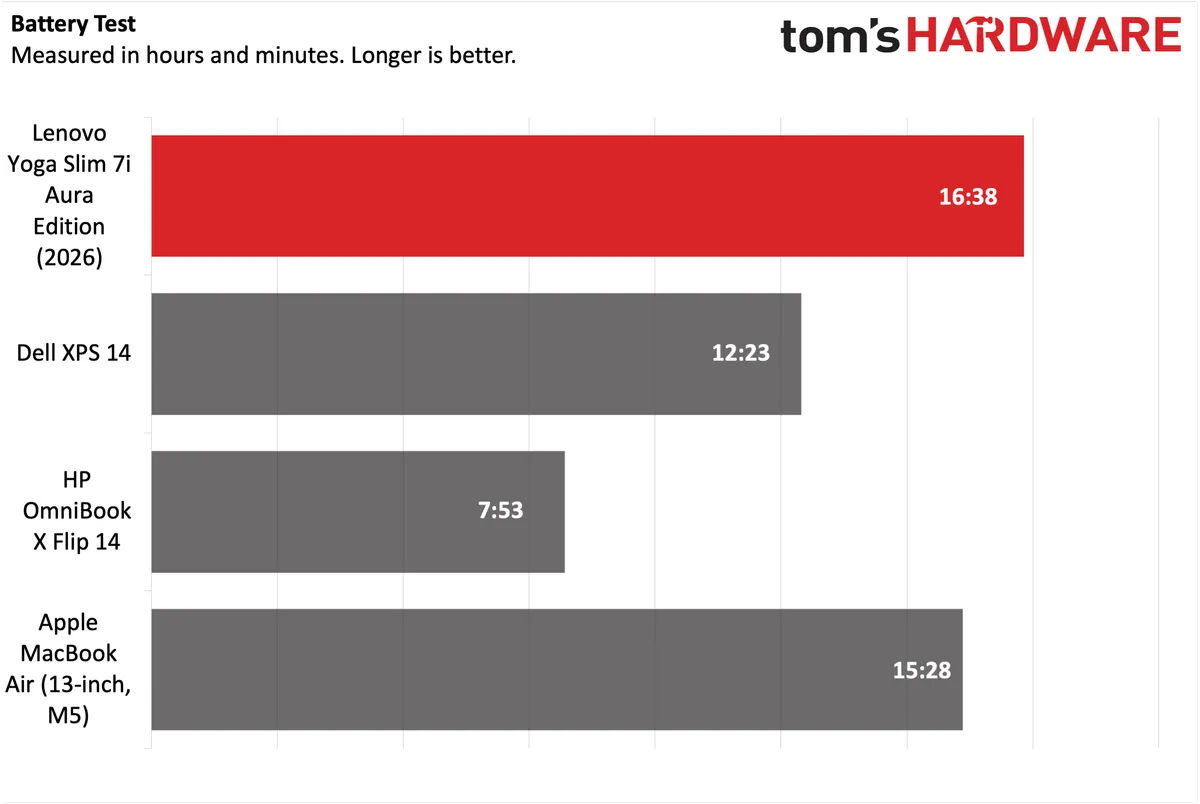
The system also offers a lovely display. The POLED touchscreen measured 476 nits of brightness while falling in similar gamut ranges as other OLED notebooks that weren't as luminous.
There are some downsides. There are limited ports outside of Thunderbolt 4/USB-C, including a lack of a headphone jack. And CPU performance fell behind some competitors, like Apple's M5 MacBook Air and a thicker AMD-based 2-in-1 from HP.Still, the laptop impressed for its airiness and multimedia strengths. And as tested with 32GB at $1,519, it's not a crazy price as the costs of many laptops skyrocket during an ongoing component shortage.
Read: Lenovo Yoga Slim 7i Aura Edition review
Another great Windows clamshell
Specifications
Reasons to buy
Reasons to avoid
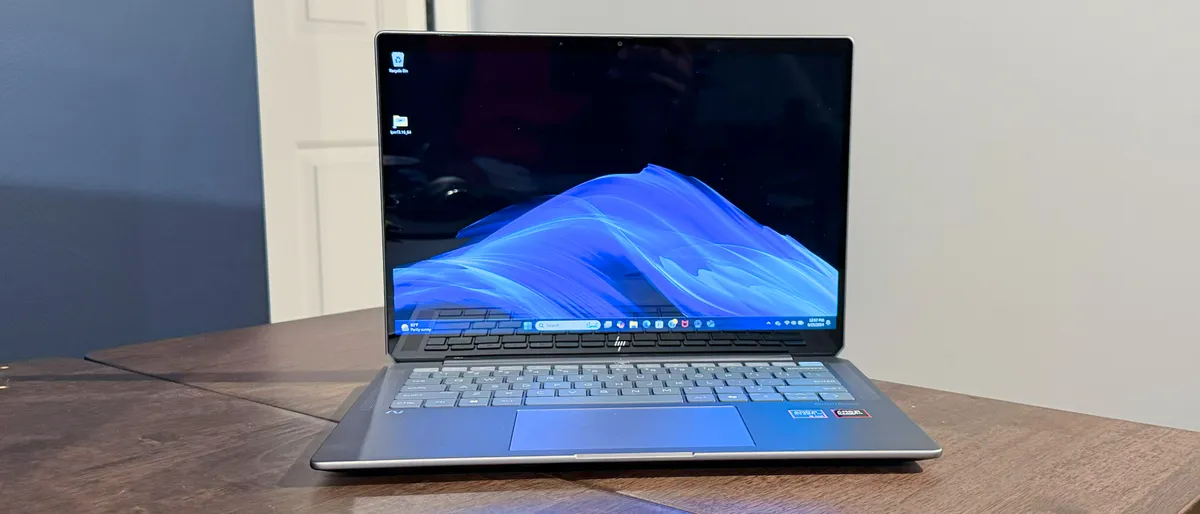
We can argue about how much the AI PC is really any sort of revolution, but there are still some strong ultraportables coming out. The HP OmniBook Ultra puts the AMD Ryzen AI 9 HX 375 in a sleek chassis with strong productivity performance.
HP is offering up decent battery life here, running for 12 hours and 52 minutes on our battery test. That's not the best, but all things considered including the high-resolution display, it's not bad. It's also nice to see Thunderbolt 4 ports on an AMD system, which is exceedingly rare.
The experience is knocked down a bit by a significant amount of bloatware, but if you're looking for a strong AMD laptop, the HP OmniBook Ultra is a strong competitor if you don't mind doing some uninstalling.
Read: HP OmniBook Ultra review
The best budget laptop

Specifications
Reasons to buy
Reasons to avoid
If you're looking for an affordable laptop, Apple does it best these days. The MacBook Neo starts at $599 ($499 with an education discount), but you rarely feel like you're not getting enough – unlike most Windows laptops in this price range. The Neo has a premium, all-metal chassis, a bright, vivid screen, and a custom mechanical trackpad that lets you click anywhere. And yes, you get all of macOS running on what was formerly an iPhone chip.
The quality of the 13-inch chassis and screen are key here. You're not getting something plastic. You're not getting something low-resolution, and you're not getting something dim. You also get a great webcam for this price range, and the system stays remarkably cool. There are some niceties you sacrifice, however. Apple has gone without a backlit keyboard. And the two USB ports aren't labeled, so you'll have to remember which is the faster 10 Gbps USB 3 port (the back one) for backup drives and monitors, lest you end up with an error message.
I suspect that most people with light workloads — especially students and people using home computers doing a lot of work in the browser — won't have too much trouble with the 8GB of RAM. That being said, 16GB systems can be found in the Windows world for a bit more money, though you'll need to hunt for sales.
But if a premium laptop experience (including great build quality and a high-res screen) are important to you, Apple delivers that better than any Windows machine priced close to the Neo’s $599 starting price.
Read: MacBook Neo review
The Best Laptop for work

Specifications
Reasons to buy
Reasons to avoid
As far as Windows-based business laptops go, the ThinkPad X1 Carbon has been the platonic ideal for a long time. With the Gen 14 Aura Edition, our only real nitpick was how darn expensive it is.
A mix of a sub-1kg (just 2.15 pounds) design, a gorgeous OLED screen, and a responsive keyboard make this excellent to use day to day, including during a commute. Those three factors (fitting it in a bag, looking at it, and typing on it) really seal the deal.
But the ThinkPad also includes a sharp, 1440p webcam in its notch and truly solid audio, making it great for video conferencing at home or wherever you go.
You still get a TrackPoint, and while we reviewed the system with a mechanical touchpad, there's also a haptic option on customized versions.
When we tested the system, it was over $2,200 for the Intel Core Ultra 7 355, 32GB of RAM, and 512 GB of storage. That's pricey, but maybe your workplace can get a better deal.
Read: Lenovo ThinkPad X1 Carbon Gen 14 Aura Edition review
The best repairable laptop

Specifications
Reasons to buy
Reasons to avoid
If you're looking for a repairable laptop that still feels like a premium device, the Framework Laptop 13 Pro is your best option. It takes Framework's previous designs and puts them in a sturdier, more attractive shell, along with a bright, high-resolution touch screen, a haptic touchpad, and Intel's high-performance Panther Lake processors. This is what the Framework Laptop should have been all along.
Of course, that does assume you can get the system. As of this writing, the X9 388H version we tested is backordered, and the prices for the LPCAMM2 RAM on Intel models have steadily increased.
Framework has a track record of releasing parts and mainboards, so we're confident you'll be able to update your laptop like prior models. The only question is if you'll be able to get one and, if you're able to get one, if you'll be able to afford it.
Read: Framework Laptop 13 Pro review
A more powerful Mac laptop

Specifications
Reasons to buy
Reasons to avoid
The MacBook Air is a great starting point, but if you want an air-cooled processor and a few more features, the base MacBook Pro adds a few niceties. The 14-inch MacBook Pro starts with an M5 processor, has three Thunderbolt ports (including one on the right side), and a beautiful micro LED display.
For those willing to spend an extra $150, there's a nano-texture display option that is completely worth it if you ever use your laptop outside. The matte display looks excellent, and was great on desks near windows.
If you need the most power possible, we also reviewed the MacBook Pro with an M5 Max, including a 40-core GPU, a mix of Apple's latest performance and super cores, and a blazing fast SSD.


View Original
View Original
View Original
View Original
View Original

Both the 14-inch and 16-inch laptops offer great speakers and beautiful displays, but you will have to pay quite a bit for any storage or memory upgrades you want, and you won't be able to make changes later.
Read: MacBook Pro (14-inch, M5) review
Read: MacBook Pro (14-inch, M5 Max) review
The Best Gaming laptop

Specifications
Reasons to buy
Reasons to avoid
Razer Blade 18 offers some of the strongest gaming performance we've seen in a laptop, but also features excellent design, comfortable features, and the latest connection standards. At $5,199.99 as tested, it sure should be good. It tops our list of the best gaming laptops.
The major highlight is the dual-mode display, which has two options: 3840 x 2400 at 240 Hz or 1920 x 1200 at 440 Hz. Those two choices (which you can switch between in Razer Synapse) is enough to showcase both intensive, graphics-driven games at high settings and esports where frames are more important than resolution and detail.
The laptop, packed with an Intel Core Ultra 9 275HX and Nvidia GeForce RTX 5090 Laptop GPU in our review configuration, outperformed the field in our gaming tests, especially at the lower resolution.Razer is one of the few laptop makers using Thunderbolt 5 ports (we've also seen them from MSI and Apple), so this system is ready to go if you're using advanced peripherals or the fastest external storage drives.
Perhaps the biggest downside is that the Blade's dual 2TB storage drives use PCIe 4.0 rather than 5.0. You won’t notice this in games or mainstream productivity, but if you want PCIe 5.0 speed for future proofing or 8K video editing, the Titan may still be the way to go. The Blade 18 does support PCIe 5.0 drives, if you want to upgrade to speedier storage in the future.
Read: Razer Blade 18 review
Other Laptops We Tested
💻 Asus Zenbook A16
The Zenbook A16 has Qualcomm's powerful Snapdragon X2 Elite Extreme processor, including 48GB of RAM on the package. While the chip is fast, the laptop, while lightweight, didn't meet our expectations. While light, it flexed and didn't feel premium; battery life was lesser than competitors; and while emulation is better than it used to be, there are still some compatibility issues with Windows on Arm for power users.
Read: Asus Zenbook A16 review
💻 Samsung Galaxy Book6 Ultra
Samsung's Galaxy Book6 Ultra is a powerful system for creatives, thanks in part to the RTX 5070 GPU in the version we tested. The OLED screen is beautiful and you get an nice design (albeit one that is quite similar to Macs), but this laptop is pricey, and you get a shallow keyboard.
Read: Samsung Galaxy Book6 Ultra review
Quick Laptop Shopping Tips
✅ Get a good keyboard
Whether you’re using your laptop to browse the web, send emails, code, write, or do other productivity work, the keyboard is one of your primary ways of interacting with your computer. Get something with responsive keys that aren’t mushy. Low-travel is ok if the keys have the right feel to them, but the last thing you want to do is “bottom out” while typing. Ideally, you can try out a store model before buying.
✅ Consider what you need in a screen
At a minimum, your laptop should have a 1920 x 1080 screen. Some laptops offer 4K options, though it’s sometimes harder to see the difference at 13-inches or below. While 4K may be more detailed, 1080p screens give you much longer battery life. OLED screens are becoming far more common on laptops, with deep blacks and bright colors, but often at the cost of battery life. Right now, laptops with 16:10 screens are in vogue, though 16:9 is still popular. 3:2 is great if you want a taller screen that shows more of your work at a time, but it's relatively rare. Additionally, more screens have been featuring variable refresh rates, allowing for smoother performance in some software, and longer battery life if you're idling. Many premium laptops will up to 120 Hz.
✅ Some laptops can be upgraded
While CPUs and GPUs are almost always soldered down, some laptops let you replace the RAM and storage, so you can buy cheaper now and add more memory and a bigger hard drive or SSD down the road. But the thinnest laptops may not have that option, so buy with the future in mind. Some, like the Framework Laptop 13, are designed around being easily upgradeable. While gaming laptops are often upgradeable, more and more productivity systems have soldered memory, Wi-Fi chips, and sometimes even storage.
✅ Battery life is important
If you regularly use your laptop away from a power plug, aim for something that lasts for 12 hours or longer on a charge (gaming is an exception) at a bare minimum. But be wary of manufacturer claims, which don’t always use strenuous tests. Fast charging can help notebooks top you off even more quickly.
Finding Discounts on the Best Laptops
Whether you're shopping for one of the best laptops, or just something that is good enough for your needs, you may find savings by checking out our lists of the latest Dell coupon codes, HP coupon codes, Lenovo coupon codes, Best Buy promo codes or Newegg promo codes.
Get Tom's Hardware's best news and in-depth reviews, straight to your inbox.

Andrew E. Freedman is a senior editor at Tom's Hardware focusing on laptops, desktops and gaming. He also keeps up with the latest news. A lover of all things gaming and tech, his previous work has shown up in Tom's Guide, Laptop Mag, Kotaku, PCMag and Complex, among others. Follow him on Threads @FreedmanAE and BlueSky @andrewfreedman.net. You can send him tips on Signal: andrewfreedman.01
-
USAFRet Reply
Will the macOS seamlessly integrate with the work ecosystem?LordVile said:How isn’t the MacBook best for work exactly?
Sometimes yes, sometimes no. -
LordVile Reply
Unless you’re managing a fleet of laptops then yes? You’re required to use office and a browser which macs do better than windows machines and they even have handy things like supporting H265 out of the box which windows doesn’t.USAFRet said:Will the macOS seamlessly integrate with the work ecosystem?
Sometimes yes, sometimes no. -
USAFRet Reply
Yeah..."unless".LordVile said:Unless you’re managing a fleet of laptops then yes? You’re required to use office and a browser which macs do better than windows machines and they even have handy things like supporting H265 out of the box which windows doesn’t. -
USAFRet Reply
Direct from your reply, for one:LordVile said:Unless what exactly?
"Unless you’re managing a fleet of laptops"
Where I work, a mac is a no go. -
LordVile Reply
Which you're not as an individual purchaser that's an issue for business and if you're buying Macs as a business you don't have the issue because you'll only have Macs. All typical BYOL use cases require the office suite and access to a browser which macOS does just fine.USAFRet said:Direct from your reply, for one:
"Unless you’re managing a fleet of laptops"
Where I work, a mac is a no go. -
dmylrea Reply
You sound like you haven't used Windows in the office much. Office for Mac SUCKS compared to the Windows versions (Word/Excel/Outlook classic). It always has and always will unless MS starts giving some attention to the Mac version apps. Secondly, there is a very small slice of the "office work" population that needs H265. Even you said Office apps and browser and unless you're watching movies in a browser, I can't think of a reason an office user needs H265.LordVile said:Unless you’re managing a fleet of laptops then yes? You’re required to use office and a browser which macs do better than windows machines and they even have handy things like supporting H265 out of the box which windows doesn’t.
Lastly, most of the "Office" world connects to either a Windows server or an MS Azure cloud resource. Mac is "ok" in that respect (definitely not intuitive and there are issues), but Windows is made for it.
There's no way that "macs do better than windows machines" in an office for the majority of office workers, and I say "majority" because some business, like Design shops, might prefer an all-Mac office. In my experience, in those environments, even the accounting dept uses Windows PC's. -
dmylrea I couldn't disagree more with the pick of the Dell XPS 14 as the "Best Windows Laptop". Just checking current prices at Dell, for $1600 you get the worst Series 3 Core Ultra 5, 16GB RAM and 512GB SSD (with Windows Home) and a very mediocre 1200p screen driven by lame Intel Integrated Graphics, not even their ARC graphics. Like Mac, Dell has started really overcharging for their stuff. IMO, those mediocre specs should be around $1000. not $1600. For $1600, the ASUS Zenbook S 14 is sexy thin, twice the RAM, twice the SSD, and a 3K OLED 120hz display.Reply
The XPS 14, properly configured with better CPU and more RAM and storage is $2000. -
LordVile Reply
I don’t think you’ve used it in Mac much.dmylrea said:You sound like you haven't used Windows in the office much. Office for Mac SUCKS compared to the Windows versions (Word/Excel/Outlook classic). It always has and always will unless MS starts giving some attention to the Mac version apps. Secondly, there is a very small slice of the "office work" population that needs H265. Even you said Office apps and browser and unless you're watching movies in a browser, I can't think of a reason an office user needs H265.
Which is typically set up via browser in this case so is effectively the same.dmylrea said:
Lastly, most of the "Office" world connects to either a Windows server or an MS Azure cloud resource. Mac is "ok" in that respect (definitely not intuitive and there are issues), but Windows is made for it.
Aside from they do as they’re more reliable, better on battery, don’t have to deal with Microsoft borking the OS every few months, can actually put it away without it being flat when you go to use it again and do all the work as good or better than the windows machine.dmylrea said:
There's no way that "macs do better than windows machines" in an office for the majority of office workers, and I say "majority" because some business, like Design shops, might prefer an all-Mac office. In my experience, in those environments, even the accounting dept uses Windows PC's.
I don’t think you’ve read anything I’ve said properly