









Dota 2 Image Quality And Detail Settings
Like most of the latest titles developed by Valve, Dota 2 is powered by the venerable Source engine, modified and repurposed for top-down strategy style play instead of first-person shooting. The characters and environment are cartoony, but less so than LoL and far more detailed. The best way I can describe the art direction is a cross between World of Warcraft and Team Fortress 2.

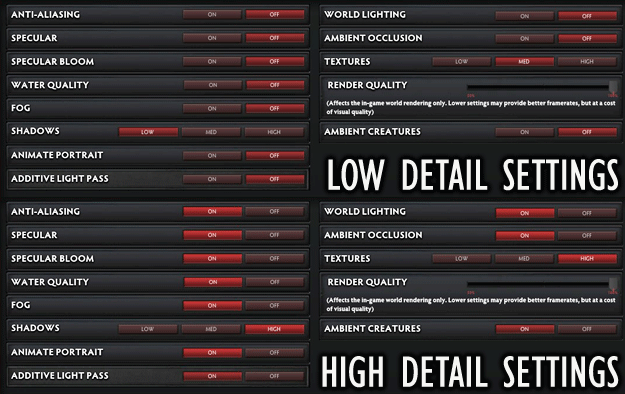
There are a lot of available detail settings, but they're straightforward on/off toggles (except for Shadows, Textures, and Render Quality). We're going to keep this comparison simple by using two combinations: first, minimum detail settings with Med textures and 100% Render Quality, and then with all of the settings maxed-out.
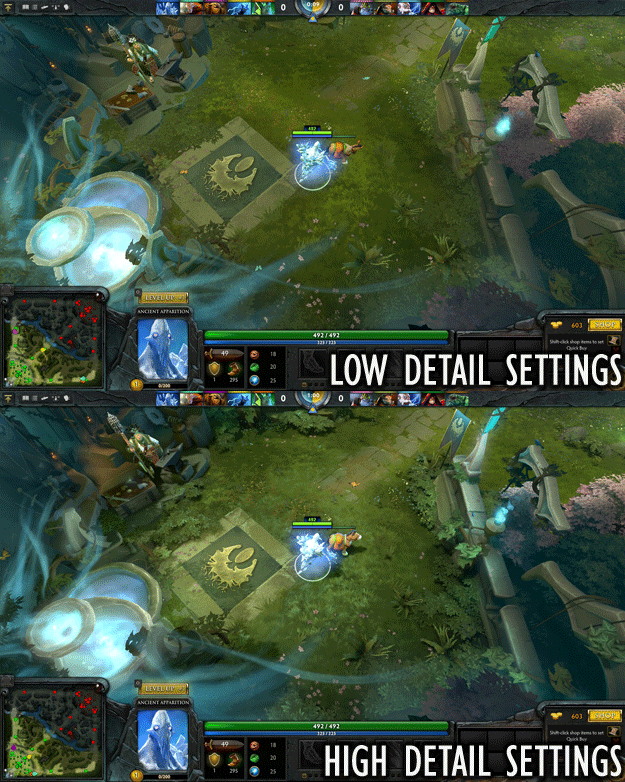
The most striking differences come from the apparent depth that shadows add. Otherwise, post-process effects and anti-aliasing are also visible in the highest-detail shots. Even entry-level settings are attractive, though the most demanding configuration offers much better graphics.