Of the key components in any PC, the storage drive is the slowest, transferring bits in a fraction of the time your CPU and GPU take to process it or your RAM takes to load it. A poor-performing storage drive often leads to a big bottleneck, forcing your processor (even if it's one of the best CPUs for gaming) to waste clock cycles as it waits for data to crunch.
You can fix that problem with an SSD, but finding the best SSD or solid-state drive for your specific system and needs is key if you want the best gaming PC or laptop, or even if you just want a snappy productivity machine. To find the best SSDs for gaming and productivity, we test dozens of drives each year and highlight the best ones here. We also maintain an SSD benchmark hierarchy that ranks SSDs by performance. We have multiple categories, including the best SSD for NAS and the Best SSD for the Steam Deck listed below. For those on the hunt for the best external SSD or the best SSD for the PS5, be sure to head to those links for our recommendations based on our exhaustive testing. If you're looking for the ultimate in cheap and deep storage, we also have a list of the best hard drives.
Picking the Best SSD for You
Why you can trust Tom's Hardware Our expert reviewers spend hours testing and comparing products and services so you can choose the best for you. Find out more about how we test.
The era of PCIe 5.0 SSDs is also upon us, propelling storage performance to new heights. Blazing-fast PCIe 5.0 M.2 SSDs, which offer up to twice the sequential speeds of the older PCIe 4.0 standard, are now supported with Intel and AMD's current platforms, like Zen 5 Ryzen 9000 and the Intel Core 200S series.
It's great if your desktop system can handle a PCIe 5.0 drive, but they are still new and more expensive and certainly aren't a requirement. For example, the PCIe 4.0 Samsung 990 Pro is our current choice for the best SSD overall, and the best SSD for gaming. This drive is rated for 7,450 / 6,900 MBps of sequential read/write throughput and 1.2 / 1.55 million read/write IOPS. That means less time waiting for game levels to load or videos to transcode, not to mention a snappier experience in Windows.
PCIe 5.0 SSDs still have plenty to offer. The Crucial T705 ranks as the fastest consumer SSD in the world that you can actually buy, alongside similar SSDs like the Sabrent Rocket 5, delivering up to a blistering 14.5 GB/s of sequential throughput and 1.8 million random IOPS over the PCIe 5.0 interface. That's an amazing level of performance from a surprisingly compact device.
While the PCIe 5.0 drives are the fastest SSDs money can buy right now, believe it or not, raw speed isn't everything. In regular desktop tasks such as web browsing or light desktop work, you may not even notice the difference between a PCIe 3.0 SSD and one with a 4.0 interface, let alone a new bleeding-edge PCIe 5.0 model. The latest PCIe 5.0 SSDs also carry a heavy price premium for now, so you're probably best suited with a PCIe 4.0 model — unless you're after the fastest possible performance money can buy, of course. If that's the case and your system supports it, go for a new PCIe 5.0 SSD.
Ultimately, the best SSD for you is one that provides enough capacity to hold your data at a price you can afford. Consider that a high-end, AAA game can use more than 100GB of data, and Windows 11 all by itself may need 60GB. These days, we feel 2TB drives represent the sweet spot, with 4TB models becoming increasingly common.
Best SSDs in 2026 at a glance (more info below):
Best SSDs | Best SSD | Alternate |
|---|---|---|
Best Overall / Best M.2 SSD | ||
Fastest SSD | ||
Best M.2 SSD for Laptops | ||
Best Budget M.2 SSD | ||
Best SSD for PS5 | ||
Best SSD for Steam Deck, Mobile | Row 5 - Cell 2 |
Here's the shortlist of our rankings, but we have deeper breakdowns for these drives below, along with far more picks for other categories, like PS5 SSDs, RGB SSDs, workstation SSDs, and SATA SSDs, among other categories.
Quick Shopping Tips
✔ Pick a compatible interface (M.2 PCIe, SATA, Add-in Card)
Look at your user manual or a database like the Crucial Memory Finder to determine what types of SSD your computer supports.
✔ 500GB to 2TB
1TB is the practical minimum for any PC build that costs more than $500 (perhaps one of the best PC builds). 2TB is the best SSD capacity for anyone that can spend $200+ on a drive. 500GB is the bare minimum anyone should consider at any price. 4TB drives have also plummeted recently, so good deals abound.
✔ M.2 SSDs are the fastest
M.2 PCIe NVMe SSDs are the most common type of SSD on modern systems. These small, rectangular drives look like sticks of RAM, only smaller. They are usually 80mm long by 22mm wide, described as size 2280, but some may be shorter or longer, so make sure you get one that matches your slot.
✔ SATA is the slowest
SATA isn't as fast as an M.2 SSD, but the majority of desktops and many laptops support 2.5-inch SATA drives.
Below, you'll find our list of the best SSDs. For even more information, check out our SSD Buyer's Guide. Iif you're looking for an external SSD, you can check out our Best External Hard Drives and SSD page, or learn how to save some money by building your own external SSD.
Best SSDs You Can Buy Today

Samsung hit back at its competitors with this impressive update to the 980 Pro. New hardware and new options, including a heatsink with RGB and a 4TB variant, have allowed Samsung to retake the M.2 SSD crown. Performance is excellent across the board, setting a few new performance records, such as with 4K random read performance. In our testing, the drive was consistent, power-efficient, and cool. Samsung has also updated its software for this drive, giving it the best SSD toolbox available, and the drive is backed by a competent warranty and decent support.
$20 extra for a heatsink and RGB is a good deal, and Samsung will likely discount this drive over time. Competing PCIe 5.0 drives on the market offer faster performance, but they still carry a premium.
Read: Samsung 990 Pro review

WD has taken its popular Black SN850 SSD and turned it up to 11. The Black SN850X leverages an improved controller and newer flash to get the most out of the PCIe 4.0 interface. Performance is improved across the board, and the drive rivals most of the top contenders in the PCIe 4.0 market. There's also a heatsink option that comes with RGB at 1TB and 2TB. WD also supports the SSD with its decent Dashboard application and a respectable five-year warranty.
The M.2 Black SN850X was a bit pricey at launch, however, with a daunting MSRP, but those prices have largely come down. The touted Game Mode 2.0 feature felt incomplete in our testing, although WD ensures us that this will improve with future firmware updates. All-in-all, this is a good compromise if you can’t find the Samsung 990 Pro.
Read: WD Black SN850X review
Fastest Best SSDs

The Corsair MP700 Pro XT delivers shocking levels of performance with excellent power efficiency. It’s the first Phison E28-based drive we reviewed, and it’s also the fastest drive, period, we’ve ever reviewed. If you want a no-compromises storage solution, this is it. The only exception would be if you’re gunning for 8TB in a single drive, in which case we recommend the Samsung 9100 Pro or, when it arrives, the 8TB model of the SanDisk WD Black SN8100. The Black SN8100 was our old pick for fastest SSD and still remains relevant at lower capacities if it’s priced lower than the MP700 Pro XT.
Read: Corsair MP700 Pro XT review

Not content with the release of the WD Black SN7100, our pick for the best laptop M.2 SSD, Sandisk followed up quickly with the WD Black SN8100. This drive is a response to the Samsung 9100 Pro – a good drive in its own right – with the added desire to destroy all existing high-end PCIe 5.0 SSDs. The SN8100 achieves this by using a new, more efficient controller from SMI along with very efficient BiCS8 flash. Through this, the drive is not only highly power-efficient for an SSD of this caliber, but it’s also able to hit higher performance levels with less overhead. For the time being, it’s the fastest all-around drive out there.
Sandisk could have skimped on the capacity end, but there’s 1TB to 4TB at launch, with 8TB promised in 2025. Historicall,y it has been difficult to get even 4TB drives out the door at this performance level and while it might take some time for Sandisk to improve availability there, the upfront promise of 8TB has us more hopeful. An 8TB drive in this class is a dream come true for many enthusiasts. That said, you’ll pay for the privilege. The SN8100 is not and will not be an inexpensive drive..
Read: Sandisk WD Black SN8100 review
Best Laptop SSDs

If you’re looking for a new SSD for your laptop or other portable device, the Sandisk WD Black SN7100 should be at the top of your list. Battery life is usually of utmost importance, and there is no drive on the market more efficient than this one. In the grand scheme of things, your SSD probably won’t make a huge dent in your power budget unless you’re pushing things a little harder, but on the other hand, every bit matters. That selling point alone might not be enough for everyone, but luckily, the Black SN7100 also has fantastic random read performance, which makes it exceptionally responsive.
While the drive did not have a 4TB model at the time of launch and review, it is now part of the lineup, which removes one of the negatives we had for the drive. You no longer have to compromise on capacity. However, the drive still suffers from middling all-around performance, and its pricing remains a sticking point. Sandisk has been more prone to sales as of late, though, and we think that even if this drive isn’t the best pick for desktop, it’s pretty hard to beat for laptops.
Read: Sandisk WD Black SN7100 Review

The Crucial T500 combines cutting-edge flash with a customized controller that manages to be power-efficient with just four channels but also squeezes in the coveted performance-boosting DRAM cache. The T500 is also a single-sided drive with TCG Opal support, making it perfect for professional laptop use.
Many laptops are still stuck with PCIe 3.0 slots, and that’s fine. The T500 will be even more efficient when run at 3.0, and its benefits, aside from bandwidth potential, do not disappear. While the T500 does offer a heatsinked version, which we have in our all-around best SSD category, you’ll be going bare for a laptop. In this respect, it can even be better than DRAM-less drives, as the T500’s controller has more surface area and a metal IHS to prevent controller overheating. It’s simply the finest drive for laptops at this time unless you really want more horsepower. That’s on the menu, too, especially once the 4TB version arrives.
Read: Crucial T500 Review
Best 4TB SSD

4TB has become a more attractive capacity point for SSDs as time has gone on. While there are now many options available, most come with compromises of one sort or another. You may have to settle for QLC, a weaker controller, no DRAM, unreliable hardware, etc. This is not always a big deal, especially if the drive is intended to be a secondary gaming drive. In the PlayStation 5, however, extra cooling is beneficial, so it’s convenient to have a heatsink option available. At the same time, laptops favor bare drives and especially single-sided drives, the latter of which have been very rare with TLC until recently.
Samsung has managed all of this with its high-performing 990 Pro SSD. You have a powerful controller with DRAM, cutting-edge TLC flash, and a single-sided drive with or without heatsink even at 4TB. WD’s SN850X has been out a while at 4TB but has no heatsink option and is double-sided, with the SN850P being a latter heatsinked version for the PS5. There has been an increasing amount of 4TB TLC drives, including the Lexar NM790 and Addlink A93, but these cannot compare to the power and brand power of Samsung’s 990 Pro. You do have to pay for that privilege given the high MSRP, but at this time there is no substitute.
Read: Samsung 990 Pro Review
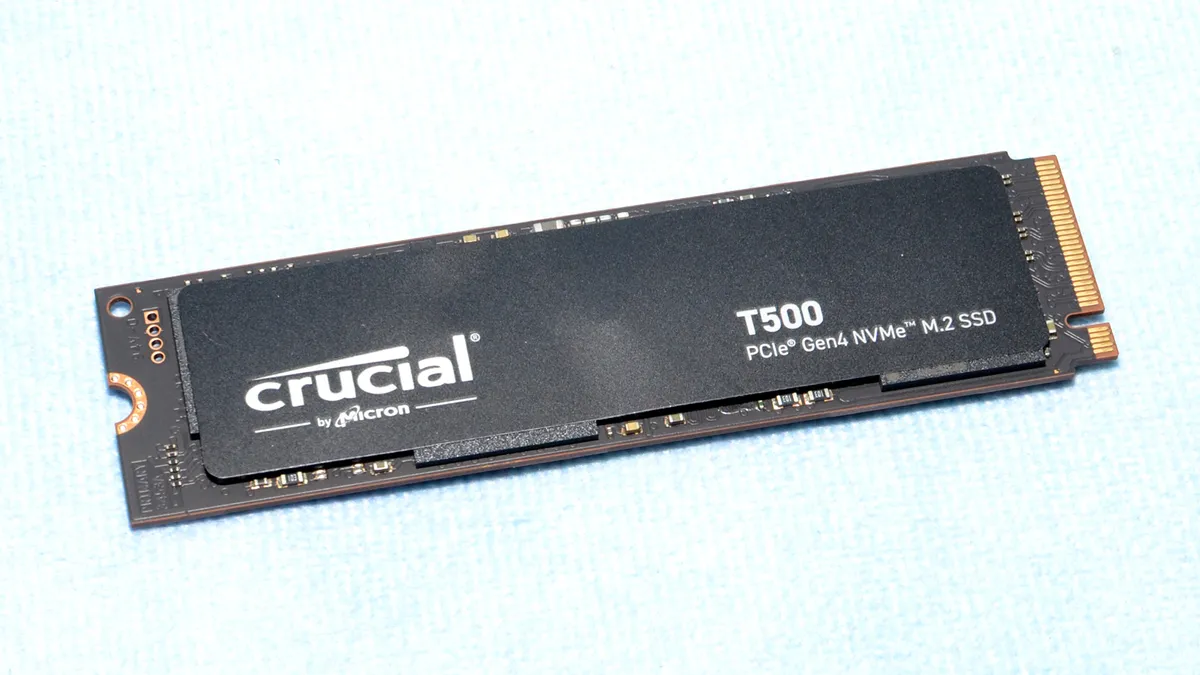
Now that Crucial has finally brought out the 4TB SKU for the T500, it can replace the T700 on our best SSDs list for the best 4TB SSD alternative. The T700 is still a good choice for this, but the T500 is better for a few reasons. While both drives have a heatsink option, the T700 requires one, while the T500 can work bare in a laptop. The T500 is also more power-efficient but doesn’t skimp on performance by omitting DRAM. And while the T700 is PCIe 5.0 capable, many machines — including laptops and the PS5 — won’t benefit from that extra bandwidth.
The 4TB T500 is not without its faults, though. Its pricing is a little high for what you get, matching other high-end drives, which makes more sense on desktops. This is partly because the T500 has inconsistent sustained performance while those like the 990 Pro and SN850X do not. The 4TB T500 is also double-sided, which potentially reduces its compatibility. There are already single-sided, 4TB DRAM-less drives for less, such as the Lexar NM790, and there may be more in the future, although in general, this fact shouldn’t reduce the T500’s appeal.
Read: Crucial T500 4TB review
Best High-Capacity (8TB) SSD

The Samsung 9100 Pro is not a record-setting drive now that the second generation of Gen 5 SSD controllers are coming out in retail products. However, it is the first high-end drive to offer an 8TB SKU. This is a massive amount of storage, especially for a drive at this performance level. The 9100 Pro delivers good results in all of our tests, and the overall package is perfect for enthusiasts who want this much space in one drive for their HEDTs and workstations. It can also work in laptops, but the double-sided nature of the drive makes it more suitable for desktops, especially with the optional and affordable heatsink. Behind it all is Samsung’s name, so you know you’re getting a high-quality product with support to back your expensive investment.
Read: Samsung 9100 Pro 8TB SSD review
Best Budget M.2 SSD
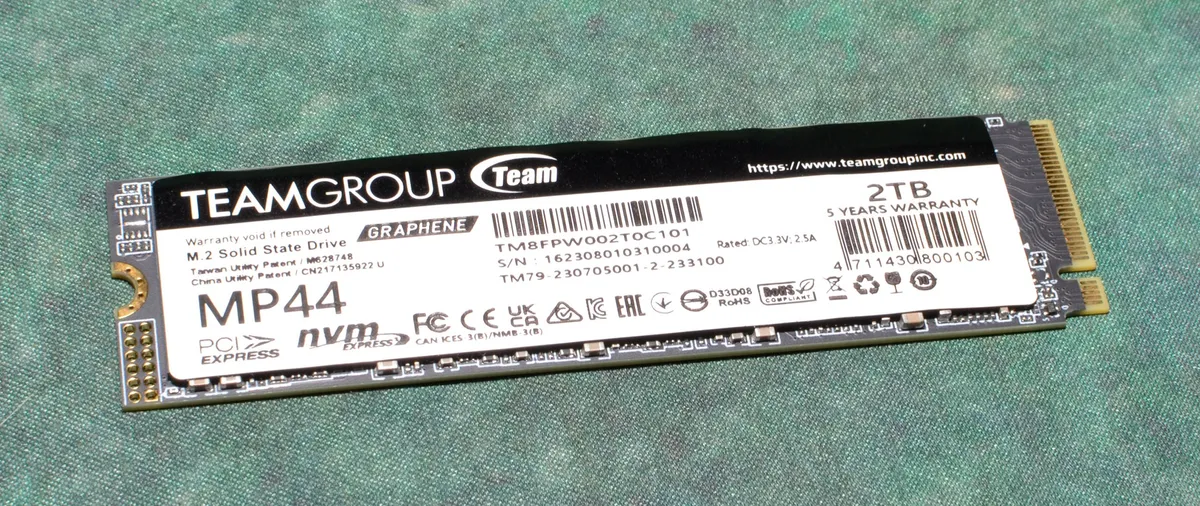
The Teamgroup MP44 is one of those drives that remains a value champion just for being in the right place at the right time. It feels like a natural successor to the Teamgroup MP34, a drive that was once the most popular 4TB choice among budget PCIe 3.0 drives. The MP44 is even better than that, though, as it has a more reliable controller with up-to-date flash. As such, performance is good everywhere it matters and the drive is power-efficient, too.
It’s probably not the best SSD for laptops as the controller can act as a hotspot, but otherwise it’s a good choice at any capacity. However, it faces more competition below 4TB. There are faster drives either way, but it’s difficult to argue about the MP44’s price. Its most direct rivals would be the Patriot Viper VP4300 Lite, the Lexar NM790, and the Addlink A93, but it generally beats them all with its lower cost, particularly at the coveted 4TB.
Read: Teamgroup MP44 Review

We recently replaced the TeamGroup MP44L on our Best PS5 SSDs list for a good reason: the MP44L has had its hardware changed over its life, but it’s now showing up with decidedly bad controllers and QLC flash. It was our budget champion for quite some time, but it feels like Team has introduced the MP44Q to fill that gap.
Drives in the middle of the PCIe 4.0 range – usually around 5 GB/s peak, give or take – are becoming less sensible by the day. What this means for you is that it’s more appropriate to opt for budget-friendly 7 GB/s drives, such as the MP44 and MP44Q, if you’re budget-conscious. Which drive to pick depends on the pricing and availability at the time of purchase. The MP44Q can end up competing with the MP44 with comparable pricing at times, and even at its best, it’s up against other QLC-based drives.
That doesn’t mean the MP44L and its class of drives should be ignored completely, as sometimes it really does come down to a few $ in either direction. However, we would strongly recommend going up to the MP44Q at the least if you value hardware longevity. Cheap drives are cheap for a reason. The MP44L once stood out with good controllers and TLC flash, but now that the market squeeze has left it as a poor man’s Kingston NV3 – Kingston’s NV series being the poster child for hardware that changes in some budget SSDs – we think you can do better. The MP44Q offers a good, power-efficient alternative.
Read: TeamGroup MP44Q review

The WD Green SN3000 is not a drive for everyone. It’s on the lower end for budget Gen 4 drives in terms of peak bandwidth, and it inherits a mixed reputation. WD’s Green line has always been associated with dirt-cheap drives that are very much the last resort. This isn’t helped by the fact that the SN3000 has a shorter warranty than usual at three years, and also has some of the lowest TBW, or warrantied writes, of any drive we’ve tested in recent memory. That paints a nasty picture, but we believe this drive is actually a diamond in the rough.
The drive has good performance thanks to its BiCS8 QLC flash, so it feels more responsive than expected. This flash also helps the drive stay efficient enough for mobile devices. On top of this, you can get the drive at smaller capacities that have been hard to find. If you’re buying on a budget, it’s a veritable godsend. We can overlook its weak sustained write performance, as that’s not a factor in this segment. As for the TBW, we can’t deny that it is dismal, but in its defense, a read-heavy drive won’t have any problem here over three years.
Read: WD Green SN3000 Review

Sandisk’s newest Blue NVMe SSD is an achievement despite its complete transition from TLC to QLC flash. This drive has something for everyone, offering decent all-around performance, low 4K random read latency, and high power efficiency, all within a nice capacity range. In fact, it’s difficult to tell it apart from the TLC-based Black SN7100 in everyday use. Given that the Blue SN5100 is using less-expensive QLC flash, it should end up priced better, too, which would be quite something given the great value the Black SN7100 provides.
The Blue SN5100’s excellent balance makes it an all-around winner for use in mobile systems, the PS5, HTPCs, and as a secondary or gaming desktop drive. It’s a drive for everyone and is our pick for the best QLC drive on the market, although the Crucial P310 comes close. QLC usually means capacity, and thankfully, the Blue SN5100 is available up to 4T,B which leaves us with few criticisms. Yes, it still has weaker sustained write performance than a TLC drive, but this is less concerning than the launch price. This drive, when settled at its proper price point, will be a great pick.
Read: Sandisk WD Blue SN5100 Review
WD took its popular Black SN850 SSD and turned it up to 11, but luckily for value seekers, the price isn't nearly as extreme. The current $156 price on Amazon for the 2TB model is a great deal, even if it's now $25 more than it cost last year. The Black SN850X uses an improved controller and newer flash to get the most out of the PCIe 4.0 interface, thus delivering excellent performance with the Sony PlayStation 5. WD improved performance across the board, and the drive comes with a heatsink option at 1TB and 2TB capacity points.
WD also supports the SSD with a solid five-year warranty that will let you game with peace of mind. This drive is made for the PlayStation 5, and while it can be a bit pricier than budget options, overall, it's still our top pick for the PS5. It's also fast for gaming on a PC, particularly with DirectStorage starting to become useful, so this drive is plenty attractive.
WD has taken the course of releasing an officially licensed SN850P SSD. That drive is a glorified heatsinked SN850X and you should only pick it if you want the heatsink at 4TB. Even then, it's far cheaper to get a bare SN850X and add your own heatsink.
Read: WD Black SN850X Review
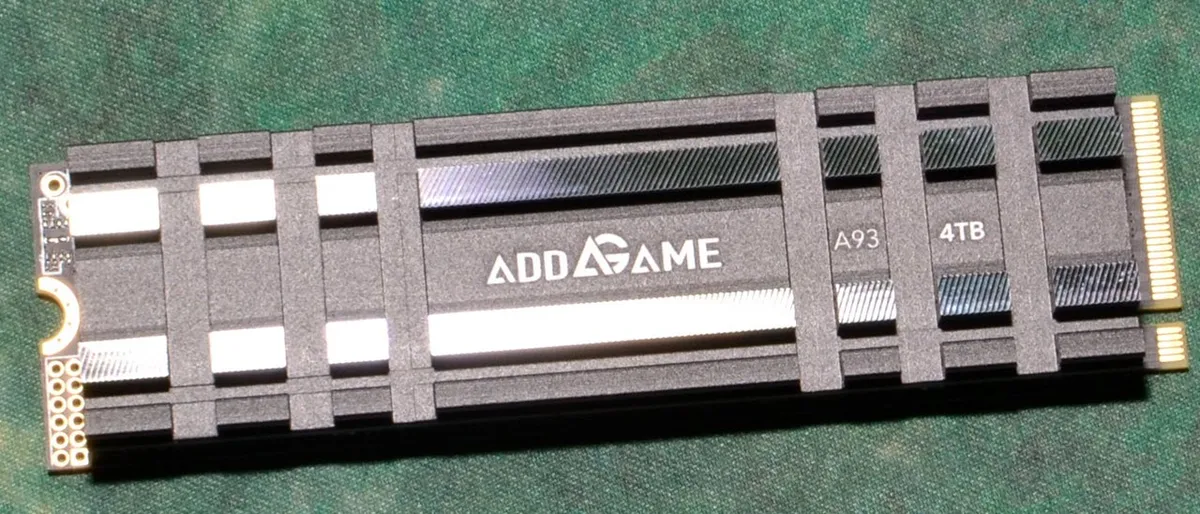
The Addlink A93 is a perfect example of a great PlayStation 5 expansion drive – it delivers top performance at up to 4TB without breaking the bank. The PS5 doesn’t need anything special, but you might as well get a drive that will last a long time. The A93 checks this box with its TLC flash, and it’s also designed for the PS5 with a compliant heatsink and a single-sided drive design. It’s DRAM-less with a four-channel controller, which means it’s power-efficient and, with its heatsink, it’s therefore unlikely to overheat, which is always good news for console lovers.
That said, enthusiasts would still prefer to have DRAM, which is why we have the WD Black SN850X as our first pick for a PS5 drive. If you’re trying to save some money, though, the A93 is a decent substitute. There are competing drives that would work as well, such as the Lexar NM790, but currently, the A93 offers the best package for the best price. It has all the performance you need with no real drawbacks, unless you really have your heart set on 8TB.
Read: Addlink A93 SSD Review

The Crucial P310 came as a bit of a surprise, but a welcome one. M.2 2230 SSDs have ratcheted up in popularity ever since Valve’s Steam Deck launched, and now there are more portable gaming systems than ever. There’s also Microsoft’s Surface Pro line and some laptops that take M.2 2230 or M.2 2242 - this drive can be extended up to M.2 2280 if needed - which used to mean going to eBay for OEM options like the WD SN740. This hasn’t been the case in a while, but finding a decent 2TB drive has remained difficult. The P310 handles that challenge like a champ.
Sure, it’s QLC-based, which means it’s not quite as fast or consistent as it could be, but it’s more power-efficient than the TLC-based WD Black SN770M and has more throughput. In fact, it’s the fastest 2TB M.2 2230 SSD we’ve ever tested. We expect the updated Corsair MP600 Mini would beat it, but the P310 has better availability and should be less expensive. It’s fast enough where it matters, which makes it the best option if you’re looking purely for capacity, but your host system should be able to take PCIe 4.0 drives to fully benefit.
Read: Crucial P310 SSD review

Kingston’s NV3 (2230) is a good example of a budget drive done right. Our reviewed version has good hardware, including superior QLC flash. However, the specifications are lower than normal which gives Kingston the ability to change the hardware down the road. This isn’t a big trade-off considering the drive is priced right at 1TB and 2TB, the most popular drive capacities for this form factor. The good power efficiency also means it won’t drain your battery or overheat.
When we’re talking about the Steam Deck this drive is more than fast enough as the device is limited to PCIe 3.0. Other and future devices will take PCIe 4.0 and even 5.0 SSDs, however. For the most part you don’t need a drive with TLC flash even in that case if your primary workload is gaming. The NV3 would have more competition there, certainly on the performance front but also possibly with capacity down the line. Aside from the excellent Crucial P310, we may begin to see 4TB drives in this and the M.2 2242 form factor with double-sided solutions, 2TB dies, or both. Right now the NV3 is a solid deal, though.
Read: Kingston NV3 (2230) SSD review

Corsair’s second run at the MP600 Mini, now with a faster controller and flash, is an example of how to do things right. It takes M.2 2230 SSDs to the next level in terms of performance while maintaining excellent levels of power efficiency. To top it off, it brings TLC flash at up to 2TB in a single-sided package. Previously, it was necessary to go with QLC flash - which in some cases is slower than TLC flash - or the power-hungry WD Black SN770M, which in any case isn’t as fast. This isn’t as big a deal with the PCIe 3.0 Steam Deck, as you can’t reach the full potential of today’s drives with that interface.
The new MP600 Mini comes at a price, though. Literally - it costs a bit more than the competition. The least expensive way to get this level of performance is to go with the Crucial P310, the best choice for M.2 2230 on any PCIe 4.0 platform if you want the highest capacity and 7 GB/s. For a 3.0 platform like the Deck and TLC flash, the Black SN770M remains solid. If you want the best performance possible, then the updated MP600 Mini is the way to go. For the time being, it is even good for M.2 2242 with an extender, otherwise, the native Rocket Nano 2242 will do the trick at 1TB.
Read: Corsair MP600 Mini (E27T) SSD Review

The WD Black SN770M is unique in that it offers 2TB of TLC NAND flash in the tiny M.2 2230 form factor in a single-sided design. This makes it optimal for use in the Steam Deck, ASUS ROG Ally, and other portable gaming/computing devices. Some of these can take double-sided drives or longer drives, but the most popular of them all - the Deck and Deck OLED - work best with this form factor. For a long time, it was only possible to get a drive with less-desirable QLC if you wanted 2TB, but with the SN770M, that compromise is no longer required.
This comes at a cost as the older hardware on the SN770M - which is the same as the popular M.2 2280 Black SN770 - pulls more power and puts out more heat. For regular gaming use, this wasn’t an issue in our testing. The difference in battery life is essentially negligible, and the drive is usually not pushed enough for its direct heat output to be an issue. Therefore, it offers the best baseline performance in this form factor for now, but QLC-based alternatives may be more affordable.
Read: WD Black SN770M Review

The Corsair MP700 Micro is the best M.2 2242 SSD on the market, and it’s not even close. It’s not only the fastest drive, it also has the highest capacity possible at up to 4TB in a single-sided design. This makes it an effective, if niche, storage solution. If you happen to need an M.2 2242 SSD with this much space or want the highest performance and power efficiency possible, the MP700 Micro is your drive. Although a bit overkill, it would also be great in PCIe 3.0 and 4.0 slots if that’s all you have available.
The overkill factor is also a drawback to this SSD. You can get by with slower drives like the Sabrent Rocket Nano 2242, especially as most M.2 2242 devices are not PCIe 5.0 capable. While it’s impossible to match the capacity of the 4TB MP700 Micro, it’s a very expensive drive, and the current memory market may end up encouraging smaller drives for affordability purposes. If all you need is 1TB or 2TB, you can get by with many M.2 2242 or 2240 drives instead. The MP700 Micro still has its place, though, and it could be a niche solution for specific HTPC builds as well.
Read: Corsair MP700 Micro review
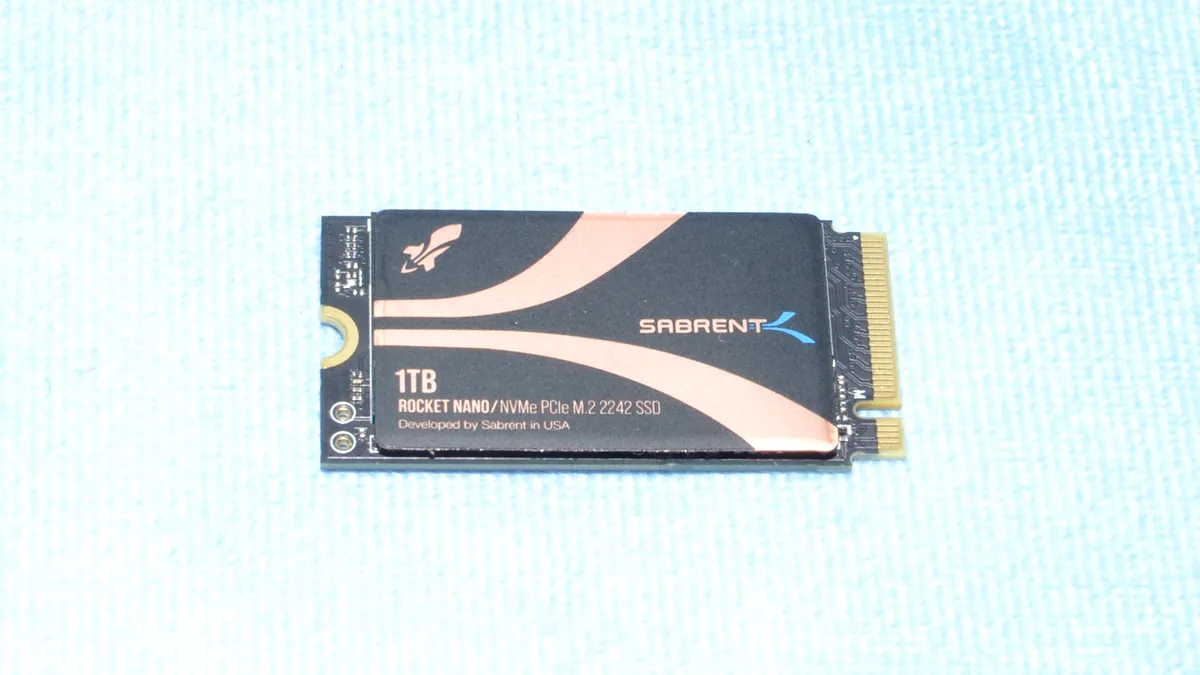
With the growing popularity of M.2 2230 SSDs, it was only a matter of time before we saw retail 2242 options. The Sabrent Rocket Nano 2242 is one of these, alongside the Corsair MP600 Micro. Alternatives include OEM and last-gen drives, like Sabrent’s original Rocket 2242, but some are double-sided. Not so with the Rocket Nano 2242, which will fit in the Lenovo Legion Go and many laptops with at least one M.2 2242 slot. It’s an easy drop-in solution with good performance and power efficiency.
The drive is only currently available at 1TB. However, with dual NAND packages, we expect larger capacity options in the future. M.2 2230 SSDs can also be extended for M.2 2242, but the 2TB options currently on the market all have their own drawbacks, except perhaps for the imminent Corsair MP600 Mini (E27T). However, the Rocket Nano 2242 gives plenty of performance for portable devices as it stands and is an easy pickup for M.2 2242.
Read: Sabrent Rocket Nano 2242 SSD review
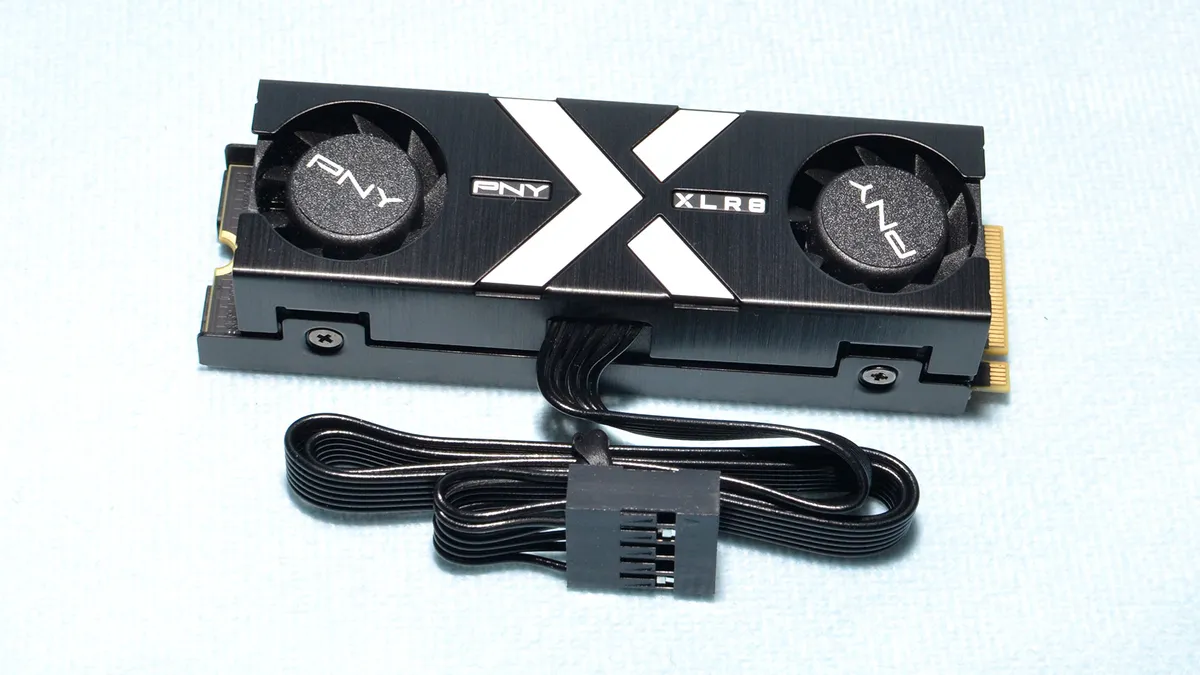
PNY had its heart set on producing a very fast RGB-capable SSD, and with the CS3150 XLR8, or CS3150, it succeeded. This PCIe 5.0 SSD also has a heatsink with dual fans to ensure it never overheats. PNY’s software allows control over the RGB and fans, with synchronization possible for the former if you have other PNY RGB products. The warranty is standard, but the drive does support hardware encryption via the TCG Opal 2.0 specification, which may be a selling point for some.
The CS3150 isn’t perfect, though. It’s expensive and can be difficult to find. It’s only available at 1TB and 2TB capacities, needing 2TB to hit its maximum performance numbers. There are also other drives equal or faster to it, although for many workloads this isn’t particularly relevant. If RGB isn’t your thing, this drive also comes without the RGB in both white and black variants. Regardless of the model you go for, the drive can operate without throttling, and its performance is good across the board.
Read: PNY CS3150 Review
Best Workstation SSDs

The Inland Performance Plus has been around for a while, so long in fact that it hasn’t been using its original hardware in a long time. It was updated when the Gaming Performance Plus came out with a newer type of flash. It also saw an expanded capacity range over time, up to 8TB. The performance specifications have not changed, though, and remain quite good for a Gen 4 drive. The warranty is also excellent at six years – more than the typical five – with up to a whopping 6,000TBW at 8TB.
This is a solid all-around drive that’s good for anything, but it’s especially good for NAS. Aside from the high write endurance and warranty period, the drive also has a balanced pSLC cache scheme that makes it more ideal for expected workloads. It doesn’t hurt that the drive is also actually available – well, at the time of writing, anyway – for prices that are not outside the competitive range. It’s Inland so there’s no real software support, but that’s our only ding.
Read: Inland Performance Plus Review

The Seagate FireCuda 530R is an all-around contender for best workstation drive, covering all the main areas you look at for a heavier workload storage solution. It has good performance with exceptional IOPS, consistent writes, and decent throughput. The drive is rated for an unusually high amount of writes, and Seagate throws in three years of data recovery service support, too. On top of this, it also optionally comes with a heatsink and runs surprisingly cool for a drive of its caliber and hardware age.
Speaking of age, the Phison E18 controller is long in the tooth, and BiCS6 flash isn’t as exciting as it once was. However, this combination proves to be a winner if you’re looking for a reliable workstation SSD. You’re mostly missing out on the higher-efficiency options that now exist, but we’d take this drive over the DRAM-less options if you have more demanding workloads.
Read: Seagate FireCuda 530R Review
Best Workstation SSD Alternate

The Kingston KC3000 is a long-standing favorite, a popular Gen 4 SSD that has been around for a while. There are many drives out there with the same hardware, including the previous holders of our Best Workstation SSD and SSD Alternate slots. The primary reason for the change is that drives with the Phison E18 controller have been identified with issues that could impact performance or reliability. However, only a few manufacturers have actually addressed this with a firmware update. Kingston is the primary one, offering the update for both the KC3000 and the Fury Renegade.
This makes the KC3000 a safer pick for workstation use, given that it also has decent all-around performance and is readily available. It also has a higher-than-standard TBW endurance rating and the Kingston name, which means it can be serviced more widely around the world. The only downside is that there are competing products, including some that are less expensive. However, if the reported issues are something you take seriously, then that brings things into focus. The KC3000 – or its sibling, the Fury Renegade – checks the right boxes for workstation use if you want a reliable solution.
Read: Kingston KC3000 Review
Best NAS SSDs
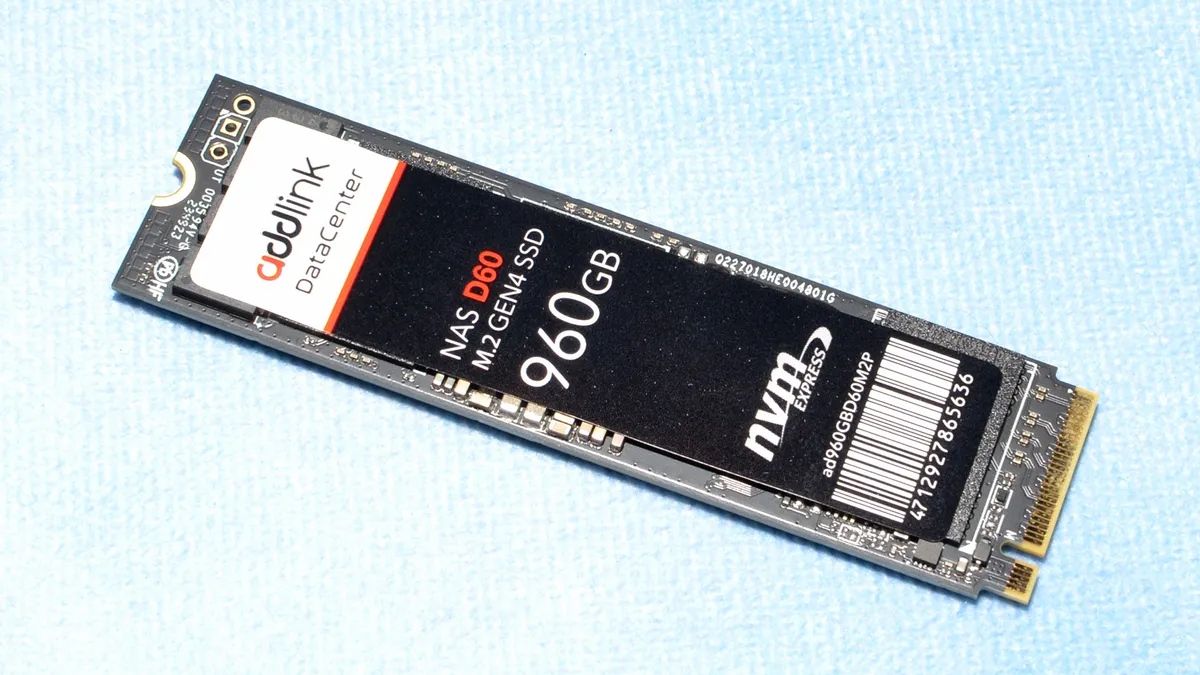
The Addlink NAS D60 is a niche drive but fills its designated role pretty well. If you have a NAS system, a workstation, or other servers - whether for home lab use or SOHO - this drive may be worth looking at. Assuming your server can take an M.2 NVMe drive or two, the NAS D60 can do caching duty in tandem with mechanical hard drives or even be used in an all-flash array. Whichever way you go, some special features of this drive help it step away from other retail consumer drives, which justifies its price premium. But it’s still more affordable than full-out enterprise solutions.
The first thing that stands out about this drive is that it’s using enterprise-grade flash. Such flash is more reliable with higher baseline endurance. This lets Addlink extend the warranty to 1 drive write per day (DWPD), which is three times the retail standard. The second thing that stands out is that it has capacitors on-board for power loss protection. This means improved integrity for data-in-flight. Lastly, the NAS D60 foregoes any pSLC cache, which, while hurting all-around performance, does give more consistent sustained performance. This combination makes it particularly good for a write cache, singly or in RAID, for NAS and other systems.
If you’re looking for a more traditional drive or one with a larger capacity option, the Adata Legend 960 Max remains viable. It also has a heatsink, which the D60 NAS lacks. Pick the D60 Max if you want the higher TBW, the PLP, and/or the non-cache performance characteristics. Oh, and remember that the NAS D60 will not be very power-efficient if that’s a factor for you.
Read: Addlink NAS D60 SSD review
Best SATA SSDs
You can get a SATA drive in the M.2 form factor, but most SATA drives are 2.5-inch models, which allows them to drop into the same bays that hold laptop hard drives. SATA drives are the cheapest.

If you’re still buying SATA SSDs, your options are vanishingly few if you’re looking for a quality drive. Crucial has stopped making its popular MX500 – our previous Best SATA SSD – and other manufacturers have swapped to DRAM-less hardware in some cases, the WD Blue SA510 being the most prominent example. While having DRAM isn’t make-or-break with newer M.2 NVMe SSDs, it’s more useful for maintaining good performance with SATA SSDs. TLC flash is also preferable to QLC if you want to maintain high write speeds and performance.
This leaves the Samsung 870 EVO as the likely best remaining SATA SSD available. You’re going to get quality TLC flash and DRAM. Samsung also offers a decent capacity range, which means you should be able to find the drive you need when you need it. The vast majority of SATA SSDs out there are DRAM-less nowadays, but they’re also cheaper and might be good enough for basic upgrades. The 870 EVO, as a result, is an expensive proposition, but if you want a drive to last, it’s the best option.
Read: Samsung 870 EVO Review
How We Test SSDs and Benchmark Charts
CPU | Row 0 - Cell 2 | |
Motherboard | Row 1 - Cell 2 | |
Memory | Row 2 - Cell 2 | |
Graphics | Intel Iris Xe UHD Graphics 770 | Row 3 - Cell 2 |
CPU Cooling | Row 4 - Cell 2 | |
Case | Row 5 - Cell 2 | |
Power Supply | Row 6 - Cell 2 | |
OS Storage | Row 7 - Cell 2 | |
Operating System | Windows 11 Pro (22H2) | Row 8 - Cell 2 |
We use the same test system for all our SSD benchmarks. You can find the specifications in the boxout, and the short summary is that it's an Intel Alder Lake platform — chosen because it was the first platform to support PCIe 5.0 for expansion cards and M.2 slots. We have periodically looked at newer platforms, but Raptor Lake didn't change the results much if at all, and AMD's PCIe 5.0 platforms tend to be slightly slower than Intel's platforms.
We have a battery of benchmarks, each of which gets run multiple times. We use the best result from each test. Here are the charts of all currently tested SSDs (from the past three years, give or take). We froze Windows 11 at version 22H2 in order to keep the test results consistent — various security updates have had an impact on certain benchmarks over the years.
We've grouped the SSDs by capacity, beginning with the 4TB and larger drives, then the 2TB drives (which are easily the most popular and well-represented class in our testing), then the 1TB drives, and finally all the 2230 drives (in both Gen3 and Gen4 modes). We haven't tested any new 500GB-class or smaller SSDs in several years as that market is mostly dead for DIY upgrades these days.
4TB SSD and larger testing results


2TB SSD testing results


1TB SSD testing results


M.2 2230 SSD testing results


Finding Discounts on the Best SSDs in 2026
Whether you're shopping for one of the best SSDs or one that didn't quite make our list, you may find savings by checking out the latest Crucial promo codes, Newegg promo codes, Amazon promo codes, Corsair coupon codes, Samsung promo codes or Micro Center coupons.
MORE: Best External SSDs and Hard Drives
MORE: All SSD Content