Best offers
|
Core i7 I7-920 Quad Core Processor... | $349.99 Dell Home More info |
|
Phenom II X4 965 Black Edition Quad... | $189.99 Newegg.com More info |
|
Core i5 750 Qaud Core Processor... | $199.99 Newegg.com More info |
|
Core i7 Extreme Edition I7-975 Quad... | $974.99 TigerDirect More info |
|
Phenom II X4 955 Black Edition Quad... | $174.99 TigerDirect More info |
Popular Searches
- amd athlon x2 5000 black edition
- amd athlon 64 x2 5000 black
- overclocking 5000 black edition
- athlon x2 5000 black edition
- athlon 64 x2 black edition
- athlon black edition
- black edition processors
- athlon 5000 black edition
- x2 black edition
- athlon 64 x2 5000 black edition
- x2 5000 black edition overclock
- athlon 64 black edition
- 5000 black edition overclock
- how to overclock amd x2 5000 black edition
- athlon 5000 black
Partners
The Games selection
violent :
More Mindless Violence
Basic shooting game, but still so powerful! Use the mouse to take aim and shoot at the little beasties before they get to you. Use Space to reload....
|
action :
Yoyo the Star
Yoyo is a young girl who recently graduated and dreams to become a movie star (don't we all). You'll have to guide her on the path to stardom,...
|
Ads
Sponsored links
9:32 AM - 10/22/2007 by
The editorial team
- Email |
- Print |
- Comments (8) |
- Share
The Athlon 64 X2 5000+ Black Edition is manufactured on a 65 nm process using the new G2 stepping, and runs at a stock speed of 2.6 GHz. Each of the two cores contains 512 kB of L2 cache.

The current version of CPU-Z does not recognize the Black Edition by name, only by model number and frequency. When it runs at its default frequency of 2.6 GHz, the CPU uses a memory divider of 7, which results in a memory speed of DDR2-743.

The following table points out the differences between the two "Black Edition" processors.

| Comparison of the Black Editions | |
|---|---|
| Name | 6400+, 5000+ |
| Frequency | 3.20 GHz, 2.60 GHz |
| Cache | 2x 1 MB, 2x 512 kB| |
| Process | 90 nm, 65 nm |
| Stepping | F3, G2 |
| TDP | 125 W, 65 W |
| Multiplier | up to 16x, unlocked |
Everest recognizes the CPU correctly, identifying the G2 stepping as well as the open multiplier.
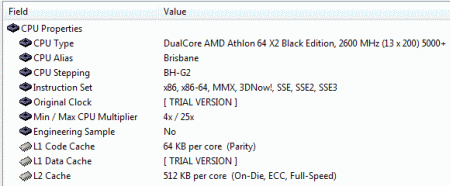
Everest recognizes the G2 stepping.

The BIOS offers multiplier settings all the way up to 25x.
Sponsored links
Related forums topics
- Do I really need a Quad?
- Dual Core - Intel vs. AMD
- What computers did you own in the old days? Share your story!
- CPU Buyers' Guide (updated 10 May 2008)
- Intel CPU...which to choose?
- GUIDE: 3+GHz Core 2 Duo Budget System for $426 (Overclock)
- e7200 overclocking issue
- FSB and RAM ????
- Best price/performance computer / Need input
- Budget Overclocker - AMD's Athlon 64 X2 5000+ Black Edition
- Question about starting pc after OC
- Whats the best Mobo & CPU combo for Gaming!
- Need a decent - good AMD Motherboard
- GUYS PLEASE HELP ME BEFOR I SHOOT MYSELF


what kind of cooling system is needed to overclock to 3.1 Ghz? I'm buying a barebones kit with this CPU but no heatsink/fan.
this article is very helpful, but my bios lets me increase the cpu voltage in increments of 5 mV up to 600mV . so how much to i out it up in order to equal 1.450 V?
1000 milliVolts = 1 volt
1450mV is my guess.
what heatsink fan was used for this? stock X2?
This article was helpful in making my decision to buy this processor, but I have a problem when overclocking it (first time overclocking). My pheonix award bios on my m2n sli board wont let me increase the cpu voltage past 1.325, and I want to know if there's anyway I can increase it. I can only get to 14.5x multiplier at this voltage.
Hi,
Great article. I am new to OC, and have the 5000+ Black Edition and I am running it in an Asus M2N-SLI with a Zerotherm Butterfly CPU cooler. CPU according to HWMonitor, Core 0 is running at about 18C and Core 2 is at about 19 so heat shouldn't be a problem. Memory currently is Patriot 1GB PC2 5300 667mhz but in a couple days I will be adding 4 GB of OCZ SLI Ready Edition Dual Channel DDR2 800 Mhz . My question, is will the 667 Patriot memory that I currently have work if I overclock to 3.0, and would the OCZ 800 be adequate to OC to 3.2 ?
Second, I've not done this before, from what I can gather here I can just change the multiplier in BIOS without messing with voltages if I don't go beyond 3.1 which would be achived by using a 15.5 multiplier.
Thanks for the information here and any tips...
**agroberts@knology.net**
I have this CPU , been very happy with it so far. I have it at 3.2ghz running smoothly. I put a gigabyte GIGABYTE GH-PDU22-SC EVR Sleeve CPU Cooler only cost 23.00 has my cpu at 32c idle
I can only get mine to a 14.5 multiplier I have a M2N-SLI Deluxe MOBO,CORSAIR XMS2 2GB (2 x 1GB) 240-Pin DDR2 SDRAM DDR2 800 (PC2 6400) Dual Channel Kit Desktop Memory X2 for 4 GB, Thermaltake CL-P0075 80mm 2 Ball CPU Cooling Fan/Heatsink. How can i get it higher without it crashing
