









Why you can trust Tom's Hardware Our expert reviewers spend hours testing and comparing products and services so you can choose the best for you. Find out more about how we test.
Asus RTX 4070 Ti Overclocking


View Original

View Original

In the above images, you can see our stock and overclocked test settings. Overclocking involves trial and error and results are not guaranteed — each card behaves slightly differently. We attempt to dial in stable settings while running some stress tests, but what at first appears to work just fine may crash once we start running through our gaming suite.
We start by maxing out the power limit, which in this case was only 110% — and again, that can vary by card manufacturer and model. We ultimately ended up with a 175 MHz overclock on the GPU, while the memory was able to go all the way to +1600 MHz with stability (1800 MHz crashed when we attempted it while running FurMark). We also set a custom fan speed that ramps from 30% at 30C up to 100% at 80C, though we never approached 80C in testing.
As with other RTX 40-series cards, there's no way to increase the GPU voltage short of doing a voltage mod (not something we wanted to do), and that seems to be a limiting factor. GPU clocks did break the 3 GHz mark in some tests while gaming, though the FurMark screen capture as usual ended up at far lower clocks. We'll include the 4K overclocked results in our charts.
Nvidia RTX 4070 Ti Test Setup

We updated our GPU test PC and gaming suite in early 2022, but with the RTX 40-series launch we found more and more games were becoming CPU limited at anything below 4K. As such, we've upgraded our GPU test system again… twice! (Thanks AMD and Intel!) Our GPU benchmarks hierarchy still uses the older i9-12900K PC, as do the professional workloads, but we're working on shifting everything over to the new PCs.
We've now retested several more GPUs using the latest AMD and Nvidia drivers: 22.12.2 for the 7900 series, 22.11.2 for other AMD GPUs; mostly 527.62 for the Nvidia GPUs, though a few GPUs were tested with the previous 527.56 drivers — except for Forza Horizon 5, which we have now retested using the 4070 Ti's preview drivers.
AMD provided us with its latest Ryzen 7000-series and socket AM5 processor, which we're using as a secondary test system. As with the RX 7900 XTX and XT review, we've run the full gaming test suite on the RTX 4070 Ti using the AMD platform and we'll have the results in the charts. We will do the same tests on other future GPUs, and at some point we might do a second set of charts once we have enough data points. As you'll see, performance varies a bit from game to game, but overall performance tends to slightly favor the Intel platform. Anyway, we now have three test PCs, as you can see in the boxout.
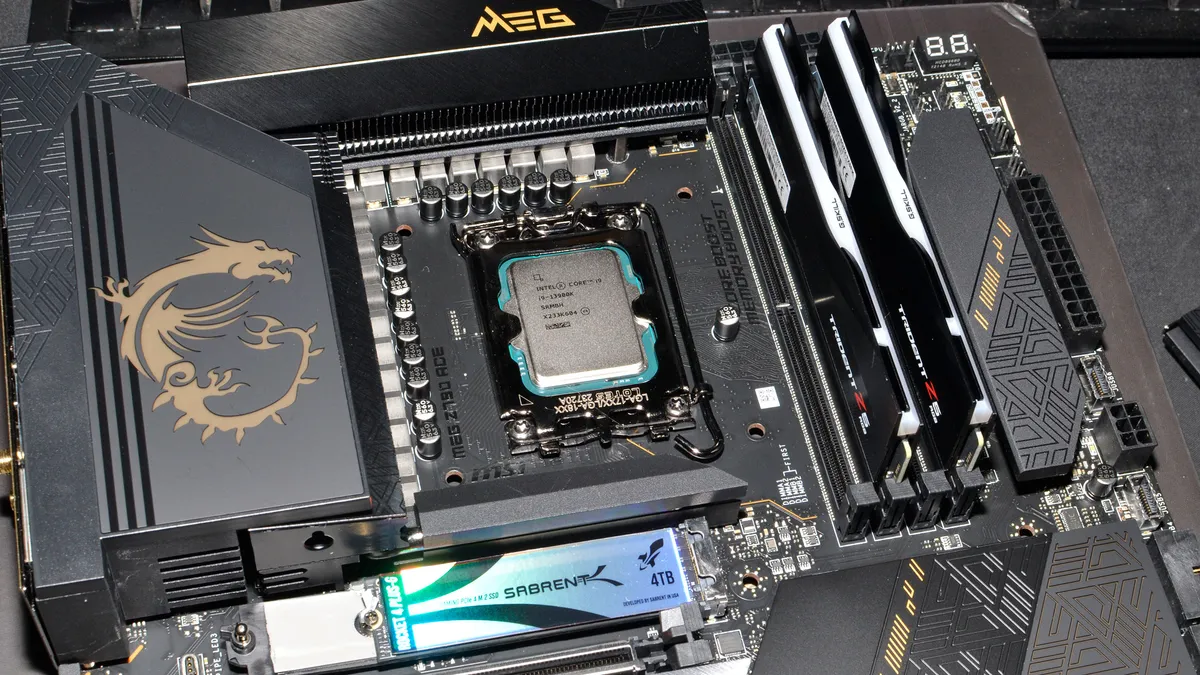
TOM'S HARDWARE INTEL 13TH GEN PC
Intel Core i9-13900K
MSI MEG Z790 Ace DDR5
G.Skill Trident Z5 2x16GB DDR5-6600 CL34
Sabrent Rocket 4 Plus-G 4TB
be quiet! 1500W Dark Power Pro 12
Cooler Master PL360 Flux
Windows 11 Pro 64-bit
TOM'S HARDWARE AMD RYZEN 7000 PC
AMD Ryzen 9 7950X
ASRock X670E Taichi
G.Skill Trident Z5 Neo 2x16GB DDR5-6000 CL30
Sabrent Rocket 4 Plus-G 4TB
Corsair HX1500i
Cooler Master ML280 Mirror
Windows 11 Pro 64-bit
TOM'S HARDWARE 2022 GPU TEST PC
Intel Core i9-12900K
MSI Pro Z690-A WiFi DDR4
Corsair 2x16GB DDR4-3600 CL16
Crucial P5 Plus 2TB
Cooler Master MWE 1250 V2 Gold
Corsair H150i Elite Capellix
Cooler Master HAF500
Windows 11 Pro 64-bit
OTHER GRAPHICS CARDS
AMD RX 7900 XTX
AMD RX 7900 XT
AMD RX 6950 XT
AMD RX 6800 XT
Nvidia RTX 4090
Nvidia RTX 4080
Nvidia RTX 3090 Ti
Nvidia RTX 3080 Ti
Nvidia RTX 3080 (10GB)
Nvidia RTX 3070 Ti
AMD and Nvidia both recommend either the AMD Ryzen 9 7950X or Intel Core i9-13900K to get the most out of their new graphics cards. We're mostly going to focus mostly on our test results using the 13900K. MSI provided the Z790 DDR5 motherboard, G.Skill got the nod on memory, and Sabrent was good enough to send over a beefy 4TB SSD — which we promptly filled to about half its total capacity. The AMD rig has slightly different components, like the ASRock X670E Taichi motherboard and G.Skill Trident Z5 Neo memory with Expo profile support for AMD systems. Both power supplies are ATX 3.0 compliant, rated for 1500W, and are 80 Plus Platinum or Titanium certified.
Time constraints prevented us from retesting every GPU on both the AMD and Intel PCs, but we now have results for about a dozen cards on the Intel PC. We've also slightly reworked our benchmark lineup, thanks to some game updates invalidating our old results (looking at you, Fortnite). For reference, the RTX 3090 generally performs about the same (a few percent faster) as the RTX 3080 Ti, and the RTX 3080 12GB tends to be a few percent slower than the 3080 Ti. We'll retest those in the future as well, but we left them off for this review. AMD's RX 6900 XT likewise lands roughly between the 6950 XT and 6800 XT, while the RX 6800 would be 10–15 percent slower than the 6800 XT.
Also of note is that we have PCAT v2 (Power Capture and Analysis Tool) hardware from Nvidia on both the AMD 7950X and Intel 13900K PCs, which means we can grab real power use, GPU clocks, and more during all of our gaming benchmarks. We'll have most of the details for power testing in a few pages.



View Original

View Original

View Original

View Original

View Original

View Original

View Original

View Original

For all of our testing, we've run the latest Windows 11 updates. Our gaming tests now consist of a standard suite of nine games without ray tracing enabled (even if the game supports it), and a separate ray tracing suite of six games that all use multiple RT effects. We tested all of the GPUs at 4K, 1440p, and 1080p using "ultra" settings — basically the highest supported preset if there is one, and in some cases maxing out all the other settings for good measure (except for MSAA or super sampling). We've also hooked our test PCs up to the Samsung Odyssey Neo G8 32, one of the best gaming monitors around, just so we could fully experience some of the higher frame rates that might be available — G-Sync and FreeSync were enabled, as appropriate.
In games that support the technology, we've also tested performance on the RTX 4070 Ti with DLSS enabled — including DLSS 3, where applicable. We're only using the Quality mode, which is 2x upscaling, as that's the only mode that mostly looks as good as native (sometimes better). We'll label the results "DLSS2" and "DLSS3" in the charts, though Minecraft doesn't allow you to specify an upscaling mode and simply uses Quality for 1080p, Balanced for 1440p, and Performance for 4K.
Besides the gaming tests, we also have a collection of professional and content creation benchmarks that can leverage the GPU. We're using SPECviewperf 2020 v3, Blender 3.30, OTOY OctaneBenchmark, and V-Ray Benchmark. Time constraints prevented us from finishing our video encoding benchmarks, but we'll revisit that topic in the coming days.
- MORE: Best Graphics Cards
- MORE: GPU Benchmarks and Hierarchy
- MORE: All Graphics Content
Get Tom's Hardware's best news and in-depth reviews, straight to your inbox.
Current page: Nvidia RTX 4070 Ti Overclocking and Test Setup
Prev Page Nvidia RTX 4070 Ti Design and Assembly Next Page GeForce RTX 4070 Ti: 4K Gaming Performance
Jarred Walton is a senior editor at Tom's Hardware focusing on everything GPU. He has been working as a tech journalist since 2004, writing for AnandTech, Maximum PC, and PC Gamer. From the first S3 Virge '3D decelerators' to today's GPUs, Jarred keeps up with all the latest graphics trends and is the one to ask about game performance.
-
sabicao ReplyAdmin said:Our GeForce RTX 4070 Ti testing reveals good performance and efficiency, but this is a large jump in generational pricing that will displease many gamers. It's barely faster than the previous generation RTX 3080 Ti and 3080 12GB, at a relatively similar price, with DLSS 3 being the potential grace.
Nvidia GeForce RTX 4070 Ti Review: A Costly 70-Class GPU : Read more
I really do feel Toms', Anand and all the other highly regarded tech sites have an obligation to express how stupid these prices are. Sure, we the customers have to use our voice by not buying, but you Sirs should be witing in every review how wrong all these new price points are. Newcomers cannot be led to believe that it is ok for a x70 series to cost 700 bucks. No freaking way. -
JarredWaltonGPU Reply
Do you not know what "almost" means? And while some would take "palatable" to mean really tasty, that's not the way I normally use it. I use it more as "acceptable but not awesome." I wouldn't call an excellent dinner "palatable," I'd say it was delicious or some other word that means I really like it. Taco Bell is palatable, for example. So is Wendy's. But neither is great, just like an $800 replacement that's only moderately faster than the outgoing $800 cards.oofdragon said:The price is Not almost palatable, stop trying to sell this nonsense -
JarredWaltonGPU Reply
They're only "wrong" when everyone refuses to pay them. Unfortunately, we're being shown time and time again that there are apparently enough people willing to spend $800 for this level of performance that we'll continue to see them. As stated in the conclusion, if Nvidia had tried to sell this as a $600 card, or a $500 card, and then scalpers just snapped them all up and asked for $800 or more, we'd be right back where we started. Except then we'd have scalpers contributing nothing and taking a chunk of the profits.sabicao said:I really do feel Toms', Anand and all the other highly regarded tech sites have an obligation to express how stupid these prices are. Sure, we the customers have to use our voice by not buying, but you Sirs should be witing in every review how wrong all these new price points are. Newcomers cannot be led to believe that it is ok for a x70 series to cost 700 bucks. No freaking way.
So yeah, don't buy a $800 card if you don't want to spend that much. Wait for prices to come down, or go with a cheaper and slower alternative. But if others keep paying a lot more than you're willing to pay, nothing is going to change. -
hannibal Cheaper than expected…Reply
Lets see what real price end up after two to tree weeks… when those few ”cheap” MSRP GPUs run out… $1200? -
Elusive Ruse Hmmm, appreciate the review Jared, yet I gotta object to your "almost" endearing tone and conclusion. Also, you insist that this is an $800 card, yet the TUF gaming you reviewed here reportedly costs $850.Reply -
peachpuff "Portal RTX at 24 fps on a 4090 gets 42 fps with Frame Generation enabled, but without upscaling, but it still feels like 24 fps. That's because the user input is still running at 24 fps."Reply
Wow really? Never knew this, interesting tidbit. -
-Fran- Thanks for the review!Reply
This is a big can of "meh; pass". Much like with the 7900XT. Ironically, the 7900XTX made the 4080-16GB look better and now nVidia returning the hand, making the 7900XT less stupid. They're still both in stupid territory, though.
I mostly agree with everything, so nothing more to add, really. Maybe just the mention this card won't have an FE (as I've read and heard), so the first batch of $800 cards will last whatever the AIBs want them to be on shelves. Which, I'm sure, won't be long. This card will be over $850 for sure.
Regards. -
Loadedaxe Replysabicao said:I really do feel Toms', Anand and all the other highly regarded tech sites have an obligation to express how stupid these prices are. Sure, we the customers have to use our voice by not buying, but you Sirs should be witing in every review how wrong all these new price points are. Newcomers cannot be led to believe that it is ok for a x70 series to cost 700 bucks. No freaking way.
He did say it. In the title.
Nvidia GeForce RTX 4070 Ti Review: A Costly 70-Class GPU
Open up your wallet and say ouch
He said it professionally, many times through out his review. I am going to assume you didn't read the whole review, so maybe you should, its there.
These cards are palatable, because most plebs pay for them. As long as everyone keeps paying these prices, Nvidia is going to keep charging them. If you all want gpu prices lower, skip a gen or two, speak with your money, not your mouth. -
DavidLejdar Seems a bit weak-ish for 4K gaming, and there are cheaper GPUs, which work fine for 1440p gaming. It still has quite some performance, and the 4K FPS are not bad as such. The numbers just don't convince me that it wouldn't drop below 60 (real) FPS at 4K with the next round of game releases, so I wouldn't pick it up for 4K at that price.Reply
And scalpers sure may be an issue, but if the RTX 4070 Ti is meant as "the entry-level GPU for 4K gaming, or for top 1440p gaming", then it wouldn't necessarily be a miscalculation if it would be produced in higher numbers, so that scalpers would have a garage full of them while they still would be in-stock at the retailers.