









Best Graphics Cards for Gaming in 2026
Here are the best graphics cards for gaming, for every monitor resolution and budget.

Welcome to our October 2026 update for the best gaming graphics cards. The AI boom continues to relentlessly devour more and more silicon, and PC components continue to get more and more expensive as supply tightens, including gaming GPUs.
In the worst cases, the RTX 5060 Ti 16GB now sells for almost double its $429 MSRP, and the RTX 5090 is now more than four times its launch price if you can even find one in stock. But even holdouts like the RTX 5070 are now selling for hundreds of dollars more than they were at the time of our last update.
Given those pricing trends, you might expect us to shift our recommendations over to more AMD products, whose prices haven't risen nearly as much as Nvidia's have. But outside of cases where there's an uncontested price-to-performance win for a Radeon, we're not changing our advice much. Here's why.
Aside from the Radeon RX 9070 GRE, the graphics card market in 2026 has remained the same as it's been for more than a year. We've surveyed current graphics card prices and adjusted a couple of our picks accordingly. With no new graphics card launches on the horizon, now is as good a time as ever to buy, especially as prices continue to rise.
Raw performance certainly matters as much as ever for gaming, but a graphics card is a package of both hardware and software features in 2026, not just a chip. Nvidia is actually getting its technology features adopted in games, and beyond FSR 4 upscaling and the occasional implementation of ML Frame Generation, AMD isn't. That gap means Radeons are increasingly delivering a distinctly different and lesser experience versus GeForces in the latest games, and you can't just compare them on hardware specs alone.
DLSS 4.5 Super Resolution is the easy win for Nvidia. It provides superior image quality to FSR 4 at a wider range of input resolutions, and it's in practically every game or can be added via overrides in the Nvidia App.
DLSS Ray Reconstruction makes ray-traced and path-traced reflections and shadows look far better than most games' native RT denoisers can manage, and sometimes even with better performance. Ray Reconstruction is available in 30 games, many of which are among the biggest PC releases of 2026, while AMD's similar Ray Regeneration model is in a grand total of two titles.
After some early teething pains, DLSS Frame Generation and Multi Frame Generation have proven to be useful tools for taking full advantage of high-refresh-rate monitors. But framegen requires companion latency reduction technology to provide a good experience. Nvidia's Reflex is available in over 300 titles by our count, while AMD's comparable Radeon Anti-Lag 2 is in just 23. (The earlier driver-level Radeon Anti-Lag does reduce input latency, but not enough in our testing to assure a responsive experience with framegen).
Even if you're paying more for Nvidia hardware, that upfront cost comes with a strong assurance that all of the software features you need for a great modern gaming experience will be present and functional in most any game you might end up playing. The same can't necessarily be said for Radeons any more.
A midrange to high-end graphics card is a five- to eight-year commitment for the average person nowadays. Price-to-performance ratio at the time of purchase is a concern, but it's not the only concern.
If you amortize the $300-ish higher cost of an RTX 5070 Ti, for example, versus an RX 9070 XT right now over a five-year useful life, you're only paying $60 or so per year extra for all of the driver support and software features that Nvidia has reliably provided. And a five-year lifespan is conservative, as even eight-year-old RTX 20-series cards are still getting feature updates like DLSS 4.5 upscaling and Ray Reconstruction.

Here's a case study. If you bought a $1200 RTX 4080 in 2022, that card is still getting updates like DLSS 4.5 Super Resolution and Ray Reconstruction in 2026, and it's still delivering great performance in cutting-edge games like Control Resonant, even with ray tracing or path tracing and the full suite of DLSS tech enabled. You're likely still looking at years of useful life from that card, and you've enjoyed the benefits of Nvidia's software features every time you've fired up a game.
In contrast, the $999 Radeon RX 7900 XTX offered a lower price of entry and more VRAM back in 2022. But games didn't prove to need that extra memory, and the 7900 XTX was behind in RT performance then and remains so now. On the software side, AMD only added support for advanced FSR 4.1 upscaling to the 7900 XTX this year, meaning that for most of the card's four-year life, you had to tolerate the distinctly lower-quality FSR 2 or FSR 3.1. And AMD has never promised support for its most advanced FSR technologies like Ray Reconstruction on the 7900 XTX.
If you bought a 7900 XTX, you may have saved $200 upfront, but unless you played nothing but raster games at native resolution during that time, you got a lesser experience than the RTX 4080 owner over the same period, and FSR 4.1 aside, that's the quality of experience the 7900 XTX will always deliver. Was the $50 a year difference worth it?
Given the slow or nonexistent pace of adoption for AMD's software features in games, even RX 9000-series cards are not aging that well. Yes, the breakneck pace of AI hardware and software development may be drawing resources away from gaming driver development and developer technology and relations, but even in that climate, Nvidia has continued to develop and deliver new software features for its products without interruption, even if new hardware has been postponed.
If you just don't care about RT, path tracing, or framegen and are fine with the image quality that FSR 4 upscaling delivers when you need it, RX 9000-series cards can still be good value options. But if you want every tool available for tuning the modern gaming experience, and you want those features to work without question, that broad assurance is what you're getting when you pay extra for an RTX 50-series card. And the market share figures show that gamers are overwhelmingly in favor of Nvidia's approach.
All that aside, and even with rising prices, graphics cards remain some of the least marked-up PC components out there, and they make great à la carte upgrades. You can just put a new graphics card in an older PC and immediately enjoy boosts to gaming performance, image quality, or both—especially if you can upgrade your monitor at the same time.
As we discuss in further depth below, the arrival of DLSS 4.5 upscaling (for RTX 40-series and 50-series cards, at least) and expanded multipliers for Multi-Frame Generation, which now can boost frame rates by up to 5x or 6x, means that driving a high-resolution, high-refresh-rate monitor is now easier than ever if you're considering a GeForce RTX 50-series graphics card.
Read on to see our picks in today's gaming graphics card market.
Best graphics cards for gaming, at a glance
Graphics Card |
1080p FPS |
1440p FPS |
4K FPS |
Median street price (vs. MSRP) |
|---|---|---|---|---|
166.3 |
135.15 |
88.02 |
$4,299 ($1999) |
|
123.7 |
92.0 |
52.8 |
$1,099 ($749) |
|
116.7 |
85.3 |
47.4 |
$759 ($599) |
|
103.4 |
74.8 |
41.1 |
$634 ($549) |
|
103.8 |
74.0 |
37.6 |
$659 ($549) |
|
70.9 |
48.6 |
24.5 |
$464 ($349) |
|
64.0 |
41.2 |
13.4 |
$369 ($299) |
|
49.5 |
31.2 |
11.1 |
$309 ($249) |
The above list shows all the latest-gen graphics cards we feel stand out in their segments. If you want to see how all of the current and prior generation GPUs stack up, check our GPU benchmarks hierarchy. We also have performance benchmarks further below.
When accounting for pricing, we perform our own research to find the midpoint of current prices for a given graphics card, rather than taking a vendor's MSRP at face value. We feel this method tends to be most representative of the price you're likely to see for products in stock.
If you can find a card for less than this midpoint, it's likely closer to (or even less than) a vendor's MSRP and a better value. Conversely, if you find one for more than this midpoint, it could be a worse value (or too close in price to a more powerful card that's a step up). Tread carefully.
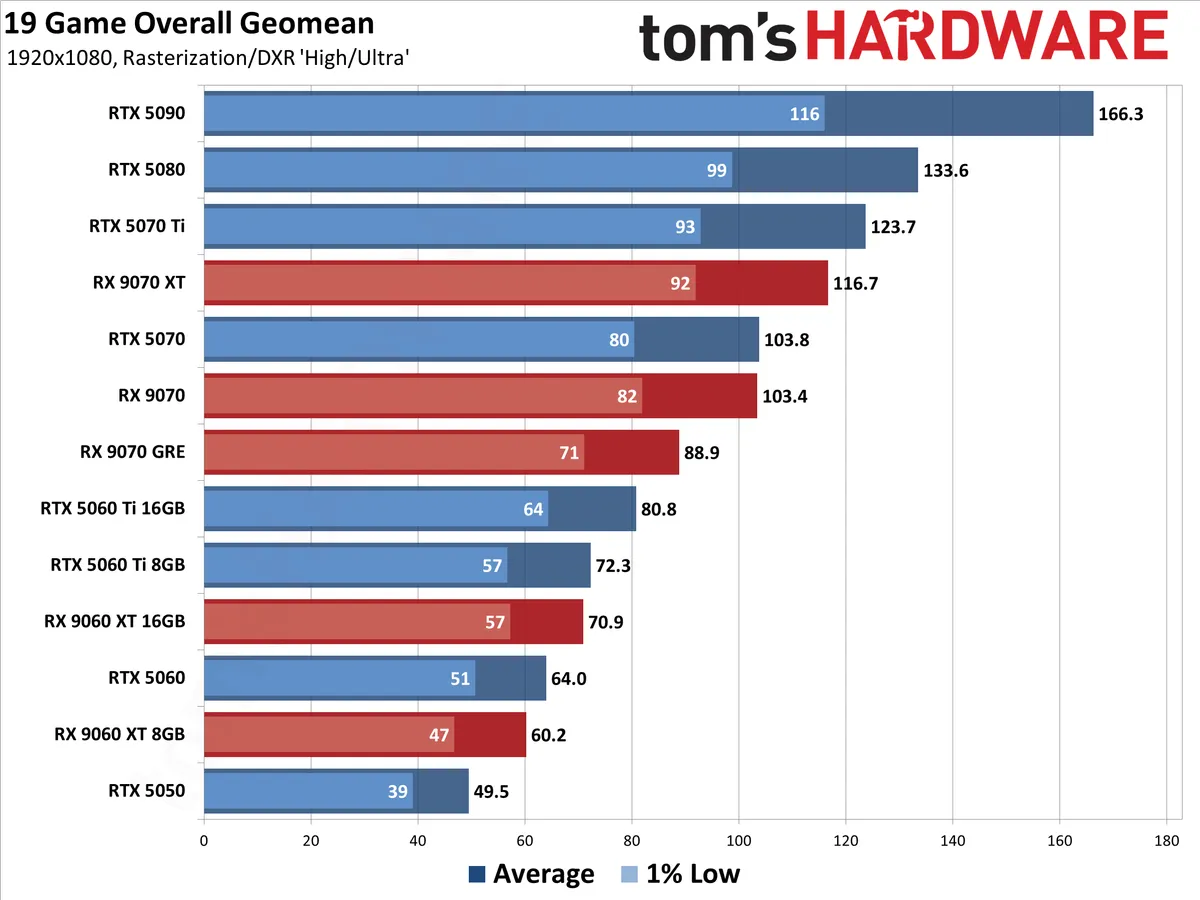
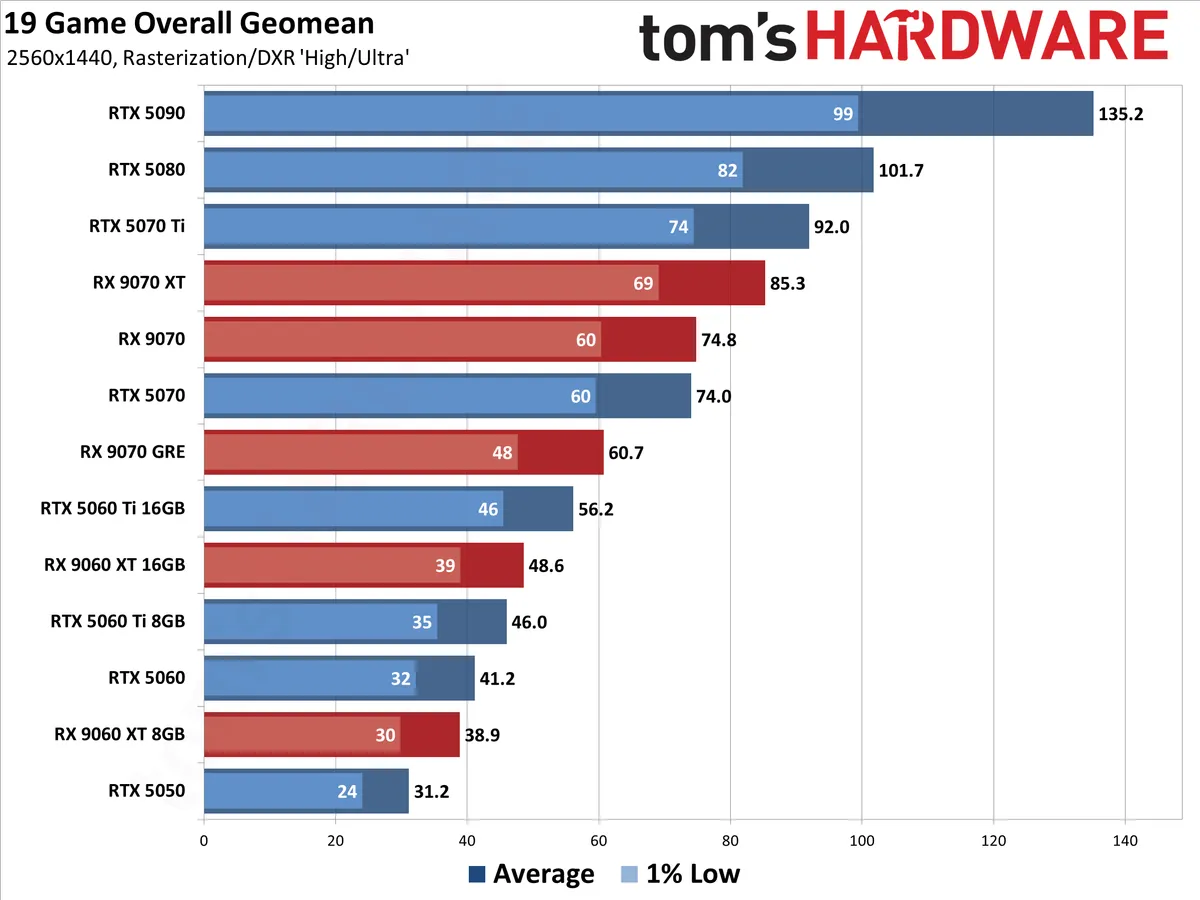
The overall performance ranking incorporates 19 games from our 2026 test suite, which takes the geometric mean (i.e., equal weighting) for both rasterization and ray tracing games. Note that we are not including any upscaling or frame generation results in the table.
Raw performance may be the most important consideration for most gamers, but it's not the only metric that matters. Our subjective rankings below factor in price, power usage, and power efficiency, and features colored by our own years of experience. Others may offer a slightly different take, but all of the cards on this list are worthy of your consideration.
Upscaling and frame generation mean GPUs are more than just a chip
GPU performance goes beyond the hardware these days. Choosing a particular GPU vendor means you're buying into a complex software stack that includes upscaling, frame generation, and (more rarely) AI-powered RT denoising technologies.
In Nvidia's corner, the DLSS 4.5 upscaling model and its second-generation transformer architecture offer superior image quality to other upscaling tech (and with lower input resolutions, meaning higher potential performance), but it's more computationally expensive than past DLSS models and works best on RTX 50-series and 40-series cards.
The DLSS 4 model and its first-gen transformer architecture still work with cards going all the way back to the RTX 20-series family. Not all games implement DLSS 4 natively, but Nvidia allows you to force the usage of that model in many older titles through the Nvidia App utility, so you can practically always get the latest and greatest.
Between native support and driver overrides, DLSS is available in virtually any modern game you might want to play. Nvidia recently marked DLSS feature availability in over 1000 titles.
RTX 50-series GPUs are Nvidia's first with support for multi-frame generation (MFG), which allows Blackwell GPUs to insert anywhere from one to five AI-generated intermediate frames between each native one (for a 2x, 3x, 4x, or even 5x or 6x frame rate boost). RTX 40-series GPUs also support framegen, but only with a 2x boost.
Meanwhile, AMD's FSR 4 offers AI-enhanced upscaling with superior image quality to other FSR versions, but official support for it is limited to RX 9000-series Radeons for now. AMD will bring FSR 4 upscaling to RX 7000-series cards in July 2026 and RX 6000-series cards in early 2027.
In the meantime, AMD's FSR 3.1 and earlier upscalers still work on any GPU, but the image quality tends to be noticeably lower than both DLSS and FSR 4.
AI-enhanced FSR framegen (aka ML Frame Generation) arrived on AMD cards as part of the FSR Redstone update late last year. Like FSR 4 upscaling, ML Frame Generation is limited to Radeon RX 9000 cards, and it can be enabled in compatible games using a control panel override for titles that don't natively have it.
Legacy FSR frame gen remains available, too. Its framerate-doubling boost remains cross-compatible with GPUs from all vendors, but its image quality can't keep up with the AI-powered frame gen tech of the latest AMD and Nvidia models.
Intel XeSS upscaling can be superior to FSR 3.x, but it isn't available in as many games as FSR or DLSS. It works best on Arc GPUs, but like FSR, it's cross-compatible with a wide range of graphics cards from AMD and Nvidia if you need it.
XeSS 2 with AI-enhanced frame generation is now available in 95 games as of this writing and requires an Arc GPU. XeSS 3 brings multi frame generation to the party through both native support and a driver override in compatible titles.
All that said, we don't think you should go out of your way to buy an Intel Arc card for gaming in 2026.
1. Best high-end graphics card: GeForce RTX 5070 Ti, $1099.99

Specifications
Reasons to buy
Reasons to avoid
If you want the best blend of high performance and cutting-edge graphics tech out there for 1440p or 4K gaming, the GeForce RTX 5070 Ti is it. This card comes with full support for Nvidia’s latest DLSS 4.5 upscaling and Multi Frame Generation tech, and its 16GB of VRAM gives you full freedom to enable every DLSS 4 feature.
AMD’s closest competitor, the Radeon RX 9070 XT, is way cheaper than the RTX 5070 Ti right now, but the AMD card obviously doesn’t support DLSS 4 or MFG. For the privilege of those capabilities, you'll spend as much as 53% more cash right now for just 5% more baseline performance than AMD’s best before you start enabling all the DLSS 4 features Blackwell supports.
Is that worth it? Yes, if you can swing it. Here's why: getting the best gaming performance on modern graphics cards is as much a software problem as a hardware one. Tuning your gaming experience to taste requires access to high-quality upscaling, frame generation, and (more infrequently) an AI-powered RT denoiser like DLSS Ray Reconstruction.
Even amid its shift to AI and data center products, Nvidia ensures that its full suite of DLSS tech is adopted in virtually every new game, whereas AMD's support of FSR 4 adoption has become rather hit-or-miss.
The RTX 5070 Ti also offers superior RT performance versus the RX 9070 XT across our 2026 test suite. Beyond that baseline, Nvidia is working with developers to enable impressive path-traced effects in many of the latest AAA releases.
In our recent experience, path-traced games play best with DLSS 4.5 upscaling and MFG at your disposal, and being able to consistently rely on the availability of those features makes the extra cash for the 5070 Ti worth it.
Our 2026 GPU Hierarchy retesting has shown that high-end graphics cards are becoming five- to eight-year investments, and Nvidia's ongoing commitment to developer relations and new software features means that you'll enjoy a first-class gaming experience throughout the life of your 5070 Ti no matter what games you want to play on it.
Spread out over that time span, the extra cost of the RTX 5070 Ti versus the RX 9070 XT is worth it for the better experience.
What about the RTX 5080? Nvidia's second-fastest Blackwell card is anywhere from 8% to 16% faster than the 5070 Ti, with the biggest gap at 4K. Prices for the 5080 in September 2026 remain insane, however, and at the midpoint of current prices, the 5080 is 51% more expensive than the 5070 Ti.
There's no way the RTX 5080 offers anywhere close to enough value for the money to justify the step up right now unless you're unwilling to settle for anything but the fastest thing this side of a 5090 for 4K gaming. Take the extra money and put it into a nice 4K OLED or something.
Read: Nvidia GeForce RTX 5070 Ti review
2. Best enthusiast value graphics card: Radeon RX 9070 XT, $759.99

Specifications
Reasons to buy
Reasons to avoid
The Radeon RX 9070 XT is AMD's most well-rounded graphics card in years. It delivers raster gaming performance within spitting distance of the GeForce RTX 5070 Ti for far less money, making it a strong value at first glance. But that appealing price tag comes with a number of asterisks in mid-2026 that mean it's no longer our first pick for high-end PC gaming.
AMD shored up two of its greatest weaknesses against Nvidia with the RX 9070 XT's RDNA 4 architecture: RT performance and AI acceleration, both of which are closer to Nvidia's latest and greatest. And AMD did all that while keeping power efficiency right there with Nvidia, too.
The FSR 4 upscaler is a big jump in image quality over FSR 3, and FSR ML Frame Generation now offers higher-quality framegen on the RX 9070 XT than FSR 3's approach, although it's still limited to a simple doubling of frame rates versus DLSS Multi Frame Generation's versatility.
The problem for the RX 9070 XT in mid-2026 is that FSR 4.x upscaling still trails Nvidia's flagship DLSS 4.5 in image quality, and AMD isn't driving the adoption of FSR 4 features nearly as aggressively as Nvidia is for DLSS. Driver-level overrides for those features can't entirely close the gap.
Worse, you might find the RX 9070 XT entirely shut out of features that you might want to enable in certain games. For just a couple of examples, Radeon gamers can't enable path-traced effects at all in recent titles like Pragmata and Resident Evil Requiem, and 007 First Light sticks you with FSR 3 upscaling that can't be overriden through a driver toggle due to the way it's implemented.
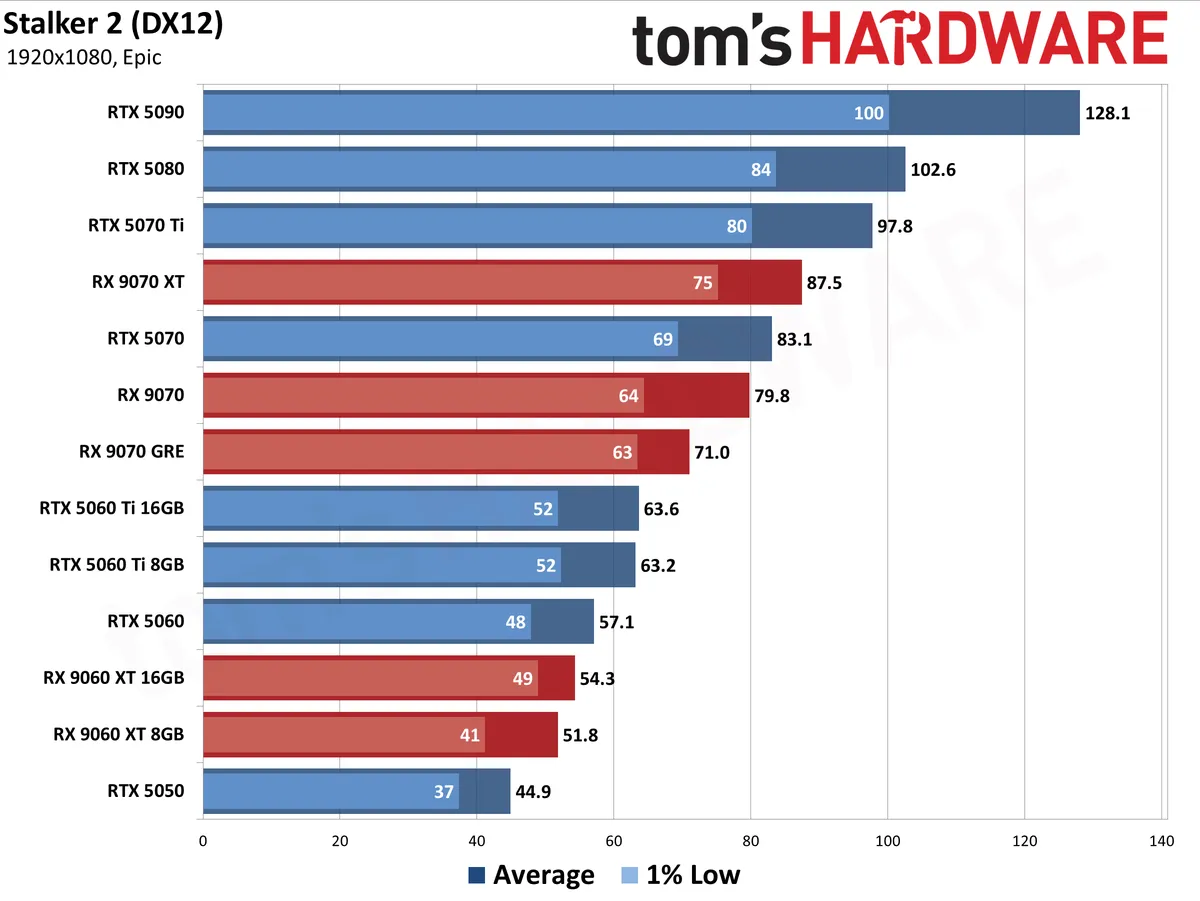
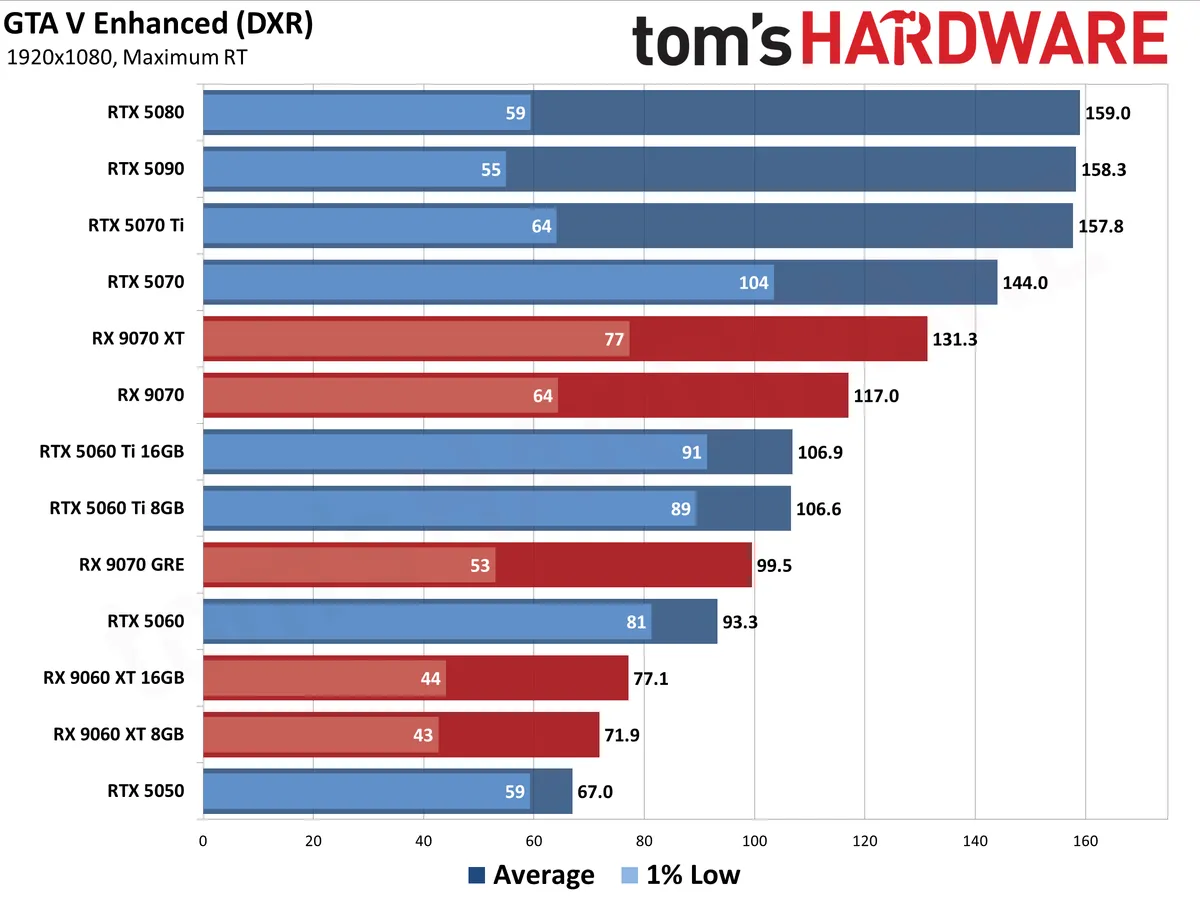
And in our latest GPU Hierarchy retesting with the RX 9070 XT, we saw major performance issues in Grand Theft Auto V Enhanced and minor visual corruptions in Stalker 2 that weren't present on GeForces or on RX 7000- or RX 6000-series cards.
We don't think these issues should have slipped past any QA program, especially for such popular and high-profile games, but they sting especially hard on a current-gen product.
All that means the overall ownership experience of an RTX 5070 Ti and an RX 9070 XT is significantly different in mid-2026. We think that gamers shopping in this price class should be able to expect a consistently high level of software feature support and quality across all the games they might want to play, and Nvidia provides that assurance better than AMD does right now.
If you're willing to gamble with the availability of FSR 4 features, for RT or path-traced effects, and don't care to tune the smoothness of your gaming experience with frame generation, the RX 9070 XT's shortcomings versus the RTX 5070 Ti may be easier to overlook given the large amount of cash that will remain in your pocket.
But we also think that you should think really hard about what you're giving up before reflexively choosing an RX 9070 XT over an RTX 5070 Ti, despite its strong value at a glance.
Read: AMD Radeon RX 9070 XT review
3. Best midrange graphics card: GeForce RTX 5070, $659.99

Specifications
Reasons to buy
Reasons to avoid
In mid-2026, the RTX 5070 had largely escaped the large price increases that we saw for other Blackwell cards. But those hikes have since come for the RTX 5070, too, and it's now over $800 at the midpoint of current prices, making it far more expensive than the competing RX 9070 (and even the 9070 XT).
Even with those hikes, the RTX 5070 still has a lot going for it versus the RX 9070 (and the RX 9070 GRE).
The advent of DLSS 4.5 upscaling, which makes it possible to achieve superior delivered image quality at lower input resolutions than older DLSS versions, takes some VRAM pressure off the RTX 5070's 12GB of GDDR7, making the deployment of RT and DLSS MFG more practical on this card than it has been in the past.
And as with the RTX 5070 Ti, the universal availability of DLSS 4.5 (both natively and through app overrides) plus MFG makes this card a fast and flexible performer across all of the games you might want to play in 2026.
Given the image quality of DLSS 4.5 and the smoothness boost of MFG, along with the higher baseline RT performance of this card versus the 9070 in our 2026 testing, we think the 5070 should be your first pick for an (ostensibly) midrange gaming card.
In an ideal world, the RTX 5070 would have more VRAM to allow for unhindered exploration of everything DLSS 4 and MFG have to offer, especially at higher DLSS input resolutions or native 4K. If you're pushing those limits, we'd still recommend the Radeon RX 9070 thanks to its 16GB of VRAM.
But if you're on a 1440p monitor where VRAM is less of an issue and want DLSS 4.5 over FSR 4, as most gamers do, the RTX 5070 is still a strong performer, and you're less likely to run into its limits.
Read: Nvidia GeForce RTX 5070 review
4. An AMD midrange alternative: Radeon RX 9070, $699.99

Specifications
Reasons to buy
Reasons to avoid
If you primarily play raster titles at native resolution and aren't on board with upscaling or framegen, the Radeon RX 9070 remains a strong alternative to the RTX 5070. It's one of the least marked-up 16GB graphics cards available even with today's AI headwinds, and in a world where MSRPs have largely been forgotten, that makes the RX 9070 a strong value.
The GeForce RTX 5070 and RX 9070 go neck-and-neck in our test suite, but the RX 9070 has 16GB of VRAM and the RTX 5070 has just 12GB. Especially if you're trying to push 4K games at native resolution, that extra VRAM matters.
But the advent of DLSS 4.5 upscaling, which provides image quality that's practically indistinguishable from native rendering even at relatively low input resolutions, means that the RTX 5070 is a more potent midrange graphics card in 2026 than it was at launch.
On top of their inherent technical superiority, you can find DLSS 4 and MFG in most every game released today, which can't be said for FSR 4.x upscaling or ML framegen. AMD's driver overrides make up some of the gap, to be sure, but not all of it.
And as with the RX 9070 XT, AMD gamers may find themselves locked out of certain features like path tracing (in major releases like Pragmata and Resident Evil Requiem) or FSR overrides (in 007 First Light) entirely.
The RX 9070 is subject to the same minor image quality issues and performance hitches we saw with the RX 9070 XT, and those issues could certainly be overcome with future software updates. But we think that if you're looking for the best midrange graphics card, it should be free of those issues entirely, and so the RTX 5070 is our first pick for this price point right now.
Read: AMD Radeon RX 9070 review
5. Best enthusiast value graphics card: Radeon RX 9070 GRE, $569.99

Specifications
Reasons to buy
Reasons to avoid
AMD's RX 9060 XT 16GB has long been an enthusiast value favorite for its solid performance and large memory pool. But recent price hikes on that card mean that you only need to spend a few bucks more to step up to the much faster RX 9070 GRE and its superior compute resources.
In our standings for raster gaming performance in 2026, the RX 9070 GRE is about 25% faster than the 9060 XT at 1080p and 30% faster at 1440p, and it's a whopping 42% faster for RT titles than its lower-end sibling. For just about 10% more cash than the 9060 XT at current prices, the RX 9070 GRE is a no-brainer.
That extra performance is far more useful for 1080p and 1440p gaming than the 16GB of memory on the RX 9060 XT, which is only really meaningful at 4K (at which point neither of these cards are operating at their best).
The RX 9070 GRE also handily beats out the RTX 5060 Ti 16GB for both raster and RT performance (at least in games where it's not locked out of those features entirely). RTX 5060 Ti 16GB cards are selling for about $800 today thanks to their usefulness for local AI applications, and that's far too much money for the gaming performance on offer.
The 9070 GRE comes with the same caveats that other Radeon RX 9000-series cards do regarding the availability of advanced features like lag reduction, neural denoising, and frame generation.
But those issues are easier to forgive in a market segment where Nvidia no longer has a dollar-for-dollar competitor for the 9070 GRE. If you aren't chasing every RT toggle and just want solid high-refresh-rate gaming performance as a baseline and access to a quality upscaler where you need it, the RX 9070 GRE is a compelling value in today's wild and crazy graphics card market.
Read: AMD Radeon RX 9070 GRE review
6. The best graphics card for 1080p gaming: Nvidia GeForce RTX 5060, $469.99

Specifications
Reasons to buy
Reasons to avoid
If you want to get your game on at 1080p, we think the RTX 5060 is still your best bet in mid-2026. The midpoint of RTX 5060 prices is around $470 right now.
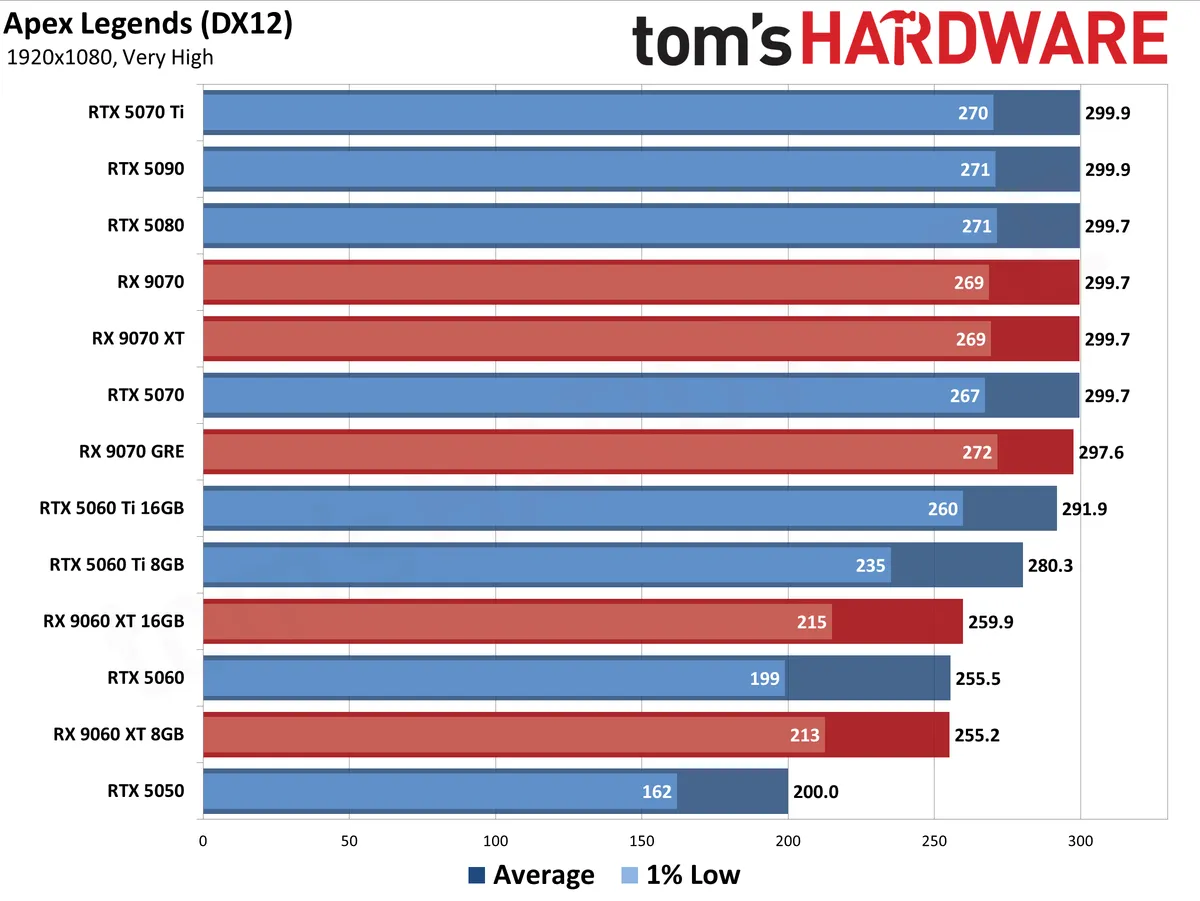
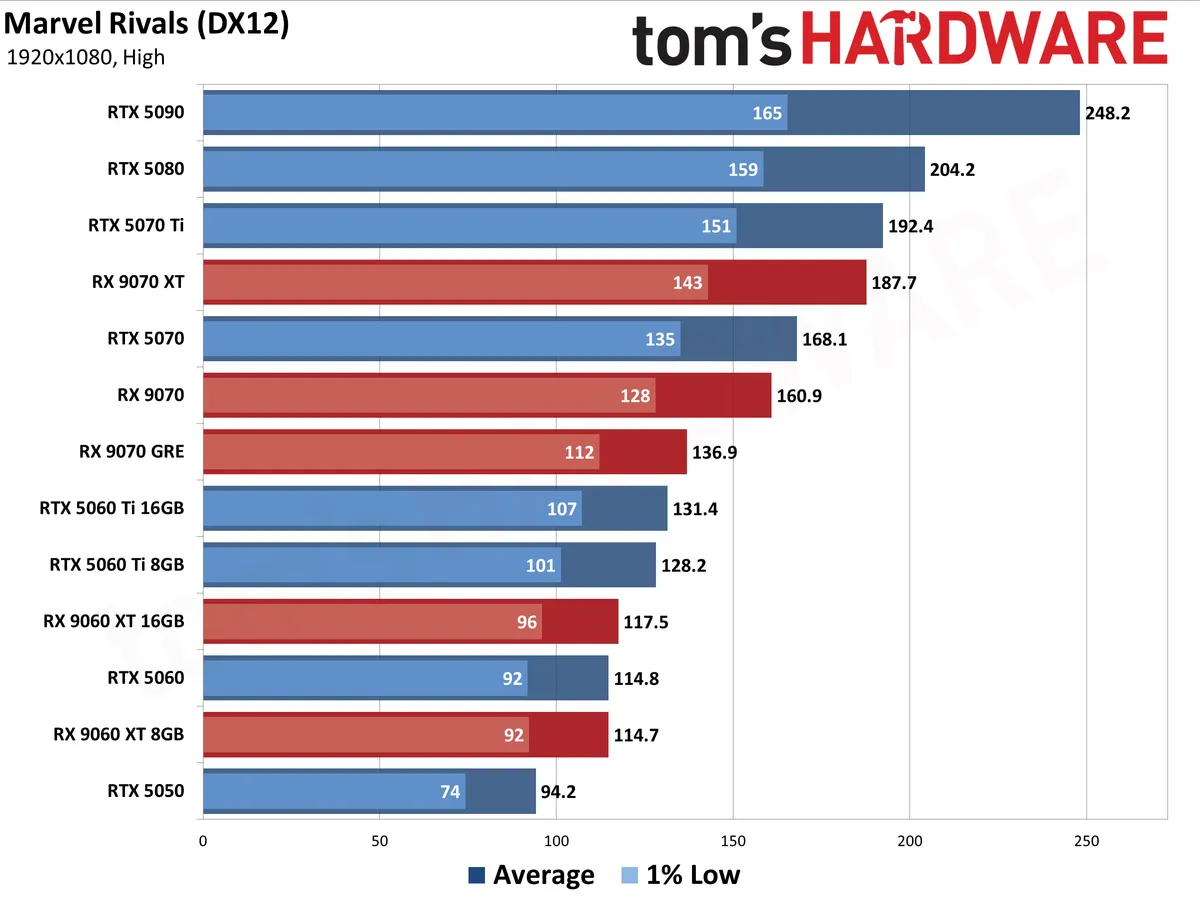
The RTX 5060 has impressive baseline performance for 1080p gaming in wildly popular titles like Fortnite, Counter-Strike 2, Marvel Rivals, and Apex Legends that aren't hungry for giant pools of VRAM. And if you are trying to push higher output resolutions in demanding AAA games, the universal availability of DLSS 4.5 upscaling means that it's easy to achieve near-native image quality at lower input resolutions than before, making the RTX 5060 a more flexible performer than ever.
If you can tune your settings right, enabling DLSS 4 Multi-Frame Generation could make for an even smoother ride on this card, but we find that 8GB of VRAM isn't enough to consistently enable framegen in the titles where you'd really want it. The feature often doesn't work if you're already at the limits of the RTX 5060's memory pool (or that of any 8GB Blackwell card), since the MFG AI model needs some VRAM of its own to run.
AMD's toughest competition for the RTX 5060 is the RX 9060 XT 8GB, which also lists for $299 but is now selling for about the same $350 as you'll see RTX 5060s going for. Supply of those cards has largely dried up in mid-2026, however, and you're likely to see only a couple options for them from any e-tailer.
Despite its much-maligned 8GB of VRAM, the 9060 XT 8GB put in a strong showing in our 2026 GPU Hierarchy testing, but not consistently enough to beat out the RTX 5060 and take home our general recommendation.
When the RX 9060 XT can bring its full compute horsepower to bear in certain games, it can handily outpace the RTX 5060, so it's worth checking out results like those from our RX 9070 GRE review and seeing whether a game you love benefits from the Radeon's raw muscle.
But if you want a more consistently solid gaming experience, we'd still recommend the RTX 5060.
Read: Nvidia GeForce RTX 5060 Ti review
7. The best graphics card, period: GeForce RTX 5090, $4299

Specifications
Reasons to buy
Reasons to avoid
There's nothing else like the GeForce RTX 5090. If you want to turn on every bell and whistle in modern games at 4K (or beyond), the RTX 5090's sheer shader and Tensor Core horsepower, along with support for Nvidia's DLSS 4 upscaling and multi-frame generation, lets you tune your gaming experience to perfection even on high-refresh-rate 4K displays.
If you're a hardcore PC gamer who demands only the best, the hair will stand up on the back of your neck when you watch the RTX 5090 breeze through workloads that other graphics cards leak out all their thermal gel about.
Prices for the RTX 5090 have always been elevated, but they're stratospheric in early 2026. Major e-tailers only have a few different models listed, and prices start at $3500 or so and only go up from there. Nvidia's $1999 MSRP is pure imagination in current market conditions.
At those prices, an RTX 5090 is an indulgence of the highest order, but then again, it always has been. Without a compelling AMD alternative even on the horizon, considerations of value don't really apply here. If you truly need (or want) this class of gaming or AI performance, you're going to have to pay up.
This card needs a system with a massive power supply, one of our best gaming CPUs, and a top-shelf monitor to take full advantage of its astounding capabilities, and all those spendy components add up quick. But if you have a big enough bankroll to consider shopping for a graphics card of this caliber, you probably don't need us to tell you all that.
If Nvidia and its industry partners fixed the meltdown-prone ATX12V-2x6 connector, the RTX 5090 would be as close to gaming perfection as any graphics card that's ever been made. Guess that's something to improve on the RTX 6090, if it ever arrives.
Read: Nvidia GeForce RTX 5090 Founders Edition review
8. The cheapest graphics card worth buying: Intel Arc B570

Specifications
Reasons to buy
Reasons to avoid
If you have to save every penny on a new graphics card with a warranty in 2026, you're hard up for good budget options. Although you might still find one for around $300, the GeForce RTX 5050 is now headed north of $400, and even with Nvidia's superior software support and feature set, there's no way you should pay that much for the baseline performance that card offers.
So even if we're not thrilled about it, we're once again left with the Arc B570 as the only cheap graphics card worth buying in 2026. At $259 for ASRock's Challenger card, the B570 is the cheapest credible gaming GPU you can get today.
The B570 just squeaks over the 60 FPS mark overall in our 2026 raster gaming test suite at 1080p, only a few frames per second shy of the RTX 5050. For many, that will be all that needs to be said about this card's performance. And its 10GB of VRAM will keep it away from any performance cliffs that might otherwise arise on 8GB cards.
You can use Intel's XeSS upscaler to boost performance in games where it's available while maintaining good image quality, even if it's not quite on par with DLSS 4.5. And Xe Frame Generation, in tandem with Xe Low Latency, provides an effective smoothness boost while maintaining a responsive experience. Xe Multi Frame Generation is also available in some games with 3X and 4X multipliers.
But much like AMD's latest FSR features, XeSS isn't being adopted anywhere near as universally as DLSS is. So getting the most out of the B570 will be a project. If you're willing to use the Optiscaler mod, you can add Intel's XeSS upscaler into many titles, along with Xe Frame Generation and Xe Low Latency lag reduction. We've done it ourselves, and Intel's frame generation and latency reduction stack works great, even in community-implemented form.
But if Optiscaler doesn't work with a title you want those features for, you're SOL.
And we've seen glaring QA issues with Arc cards in little titles you may have heard of like Fortnite that were only fixed after we raised them with the company. We can't babysit Arc cards for software compatibility to drive these fixes, and we don't know when major issues like what we saw will arise again. So that's a risk you're assuming in order to save some cash.
If you want more performance in this segment, the Arc B580 also remains available, but it's a bad deal, offering just 12% more performance than the B570 at 1080p for about 25% more money right now. If you need to step up, we'd save up and get into an RTX 5060 or even an RX 9070 GRE.
Read: Intel Arc B570 review
How we test the best graphics cards
Determining pure graphics card performance is best done by eliminating all other bottlenecks — as much as possible, at least. To that end, we've selected components for our test rig , most notably AMD's Ryzen 7 9800X3D CPU, one of the best CPUs for gaming.
We test across the three most common gaming resolutions, 1080p, 1440p, and 4K, using a mix of high and ultra settings, depending on the title. Where possible, we use 'reference' cards for all of these tests, like Nvidia's Founders Edition models and AMD's reference designs. Most midrange and lower GPUs don't get reference models, however, and in some cases we only have factory-overclocked cards for testing. We do our best to select cards that are close to the reference specs in such cases.
For each graphics card, we follow the same testing procedure. We run one pass of each benchmark to "warm up" the GPU after launching the game, then perform our actual test runs across each resolution.
We carefully review our test data and check for anomalies. For example, we always expect the RTX 5080 to be faster than the RTX 5070 Ti. If it's not, and we're not in a CPU limited situation, we'll recheck both cards to ensure that our standings our accurate. We also check and retest in cases of subtler issues, as when a transient hitch or frame-time spike causes a large dip in 1% low FPS.
Due to the length of time required for testing each GPU, updated drivers and game patches inevitably come out that can impact performance. We periodically retest a few sample cards to verify our results are still valid, and if not, we go through and retest the affected game(s) and GPU(s). We may also add games to our test suite over time, if one comes out that is popular and conducive to testing. See what makes a good game benchmark for our selection criteria.
Best graphics cards performance results
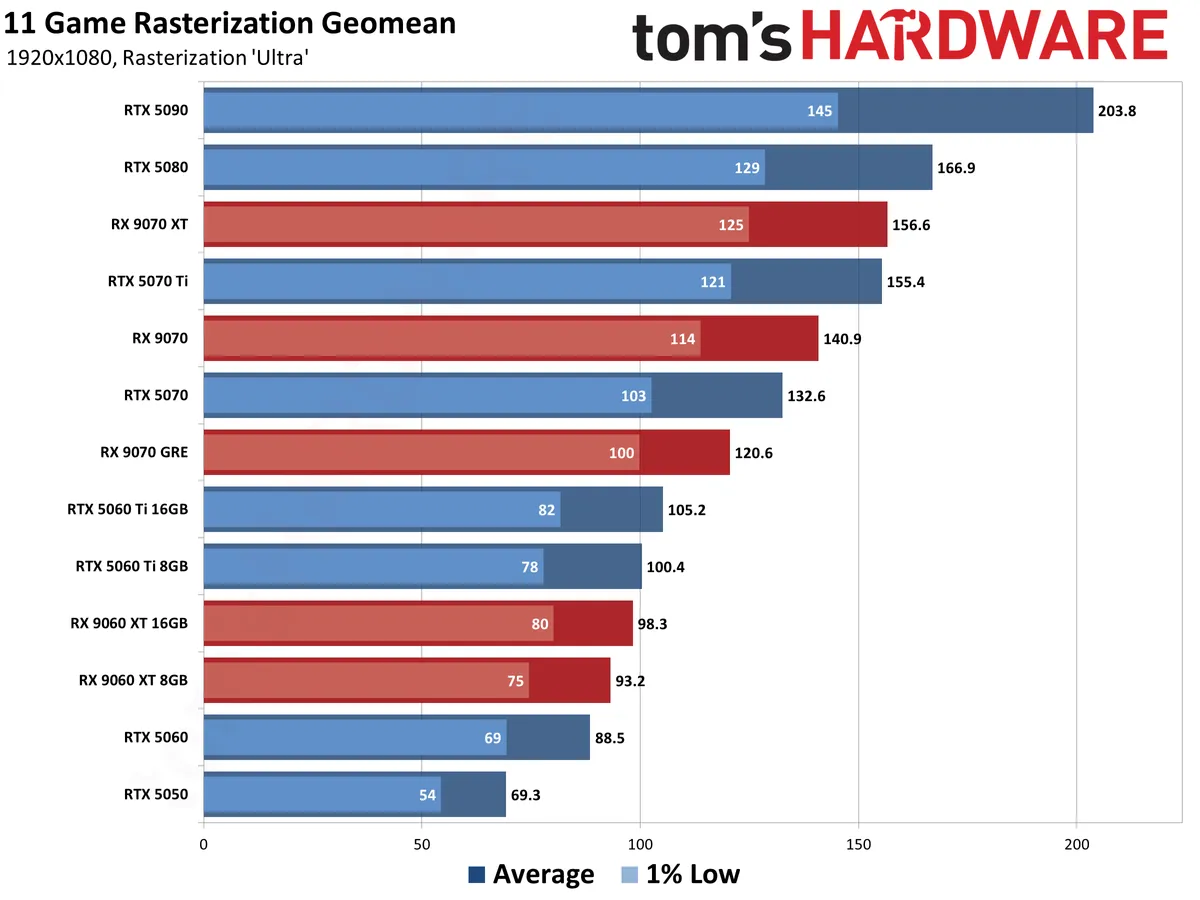
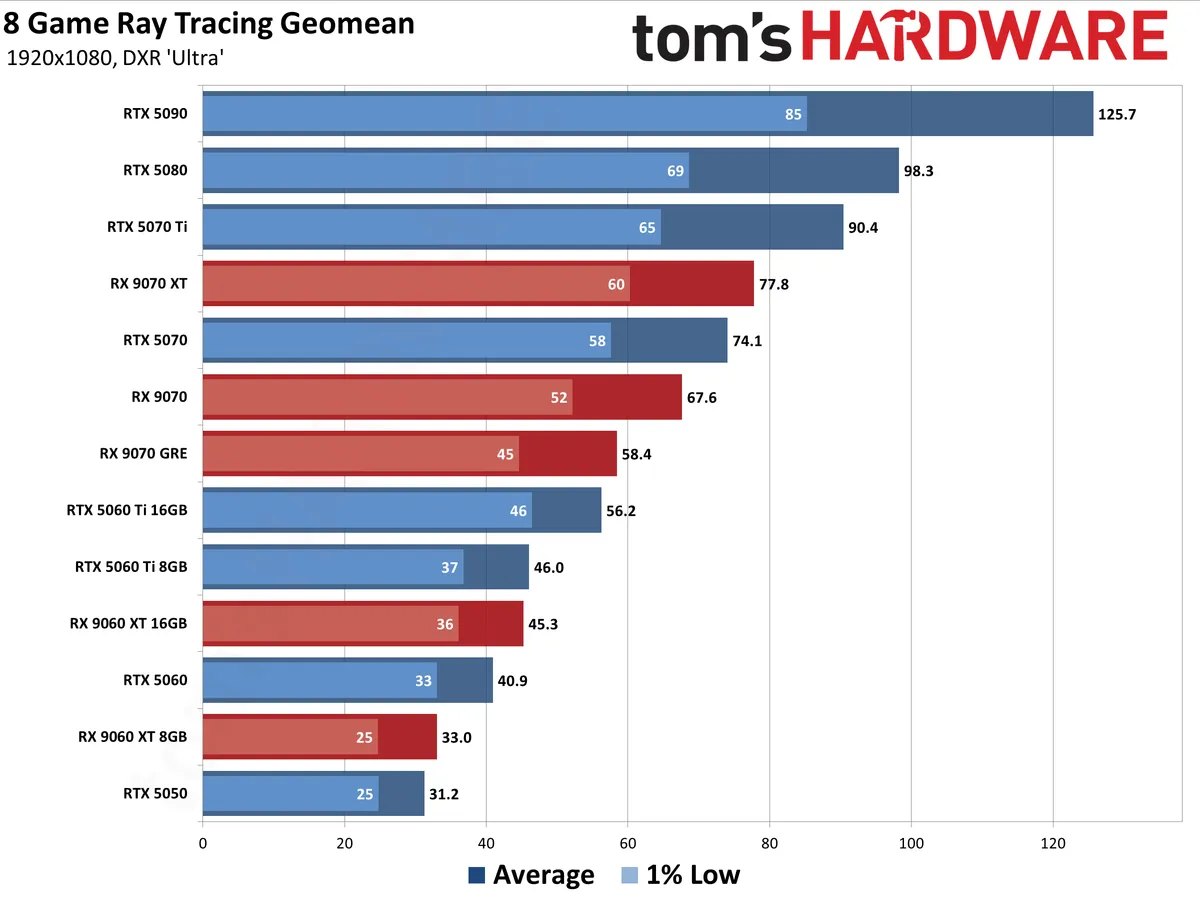
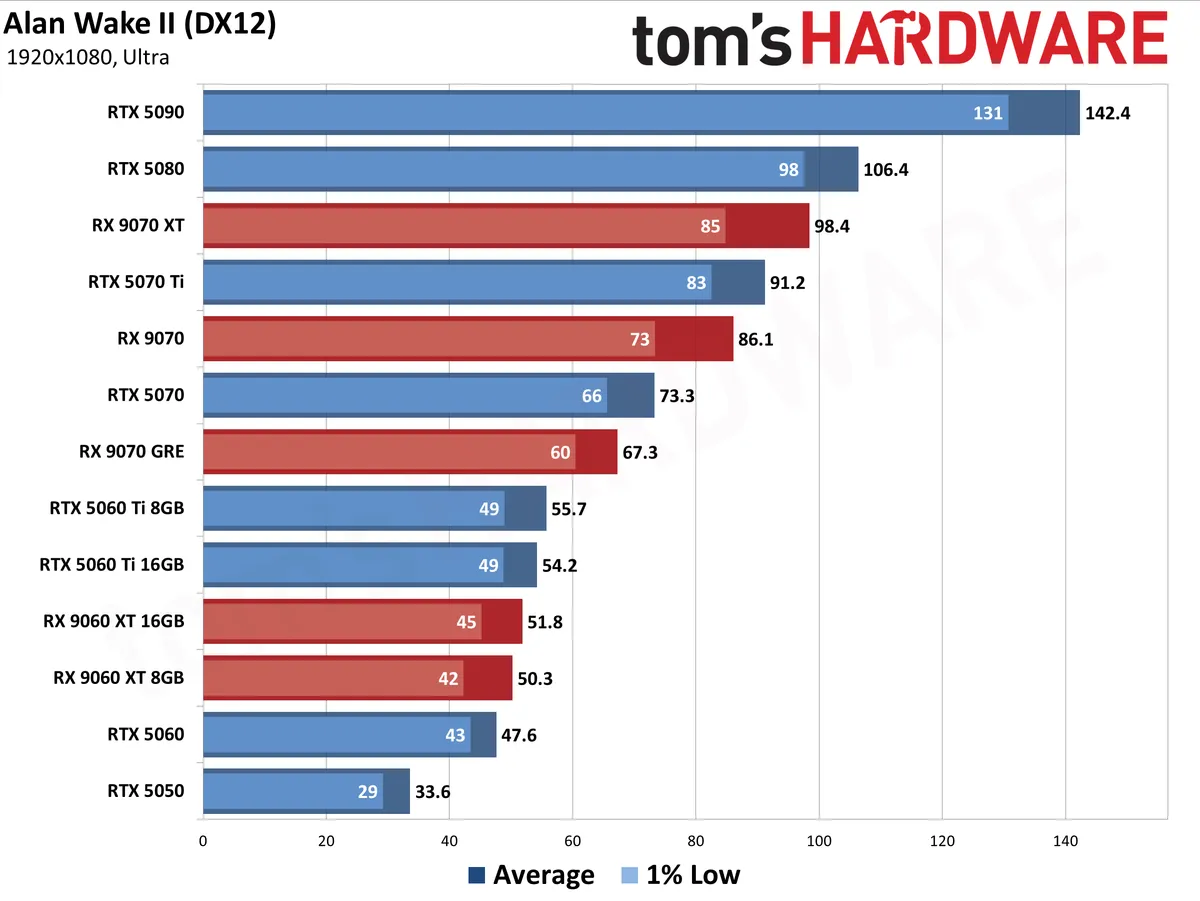
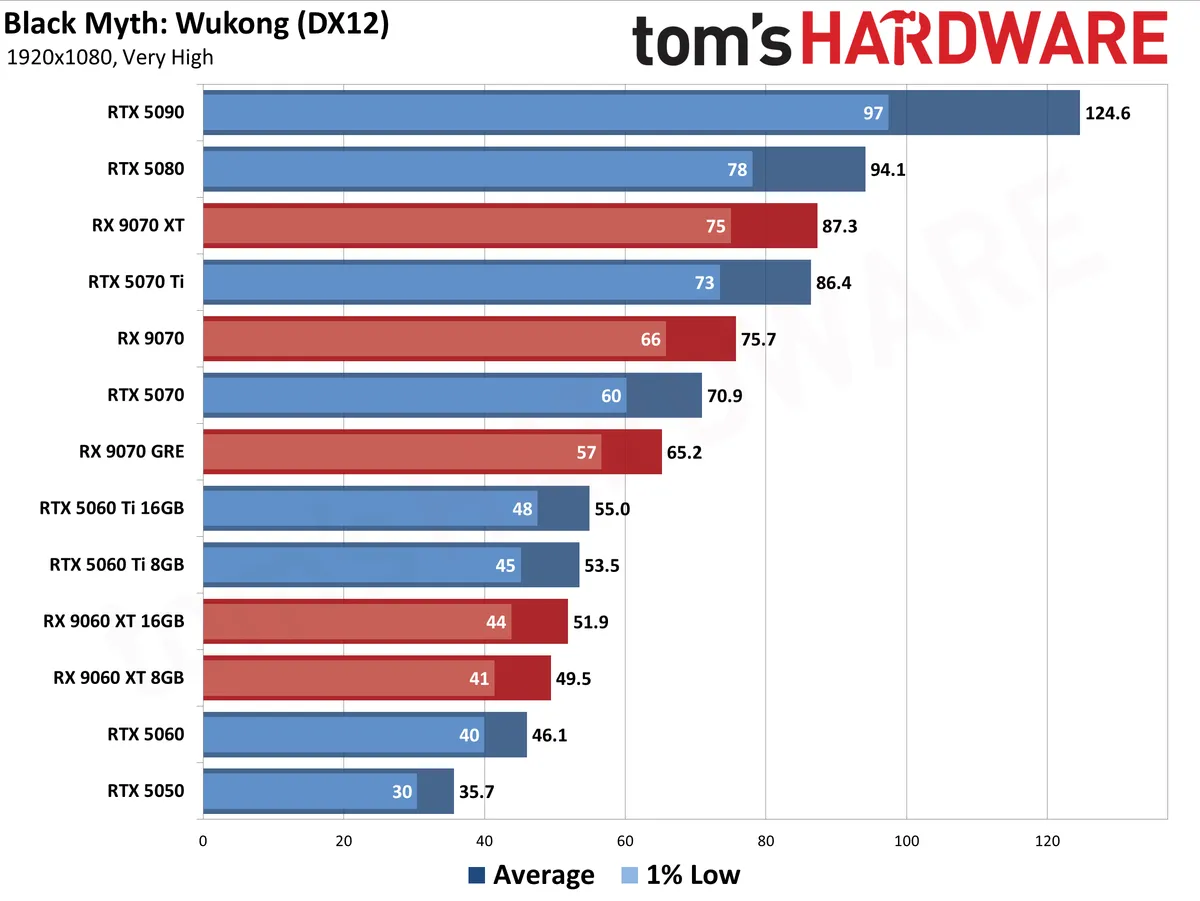
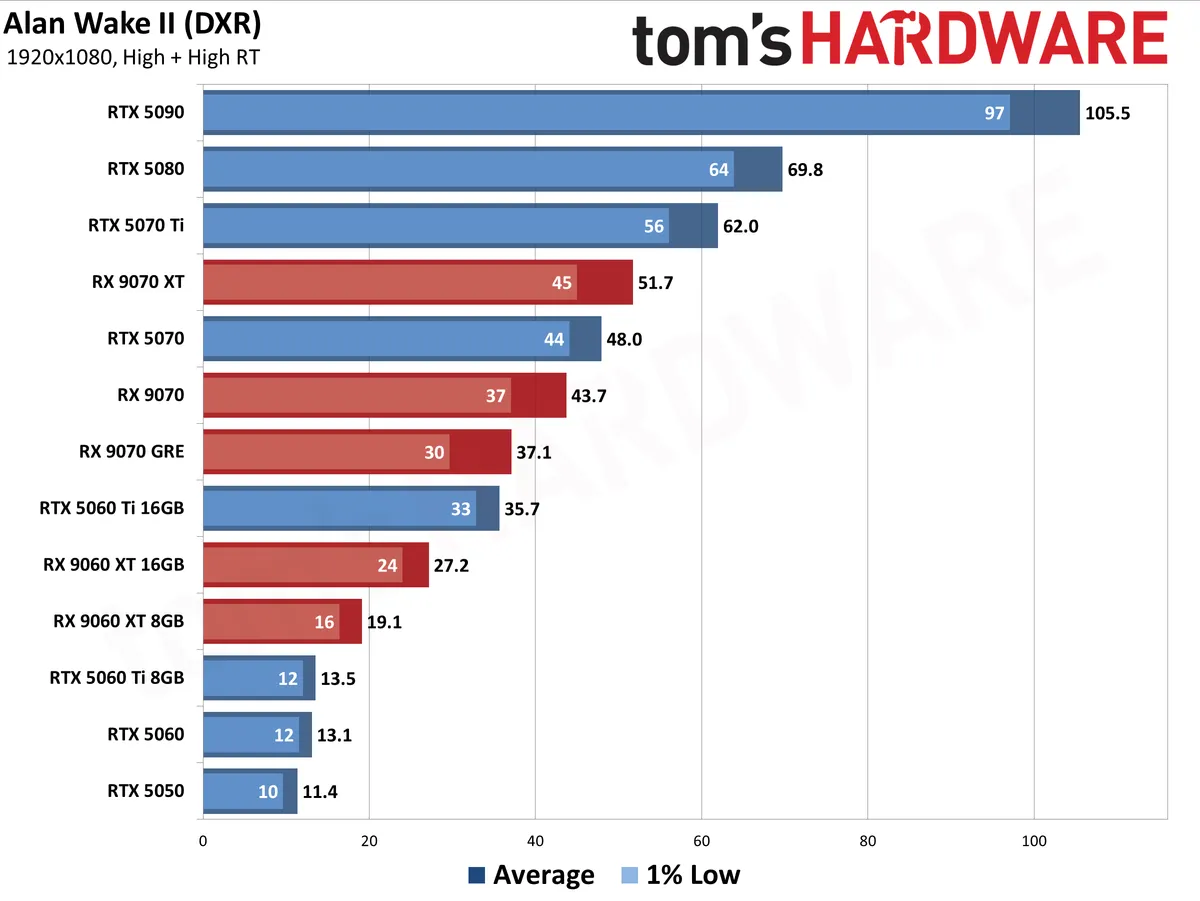
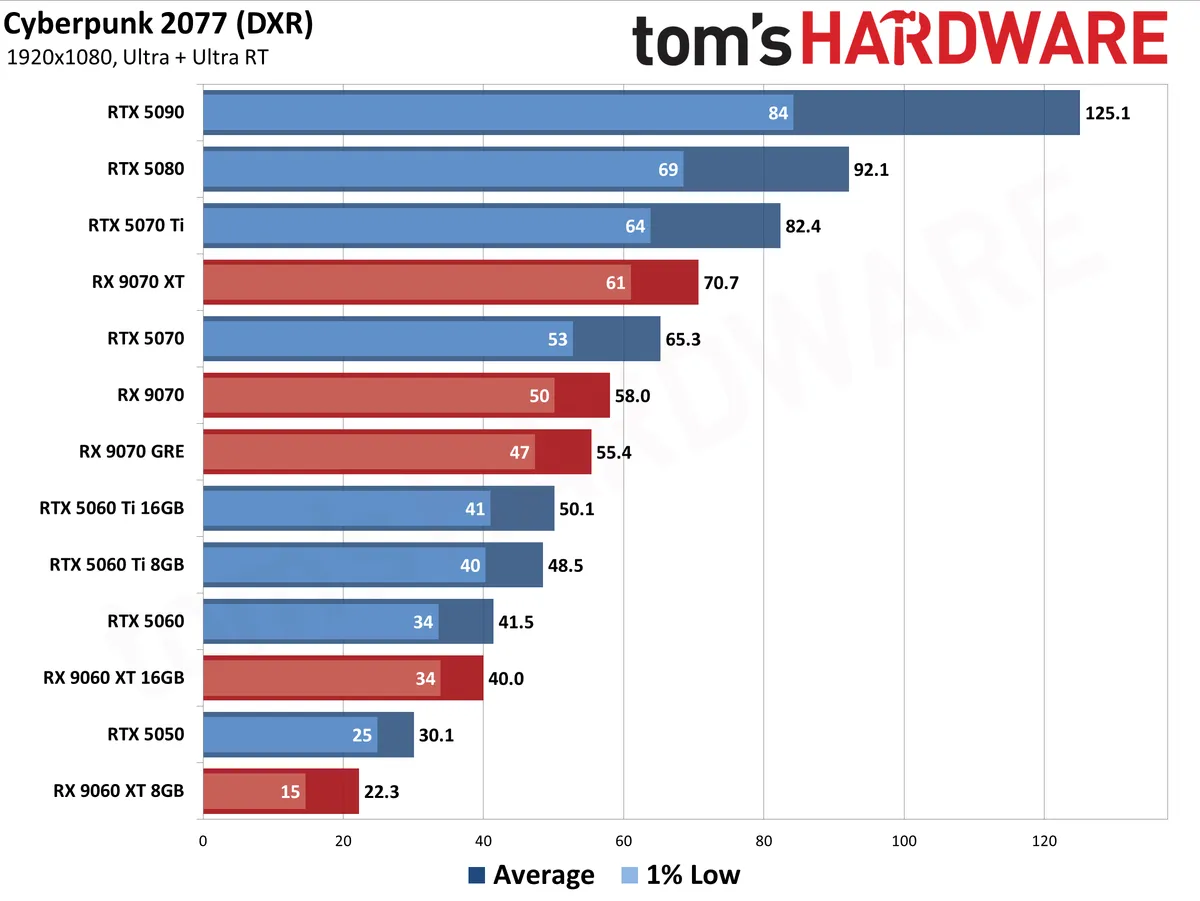
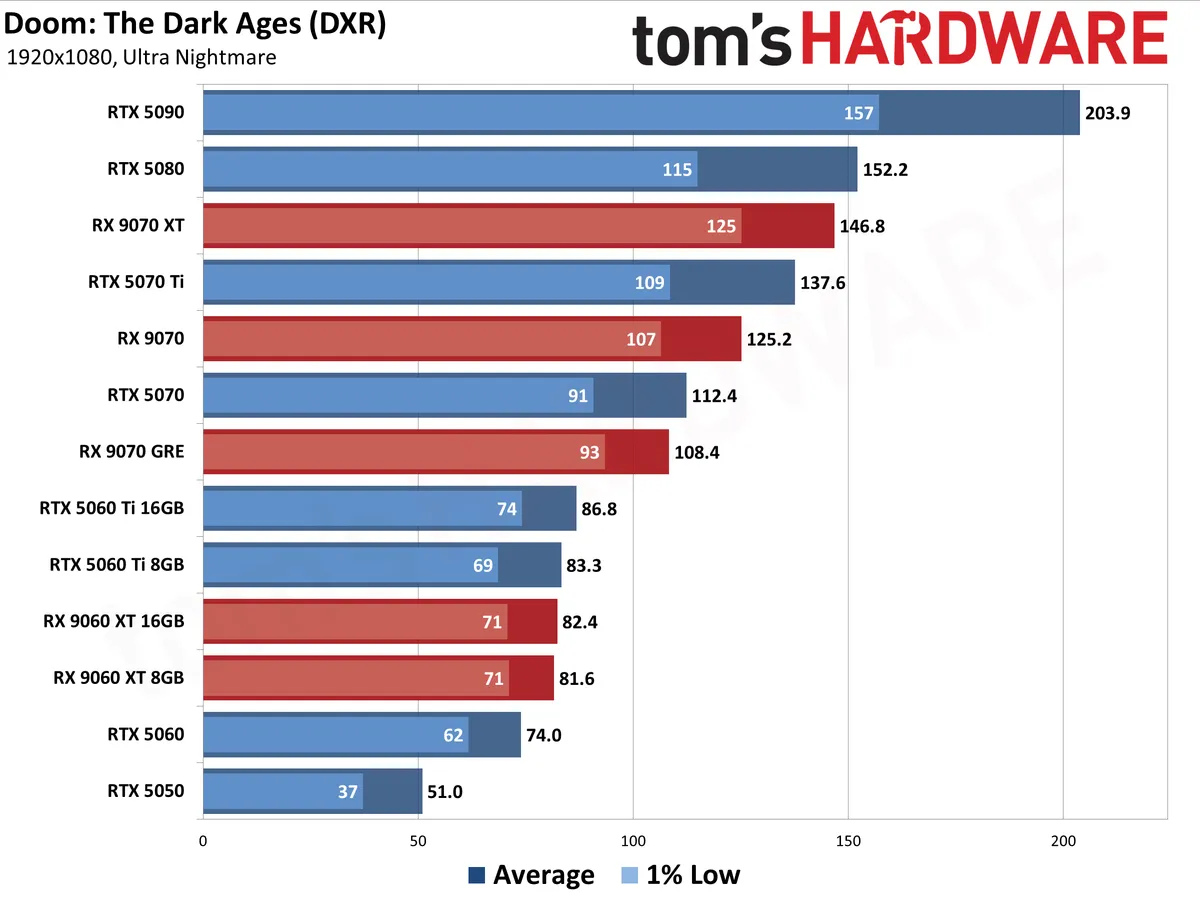
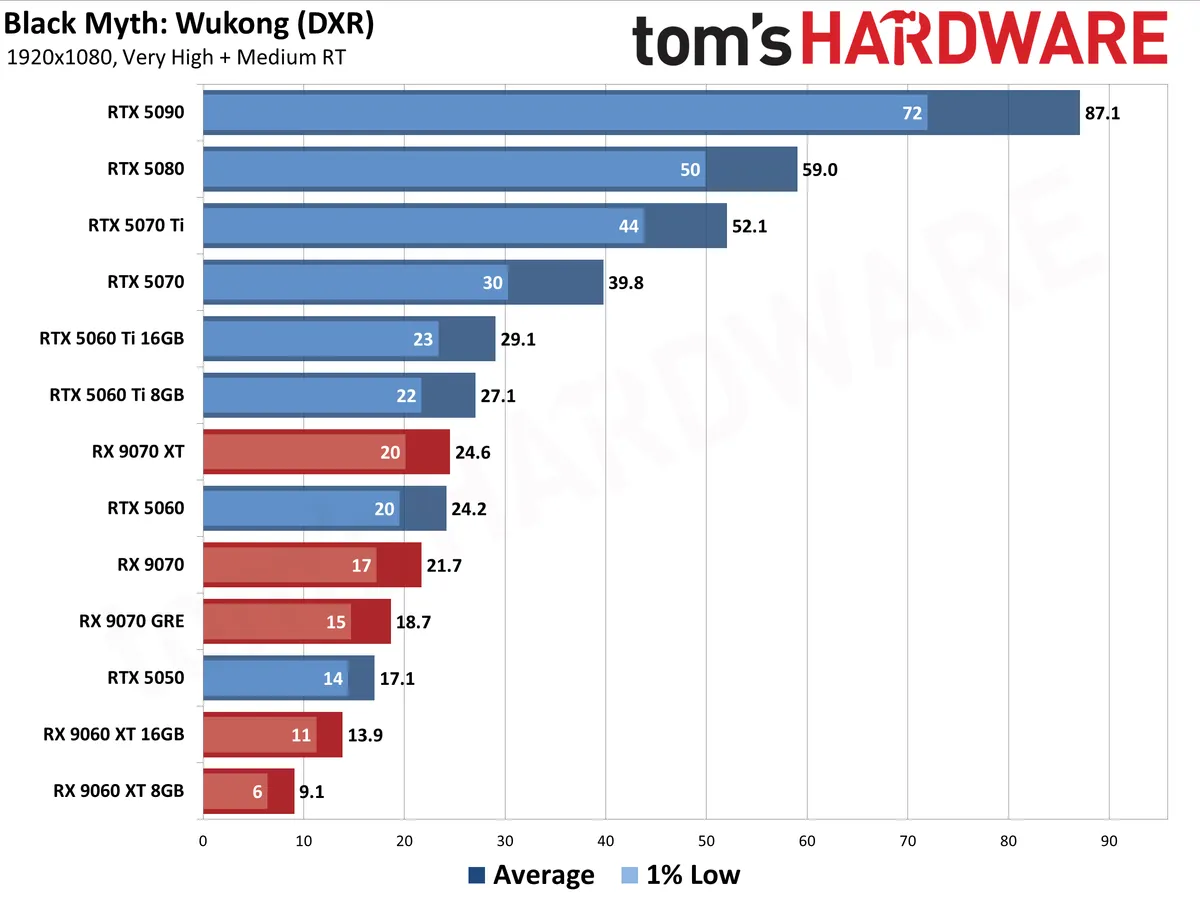
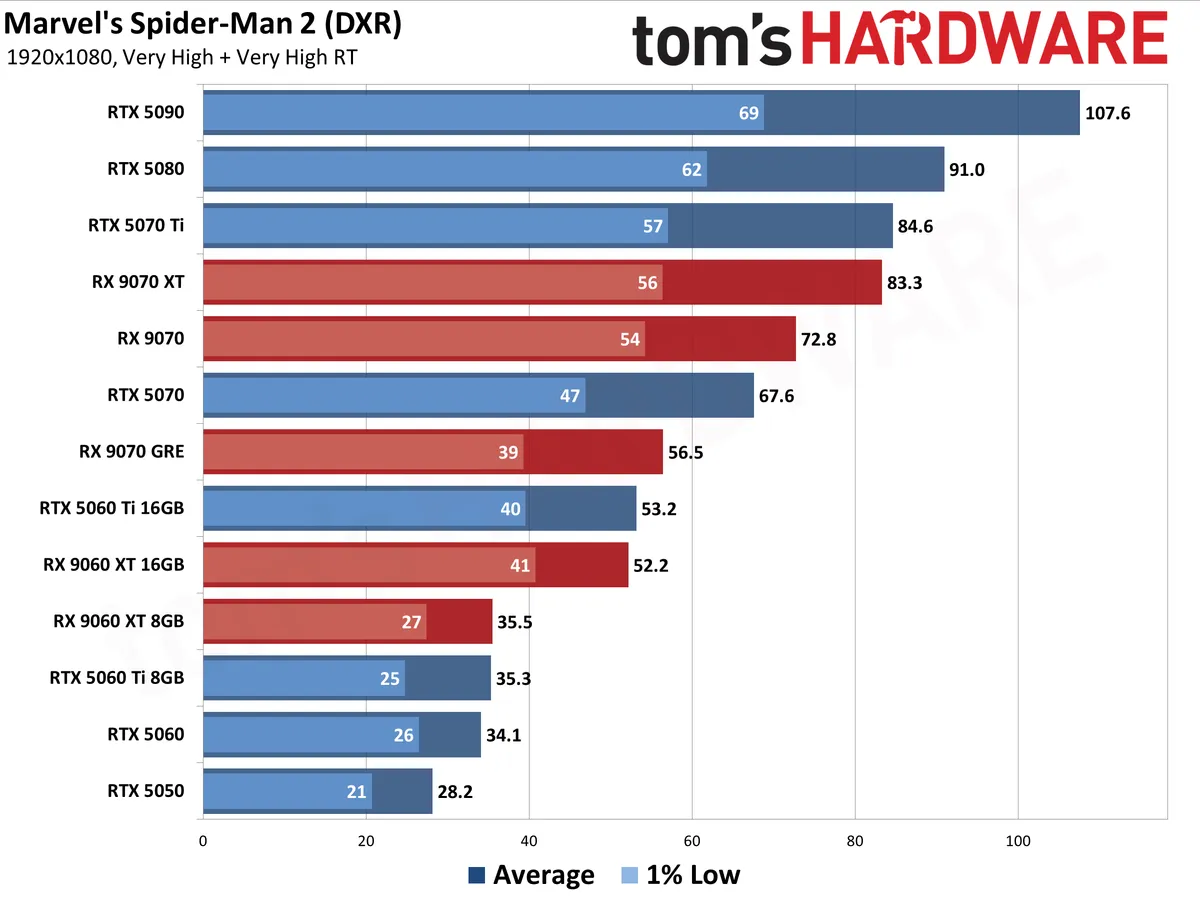
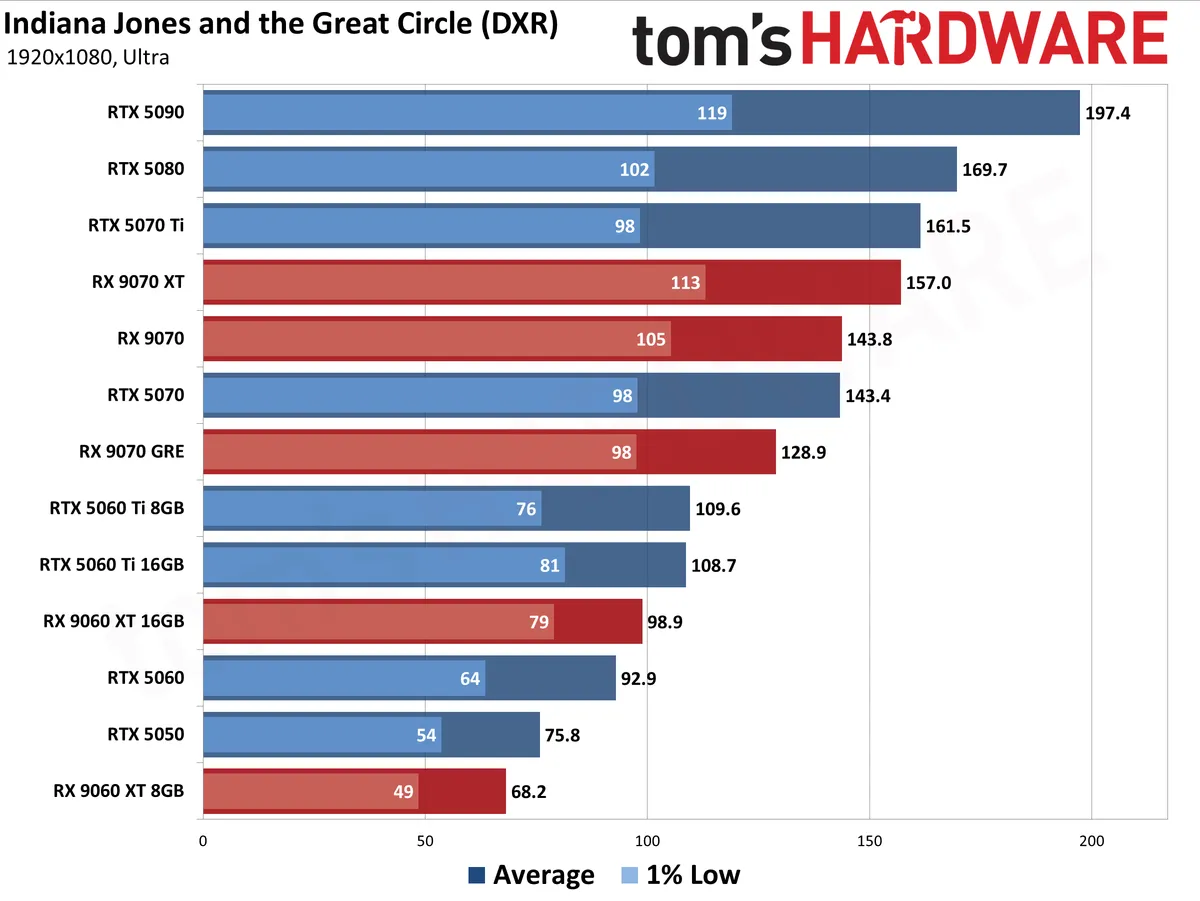
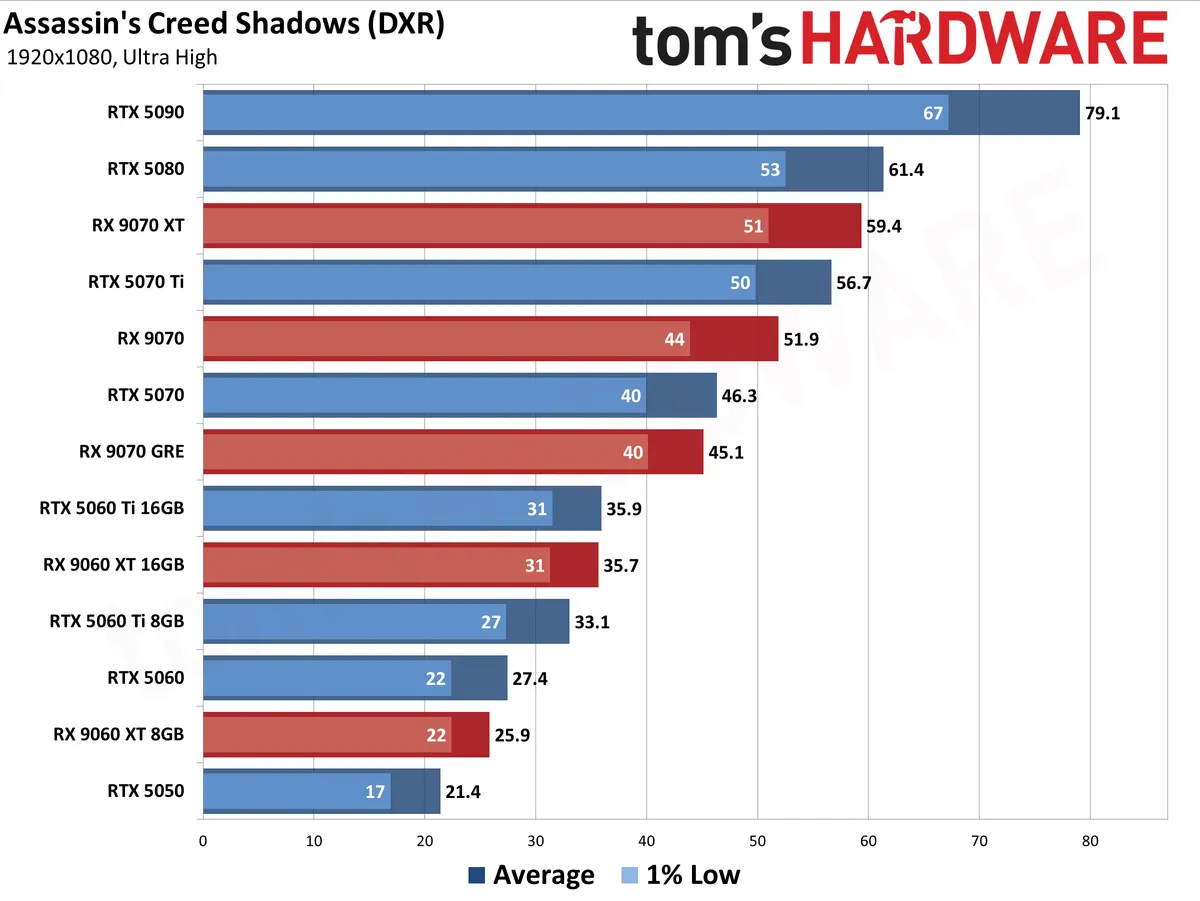
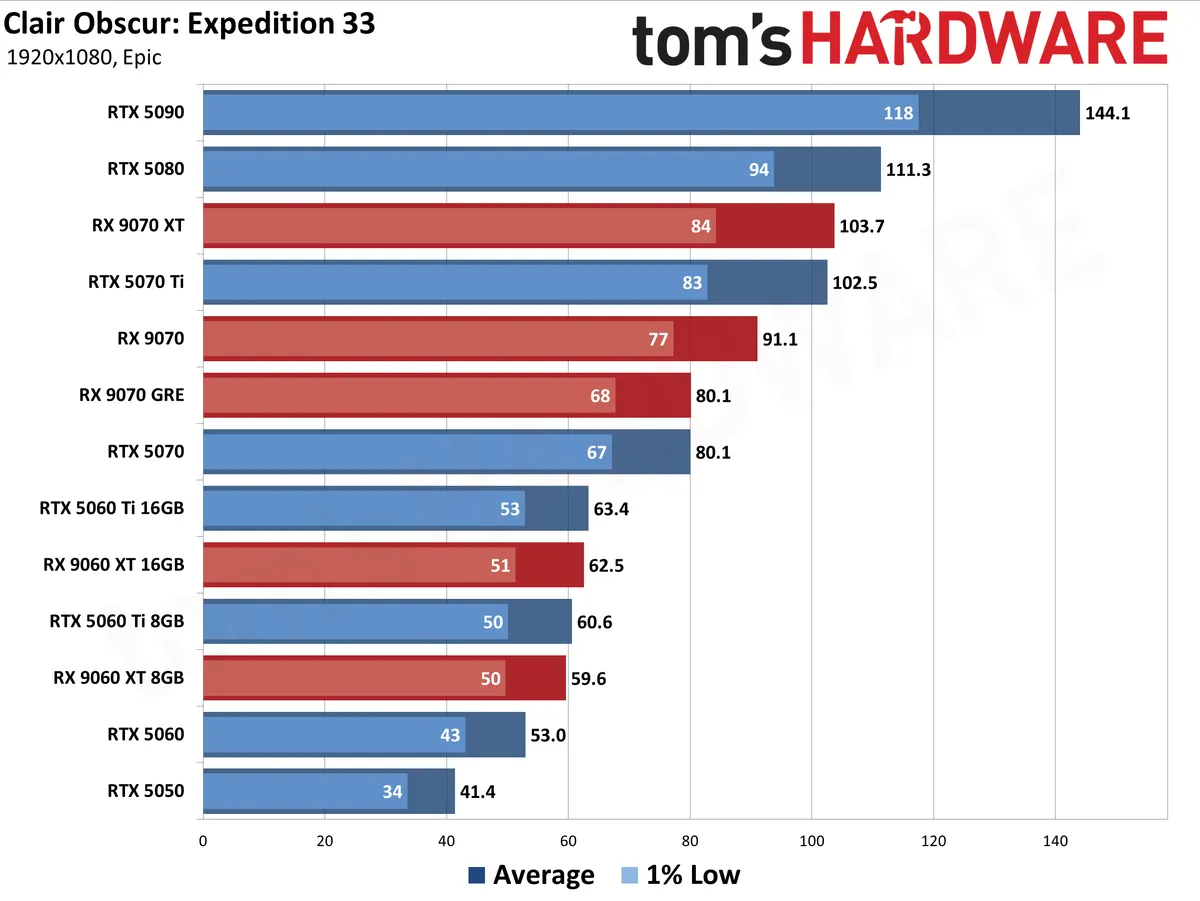
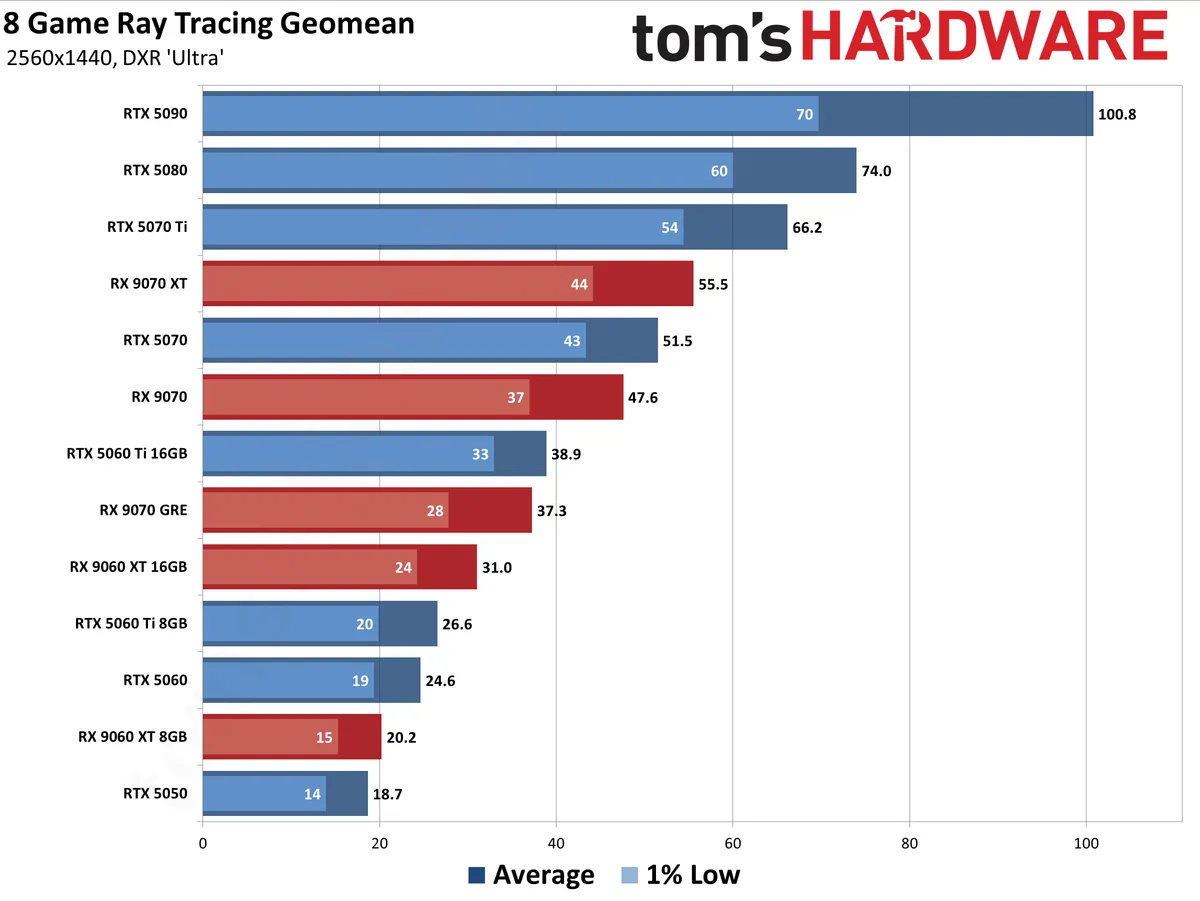
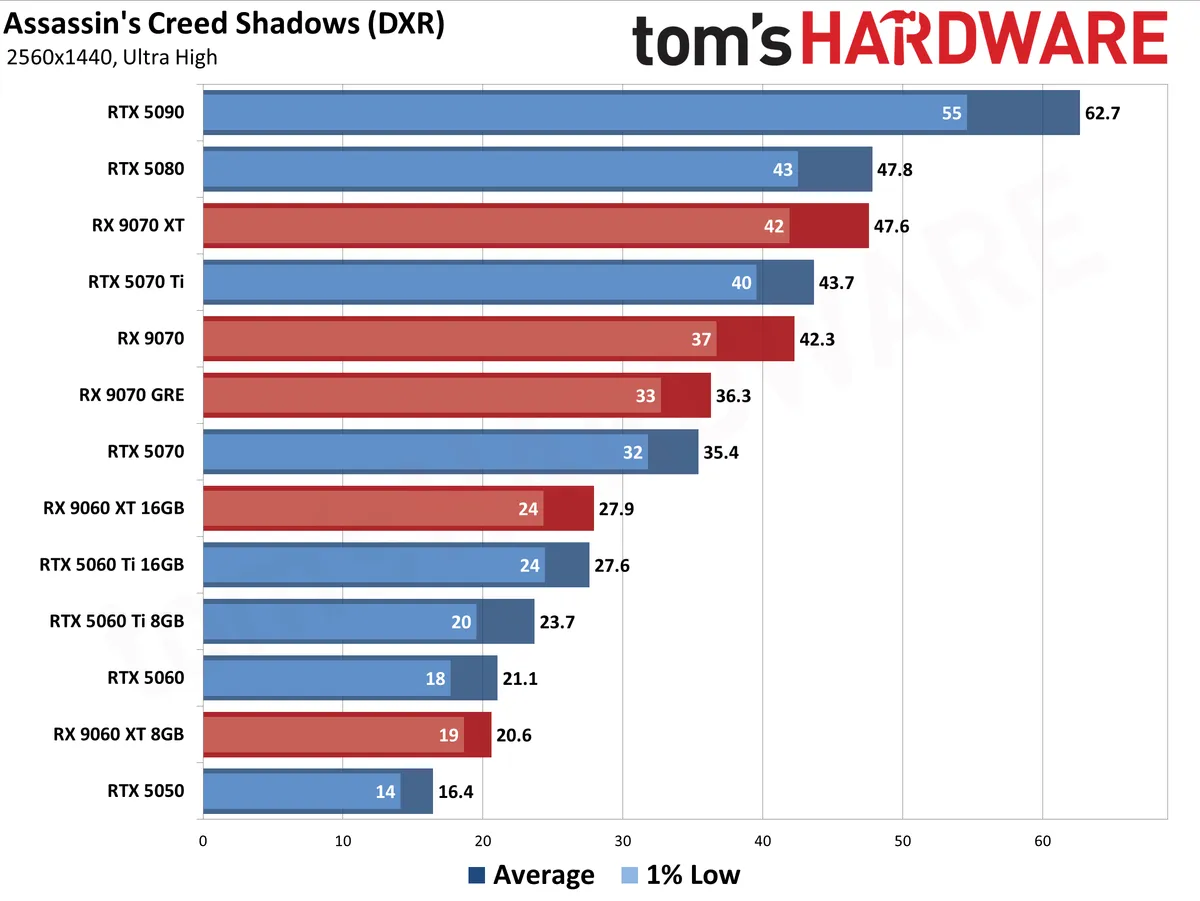
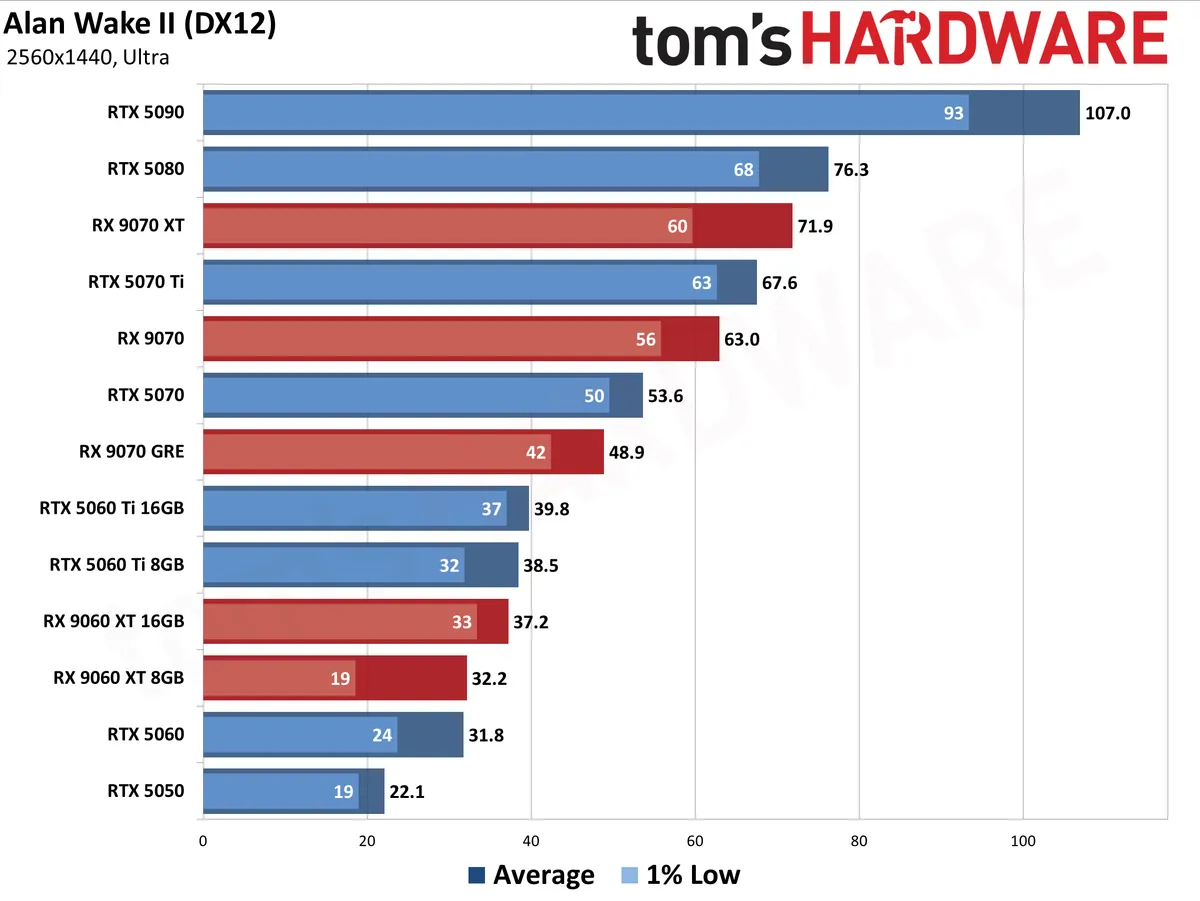
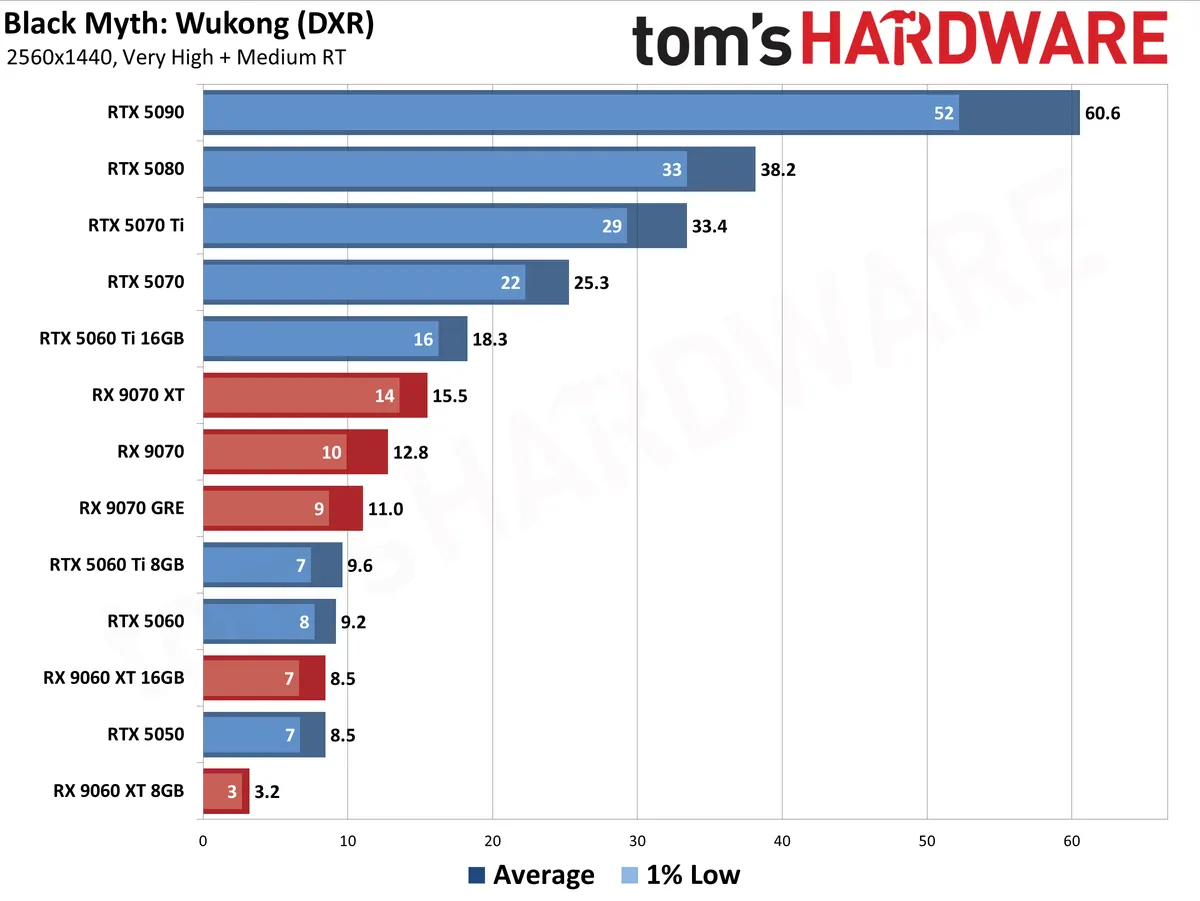
Our updated test suite of games consists of 19 games at present, eight of which have ray tracing enabled (or require RT to run at all).
We test without any upscaling or frame generation technologies enabled. We expect that most gamers will want to enable these features, but they complicate apples-to-apples comparisons between GPU vendors due to inherent differences in output image quality. To keep it simple, we present native resolution performance as a baseline.
The data in the following charts is from testing conducted during the past several months. We've tested all of the latest GPUs at every resolution and setting, even where it generally doesn't make sense (e.g. 4K with ray tracing at single digit framerates).
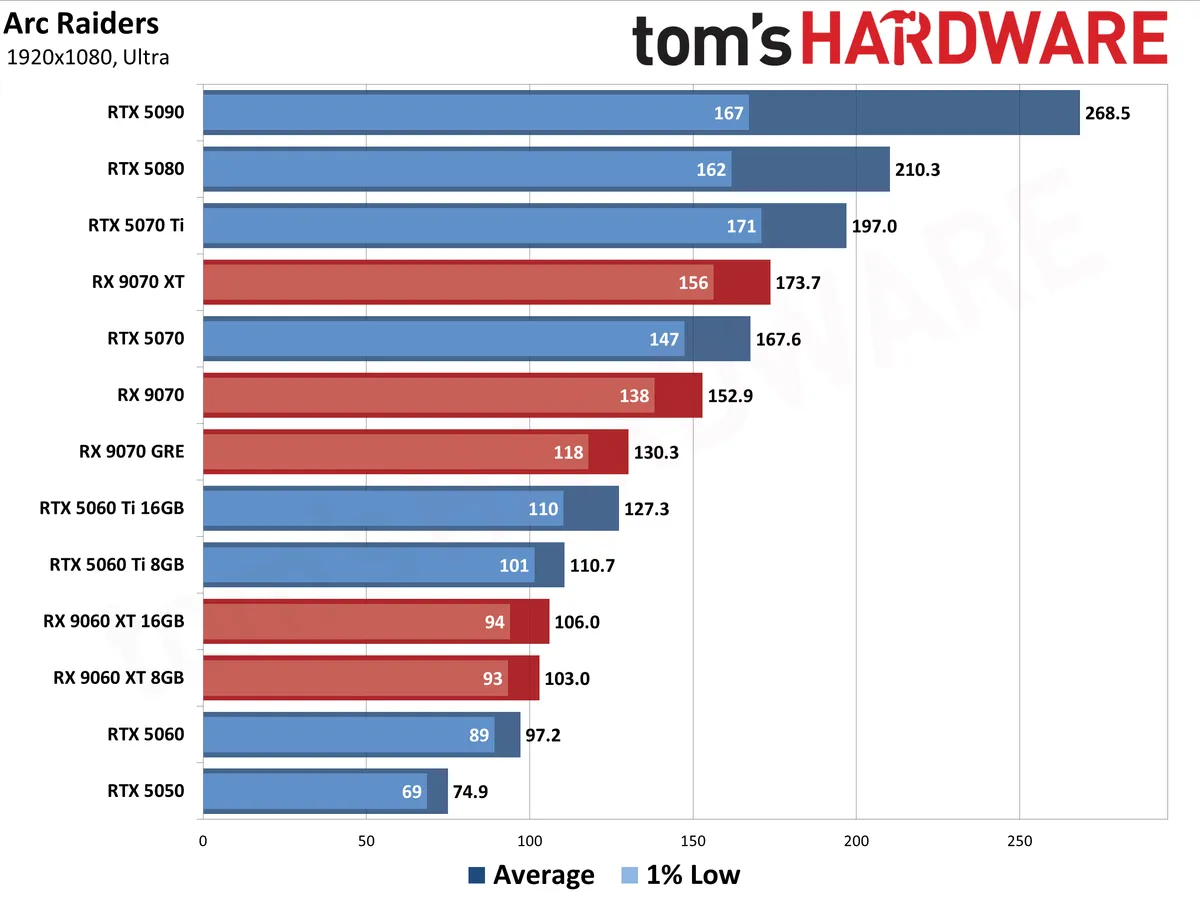
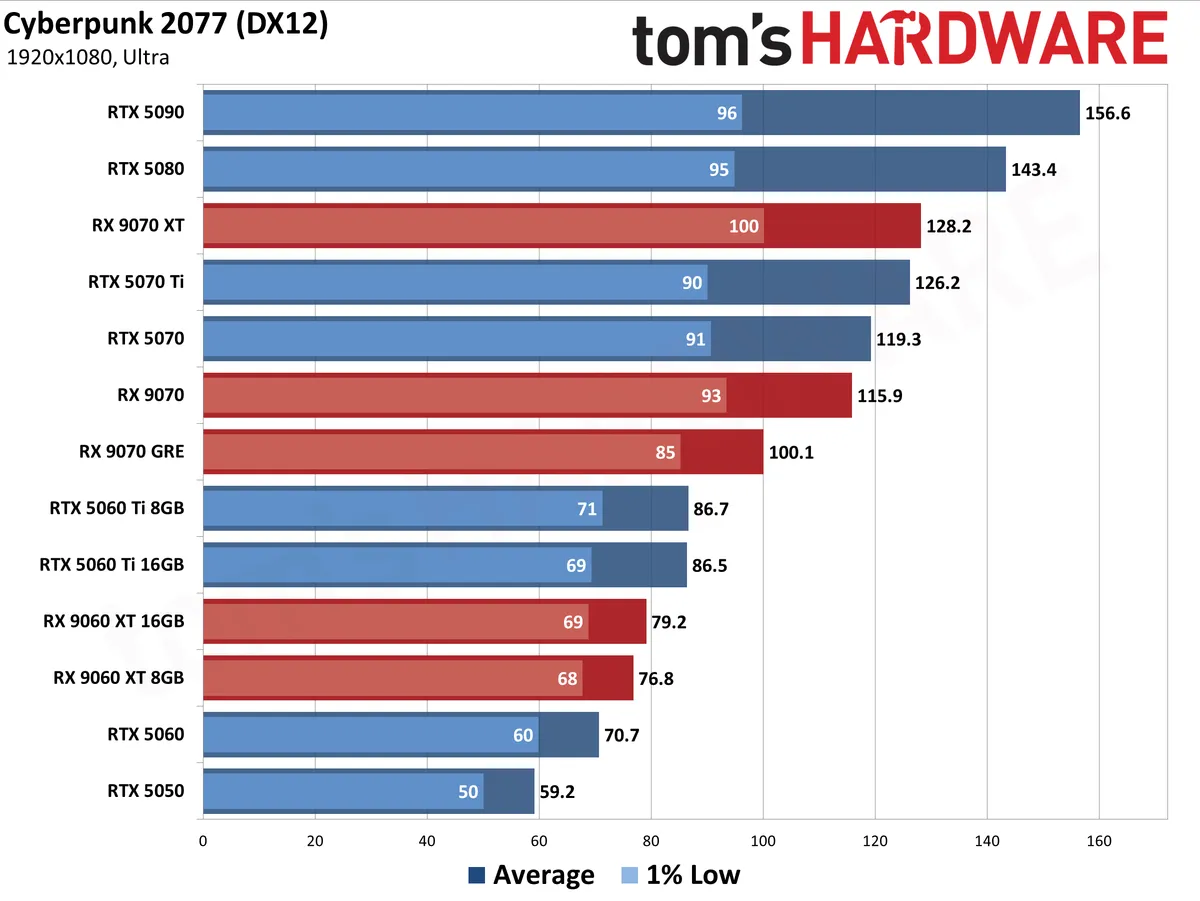
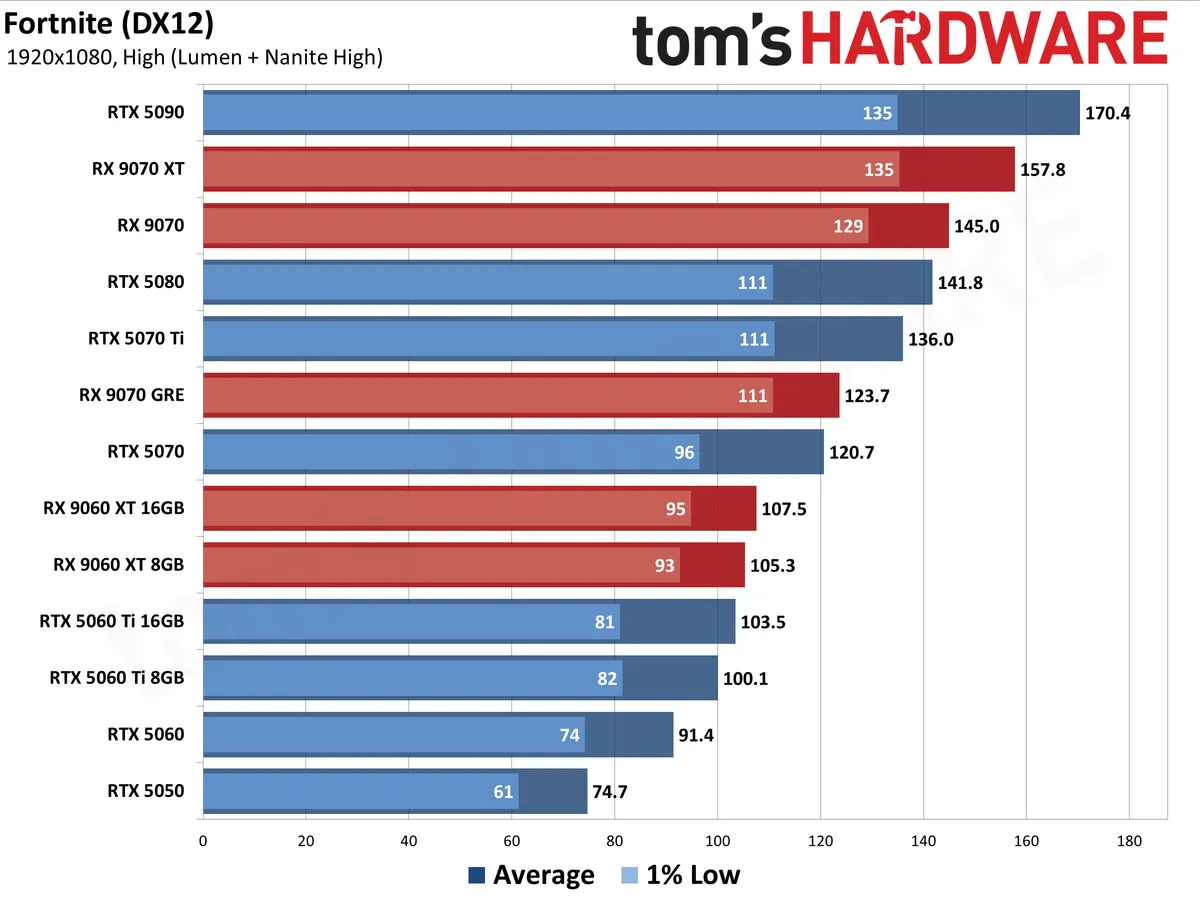
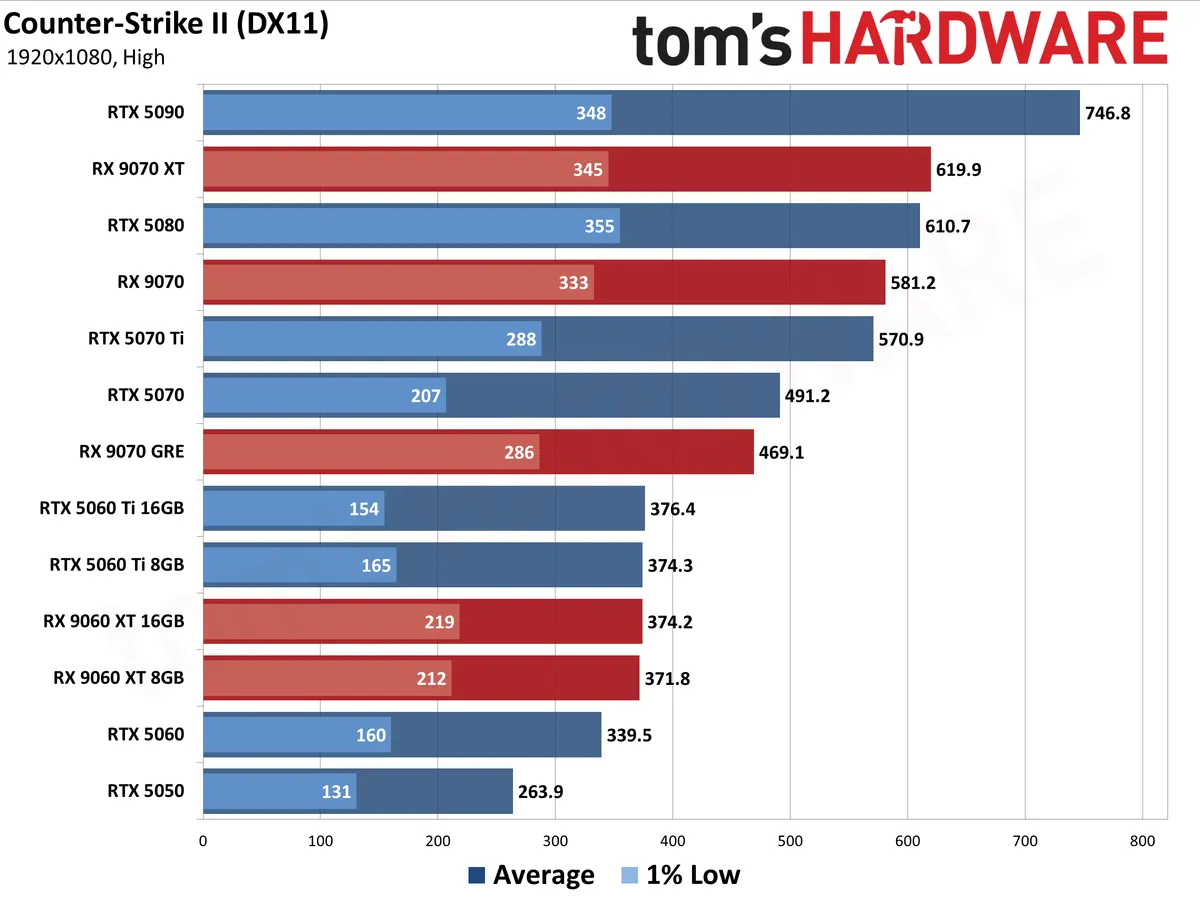
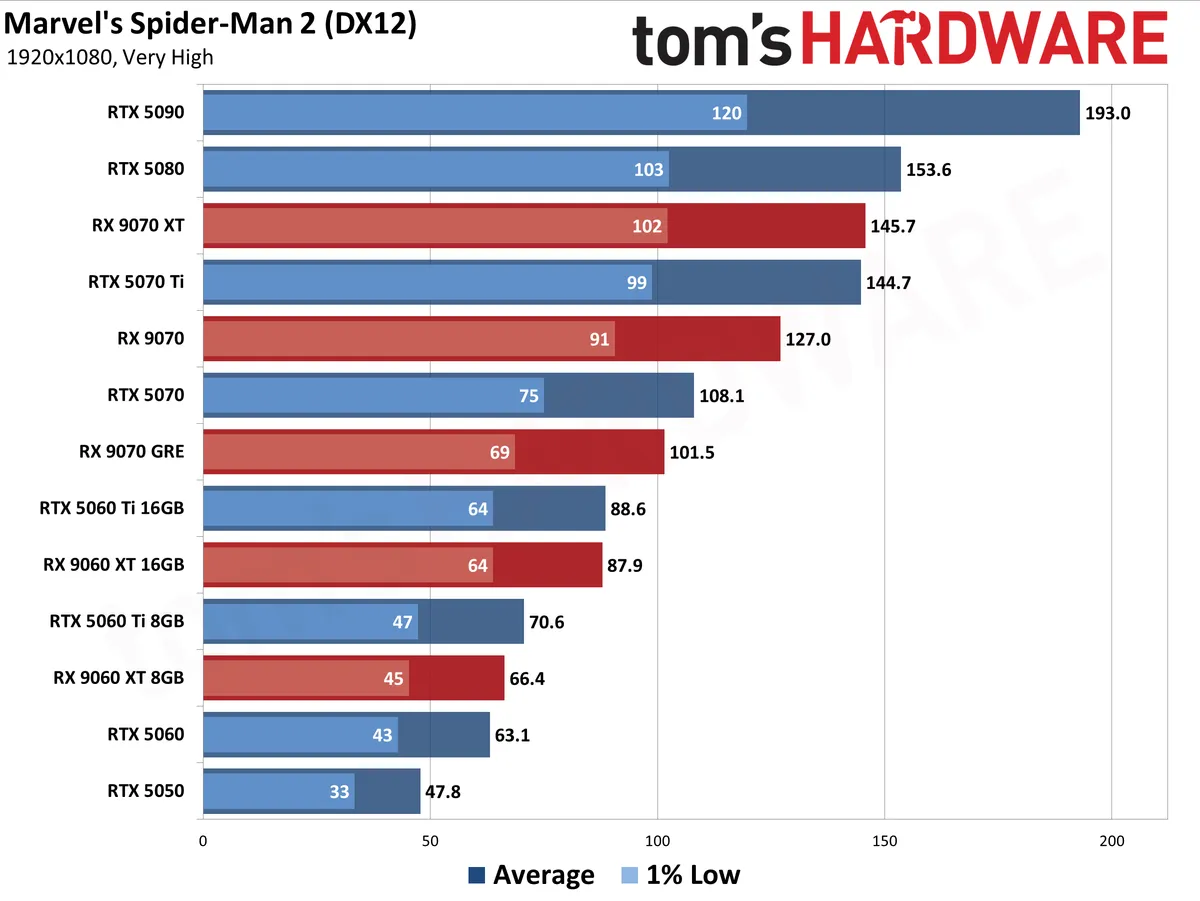
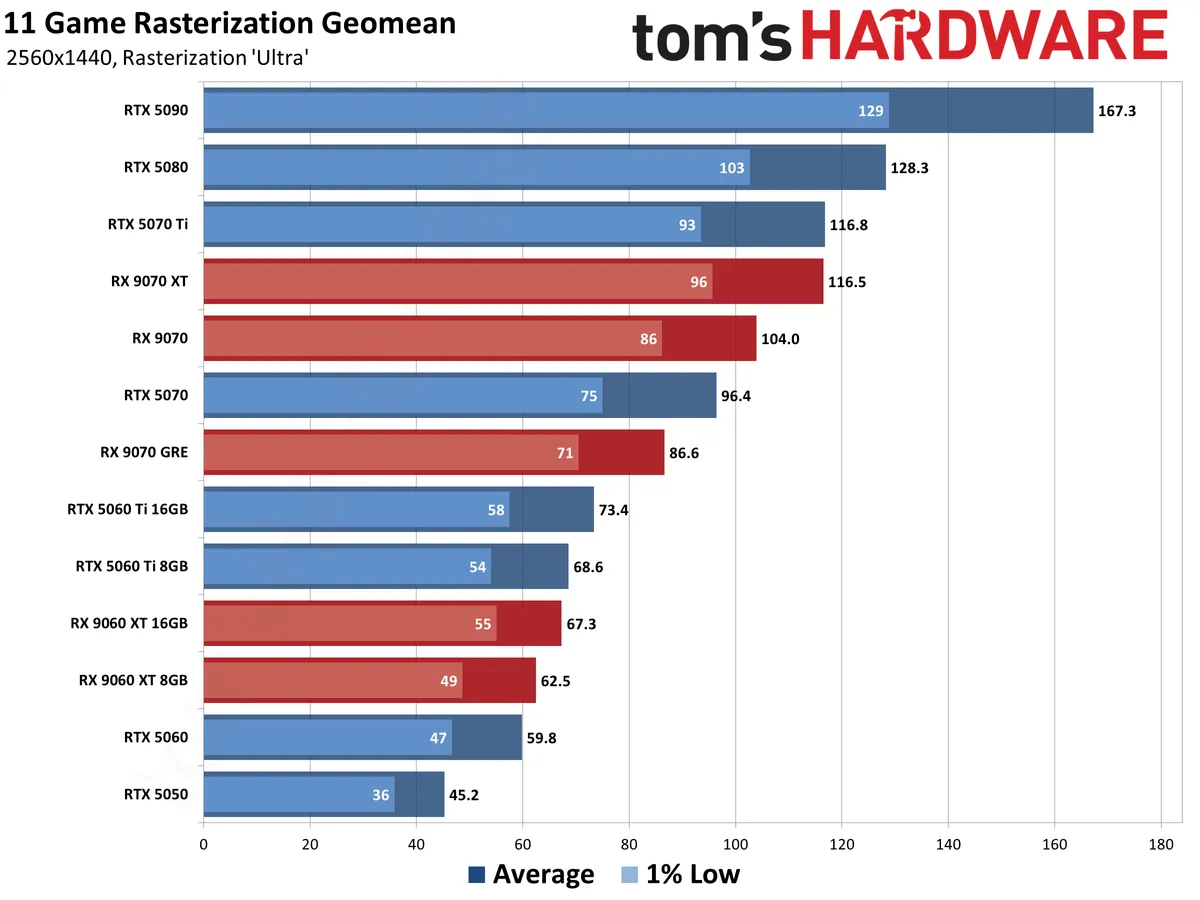
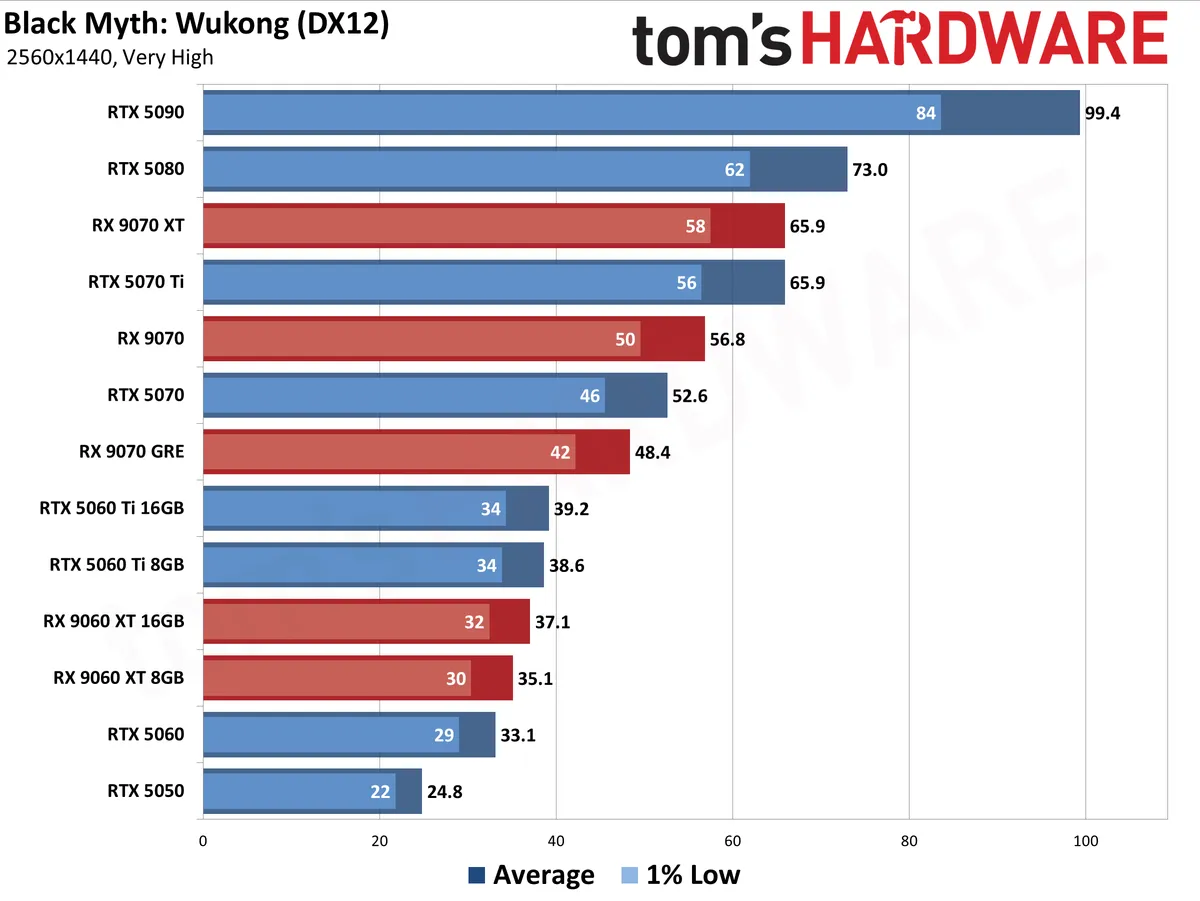
For each resolution and setting, the first chart shows the geometric mean (i.e. equal weighting) for all tested games. The second chart shows performance in the 11 pure raster games, and the third chart focuses in on ray tracing performance in eight games.
The charts below contain all the current Nvidia RTX 50-series and AMD RX 9000-series graphics cards. We're leaving Intel Arc cards out of the standings for now due to software compatibility issues with our test suite, and we'll include those results when those issues are corrected and we have the opportunity to retest them.
Our GPU benchmarks hierarchy contains additional data for every GPU spanning multiple generations of hardware. The charts are color coded with AMD in red, Nvidia in blue, and Intel in gray to make it easier to see what's going on.
The following charts are up to date as of June 2026.
Best Graphics Cards — 1080p
View Original

View Original

View Original

View Original

View Original

View Original

View Original

View Original

View Original

View Original

View Original

View Original

View Original

View Original

View Original

View Original

View Original

View Original

View Original

View Original

View Original

View Original

Best Graphics Cards — 1440p


View Original

View Original

View Original

View Original

View Original

View Original

View Original

View Original

View Original

View Original

View Original

View Original

View Original

View Original

View Original

View Original

View Original

View Original

View Original

View Original

View Original

View Original

Best Graphics Cards — 4K


View Original

View Original

View Original

View Original

View Original

View Original

View Original

View Original

View Original

View Original

View Original

View Original

View Original

View Original

View Original

View Original

View Original

View Original

View Original

View Original

View Original

View Original

Additional Shopping Tips
When buying a graphics card, consider the following:
- Monitor Resolution: The more pixels you're pushing, the more performance you need. You don't need a top-of-the-line GPU to game at 1080p, but you will certainly want more power at 1440p or 4K.
- PSU: Make sure that your power supply has enough juice and the right 6-, 8- and/or 16-pin connector(s). Nvidia, AMD, and Intel board partners will all make PSU recommendations alongside their products that you can use as a baseline, so if you're unsure whether your PC can provide enough power, be sure to check those spec sheets first. If you have an older PSU, be mindful that power supplies do lose capacity with time, so if you're contemplating a high-end GPU, it might be time to upgrade your GPU, too.
- Video Memory: In 2026, 8GB of VRAM is the bare minimum you'll want to play the latest games at 1080p, and it's the smallest amount of memory you'll find on a new card. Midrange cards tend to feature 12GB of VRAM, which is generally enough for raster gaming all the way out to 4K but may present limitations for RT even at 1440p. If you're planning to push a 4K display without upscaling or want to explore RT gaming without restriction, we recommend a 16GB card.
- FreeSync or G-Sync? Either variable refresh rate (VRR) technology will synchronize your GPU's frame delivery with your screen's refresh rate. Nvidia supports G-Sync and G-Sync Compatible displays (for recommendations, see our Best Gaming Monitors list). And most every G-Sync Compatible display also supports AMD FreeSync these days, so this vendor war is largely over.
- Upscaling and Frame Generation technologies: Nvidia's DLSS is in practically every game, and the latest DLSS 4.5 tech provides high-quality upscaling and frame generation (on RTX 40-series to boost performance to taste with practically no loss of image quality. AMD FSR 4 provides AI-enhanced upscaling on RX 9000-series cards, and a version compatible with RX 7000-series cards arrives in July 2026. Intel XeSS can deliver better image quality than older versions of FSR, but the core upscaler hasn't been updated in some time, and it's not as widely adopted as either DLSS or FSR, so it shouldn't influence your buying decision either way.
Finding Discounts on the Best Graphics Cards
While deep discounts are rare on graphics cards in 2026, you might find some particularly tasty deals on occasion. Check out the latest Newegg promo codes, Best Buy promo codes and Micro Center coupon codes for potential savings.
Want to comment on our best graphics picks for gaming? Let us know what you think in the Tom's Hardware Forums.
MORE: HDMI vs. DisplayPort: Which Is Better For Gaming?
MORE: GPU Benchmarks and Hierarchy
Get Tom's Hardware's best news and in-depth reviews, straight to your inbox.

As the Senior Analyst, Graphics at Tom's Hardware, Jeff Kampman covers everything that has to do with graphics cards, gaming performance, and more. From integrated graphics processors to discrete graphics cards to the hyperscale installations powering our AI future, if it's got a GPU in it, Jeff is on it.